
Vehicle Interior
- Make
- Land Rover
- Model
- Range Rover L322 Range Rover Pre-Delivery Inspection Manual
- Section
- Vehicle Interior
Vehicle InteriorVehicle Interior · page 1 of 2
Vehicle Interior
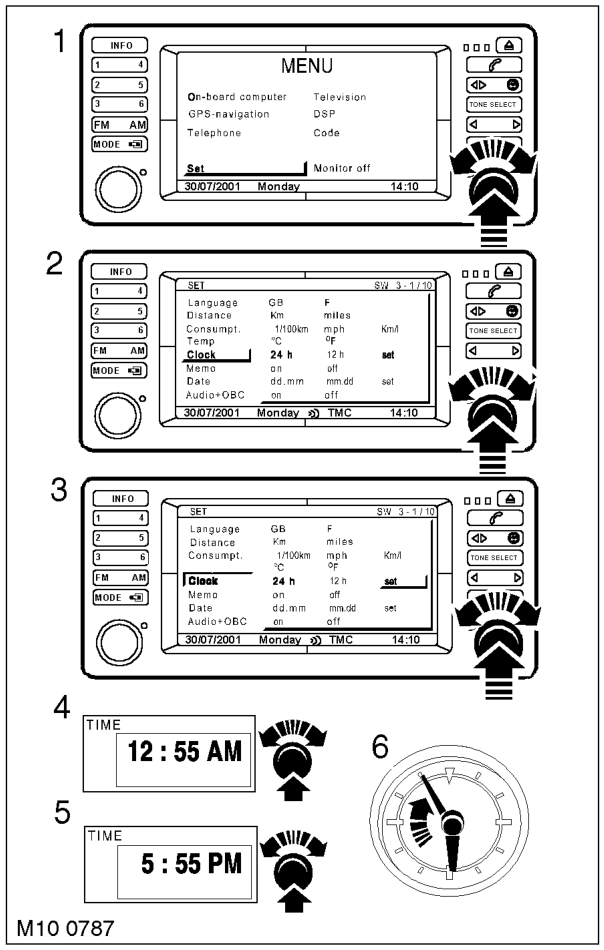
- Models fitted with Hi Line Multi Function Display (MFD) only: Set time, date and radio audio settings, including presets.
- Turn key in ignition switch to position 1.
- Switch on the MFD.
- Depress the menu button, using the right rotary control select clock and set time by depressing the right rotary control, follow the on screen icons. Enter correct time in either 12 or 24 hour mode. Press menu to exit clock mode.
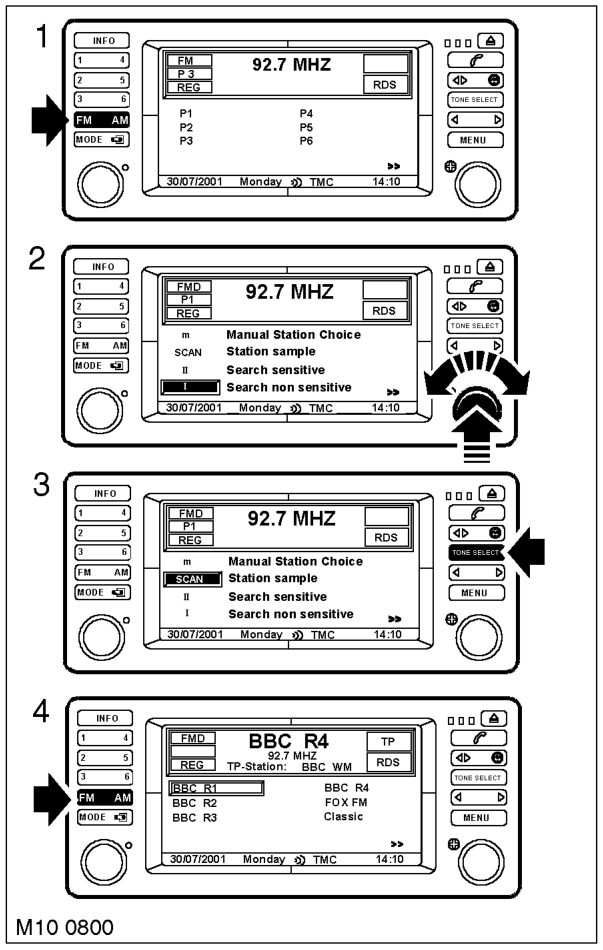
- Set 6 FM and 6 AM radio presets.
- Press the FM button then press Select, rotate the right hand rotary control to position 1 Search Non Sensitive.
- Press the FM button to display menu of selected stations, rotate the right hand rotary control and select a station to preset. Allocate a preset number to the selected station, depress the relevant preset button and hold for 8 seconds, the station will mute, resumption signifies a successful preset.
- Repeat the procedure for the 5 remaining FM presets.
- Press the AM select button and preset 6 of a possible 18 stations by repeating the process used to set the FM station presets.
- Models fitted with Mid Line Multi Function Display (MFD) only: Set time, date and radio audio settings including presets.
- Turn key in ignition switch to position 1.
- Switch on the MFD.
Parts & tools for this job For Land Rover Range Rover
- TOOLTorque wrenchSearch: 3/8 inch torque wrench
- TOOLSocket setSearch: socket set metric
- BOOKHaynes manualSearch: Haynes manual Land Rover Range Rover
Links open Amazon search results in a new tab. As an Amazon Associate I earn from qualifying purchases.