
Indicator panel adjustment (Automatic gearbox)
- Make
- Rover
- Model
- Coupé, Cabriolet & Tourer 200/400 Coupé, Cabriolet & Tourer Workshop Manual
- Section
- Adjustments › Indicator panel adjustment
Automatic gearboxIndicator panel adjustment
Service Repair No. 44.30.04
Indicator panel adjustment
This procedure must be carried out to ensure accuracy of hydraulic engagement check.
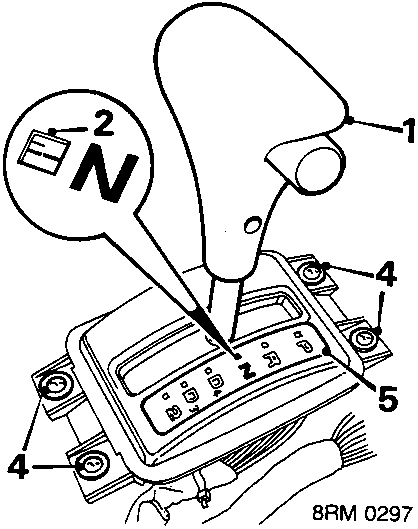
- Move selector lever to 'N'.
- Check that index line on the 'N' detent window aligns with index line on the green band.
Note: If only one index mark is visible, the reason may be that the two marks are perfectly aligned and the top mark is concealing the lower one. Move selector lever slightly to expose the lower mark.
INDEX MARKS NOT ALIGNED
- Remove front console, see BODY – Repairs.
- Slacken 4 panel retaining screws.
- Move indicator panel until marks are aligned, then tighten screws.
- Fit front console, see BODY – Repairs.
Hydraulic engagement check
This procedure is used to establish whether selector cable requires adjustment.
- Check indicator panel adjustment.
- Apply hand and foot brake and start engine.
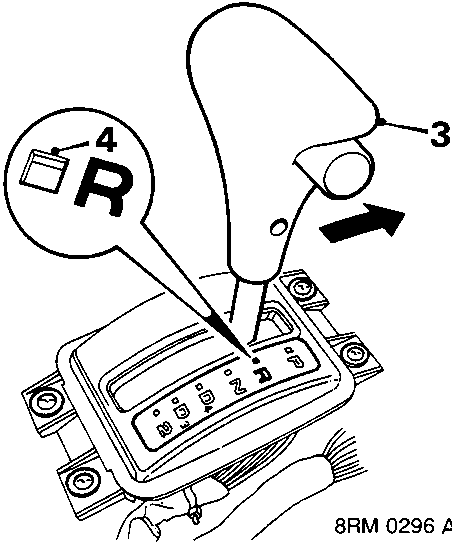
- With selector lever button depressed, move selector lever SLOWLY forward.
- The green band should be visible in the 'R' window when initial transmission engagement is felt.
- Move selector lever to 'N'.
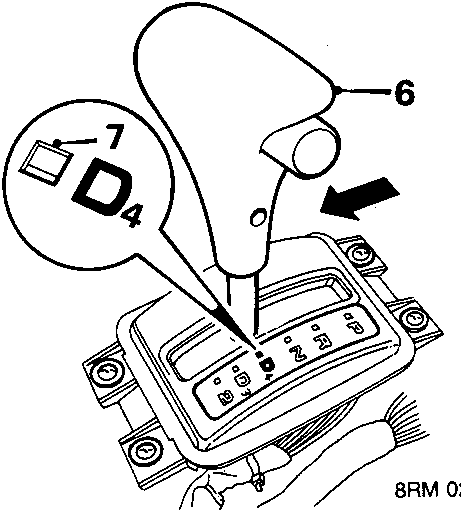
- Move selector lever SLOWLY rearwards.
- The green band should be visible in the 'D4' window when initial transmission engagement is felt.
- If green band is not positioned in 'R' and 'D4' windows as illustrated, selector cable requires adjustment.
Parts & tools for this job For Rover Coupé, Cabriolet & Tourer
- PARTTransmission filter kitSearch: Rover Coupé, Cabriolet & Tourer transmission filter kit
- FLUIDAutomatic transmission fluidSearch: Rover automatic transmission fluid
- TOOLFluid transfer pumpSearch: fluid transfer pump
Links open Amazon search results in a new tab. As an Amazon Associate I earn from qualifying purchases.