
Removing and installing amplitude modulation (AM) R177 frequency filter
- Make
- SEAT
- Model
- Leon León
- Year
- 5F, 2012–2020
- Section
- Communication › Removing and installing amplitude modulation (AM) R177 frequency filter
‹ Prev Removing and installing aerial amplifier, R111Next › Removing and installing frequency modulation (FM) frequency filter R178/R179
InfotainmentRemoving and installing amplitude modulation (AM) R177 frequency filter
Removing and installing amplitude modulation (AM) R177 frequency filter
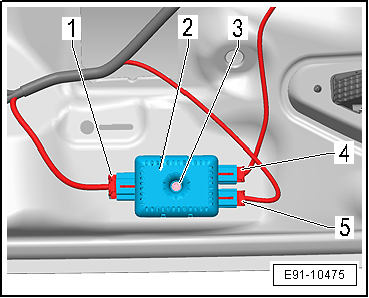
Switch off ignition and all electrical consumers, and remove ignition key.
Remove the lower cover of the hatch Boot lining; lower hatch lining: installing and removing.
Unlock and remove the connectors (1) , (4) and (5) of the Frequency filter for the amplitude modulation (AM) R177 (2).
Unscrew bolt (3) and remove Frequency filter for the amplitude modulation (AM) R177 (2) from rear lid.
Installation is carried out in the reverse sequence; note the following:
‹ Prev Removing and installing aerial amplifier, R111Next › Removing and installing frequency modulation (FM) frequency filter R178/R179
Parts & tools for this job For 2012 SEAT Leon
- TOOLTorque wrenchSearch: 3/8 inch torque wrench
- TOOLSocket setSearch: socket set metric
- BOOKHaynes manualSearch: Haynes manual SEAT Leon
As an Amazon Associate we earn from qualifying purchases.