
Removing and installing display for Infotainment system, System Colour and Media System Plus equipment variants
- Make
- SEAT
- Model
- Leon León
- Year
- 5F, 2012–2020
- Section
- Communication › Removing and installing display for Infotainment system, System Colour and Media System Plus equipment variants
Removing and installing display for Infotainment system, System Colour and Media System Plus equipment variants
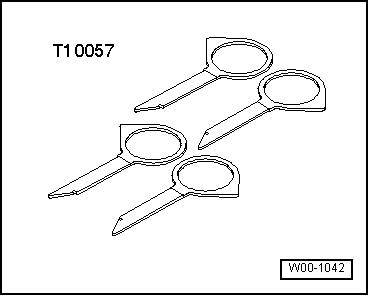
- Puller T10057
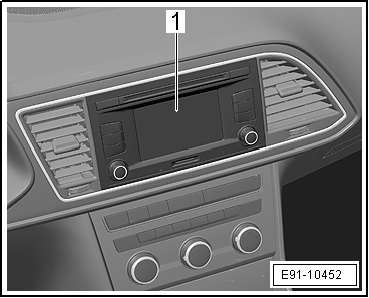
Switch off ignition and all electrical consumers, and remove ignition key.
Insert four pieces of the radio release tools T10057 into the unlocking slots on the display unit for front information display and operating unit control unit J685 (1) until they engage. The tips of the radio release tool T10057 point outwards.
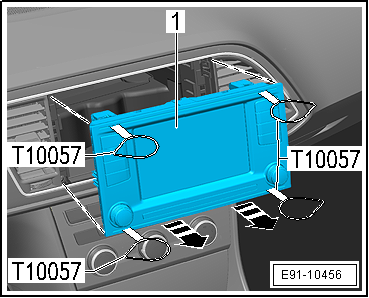
Remove the display unit for front information display and operating unit control unit J685 (1) from the dash panel by pulling the eyes of the radio release tools T10057.
Release the connector of the display unit for front information display and operating unit control unit J685 (1) and remove it.
Press release tabs on display unit for front information display and operating unit control unit J685 and remove radio release tool T10057.
For fitting, the operations are carried out in reverse order to the removal, taking the following into account:
Attach all connectors.
Push the display unit for front information display and operating unit control unit J685 into the instrument panel until it engages.
Parts & tools for this job For 2012 SEAT Leon
- TOOLTorque wrenchSearch: 3/8 inch torque wrench
- TOOLSocket setSearch: socket set metric
- BOOKHaynes manualSearch: Haynes manual SEAT Leon
As an Amazon Associate we earn from qualifying purchases.