
Removing and installing the navigation system
- Make
- Skoda
- Model
- Superb II
- Year
- 3T, 2008 on
- Section
- Electrical System › Removing and installing the navigation system
Removing and installing the navigation system
Check if there is no CD in the CD drive, if necessary take it out Operating instruction of the navigation system.
Switch off the navigation system, the ignition and all electrical consumers.
Slacken the frame (3) out of the pegs using the disassembly wedge 3409, while doing so disconnect the plug of the warning light for airbag switch-off function.
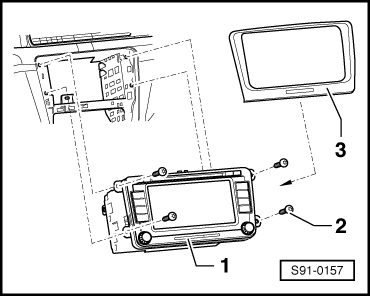
Screw out the fixing screws (2) (1.5 Nm) and pull the navigation system (1) out of the dash panel.
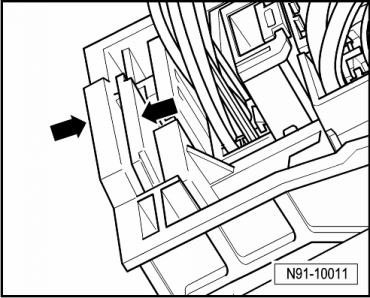
Compress plug catch (arrows).
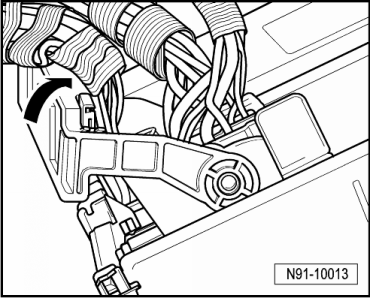
Open catch clamp (arrow) and disconnect plug.
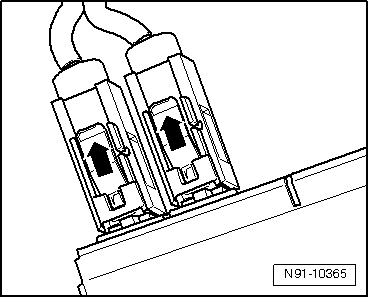
Release plug of antenna socket (arrows) and disconnect.
Navigation Columbus - disconnect the plug from the TV Tuner (if present).
Disconnect the plug for the mobile phone pre-installation (Amundsen+ as of CW 22.11 with the GSM II mobile phone pre-installation and mobile phone holder).
Installation is performed in the reverse order, pay attention to the following points:
Note
- When inserting the navigation system on no account press on the display or on the operating buttons. The navigation system may be damaged.
If the navigation system was replaced:
Deactivate the electronic anti-theft coding see Chapter “Electronic anti-theft coding” and code the navigation system with Vehicle diagnostic tester.
Parts & tools for this job For 2008 Skoda Superb
- TOOLDigital multimeterSearch: automotive digital multimeter
- PARTAssorted fuse kitSearch: car fuse assortment kit
- TOOLWire crimper and connector kitSearch: wire crimper connector kit
As an Amazon Associate we earn from qualifying purchases.