
Removing and installing TV-Tuner
- Make
- Skoda
- Model
- Superb II
- Year
- 3T, 2008 on
- Section
- Electrical System › Removing and installing TV-Tuner
InfotainmentRemoving and installing TV-Tuner
Removing and installing TV-Tuner
- Release tool for radio/navigation T10057
The TV Tuner is located in the luggage compartment behind the removable right side trim panel.
Switch off the radio navigation system, all electrical components and take out the ignition key.
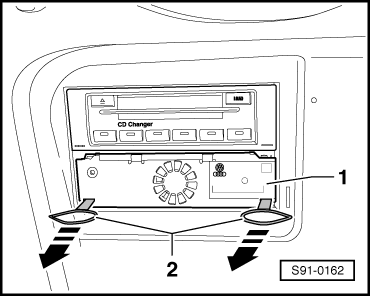
Insert release tool for radio/navigation (2) into the holes (see fig.) until it audibly clicks into place.
Note
- release tool for radio/navigation T10057.
Remove the TV Tuner (1) from the bracket by pulling on the release tool (arrows).
Disconnect plug and plug of antenna socket.
Press together the lateral catch pegs on the TV tuner and take the release tool for radio/navigation T10057 out of the TV tuner.
Mount plug and plug of antenna socket.
Insert the TV Tuner in the bracket until it clicks audibly into place.
Parts & tools for this job For 2008 Skoda Superb
- TOOLDigital multimeterSearch: automotive digital multimeter
- PARTAssorted fuse kitSearch: car fuse assortment kit
- TOOLWire crimper and connector kitSearch: wire crimper connector kit
As an Amazon Associate we earn from qualifying purchases.