Workshop Manuals Factory service & repair Vauxhall
01 General Vehicle Information02 Maintenance, Body and Chassis Sheet Metal Parts, Frame03 Paint04 Body Equipment05 Heating, Ventilation, Air Conditioning (HVAC)06 Front Wheel Suspension, Wheels and Tyres07 Rear Axle and Rear Wheel Suspension08 Brakes09 Engine and Engine Aggregates10 Clutch and Transmission11 Fuel and Exhaust System12 Steering13 Electrical Equipment and Instruments14 Accessories
Vauxhall Astra H04 · Body Equipment
04 · Body & interior

Replace side airbag sensor - L67

Make
Vauxhall
Model
Astra H
Section
Airbag › Repair Instructions › Replace side airbag sensor - L67
Body EquipmentReplace side airbag sensor - L67

Replace side airbag sensor - L67

  Remove

1.   Disconnect battery
2.   Detach rear quarter panel inner panelling (L67) LUREF_1.gif
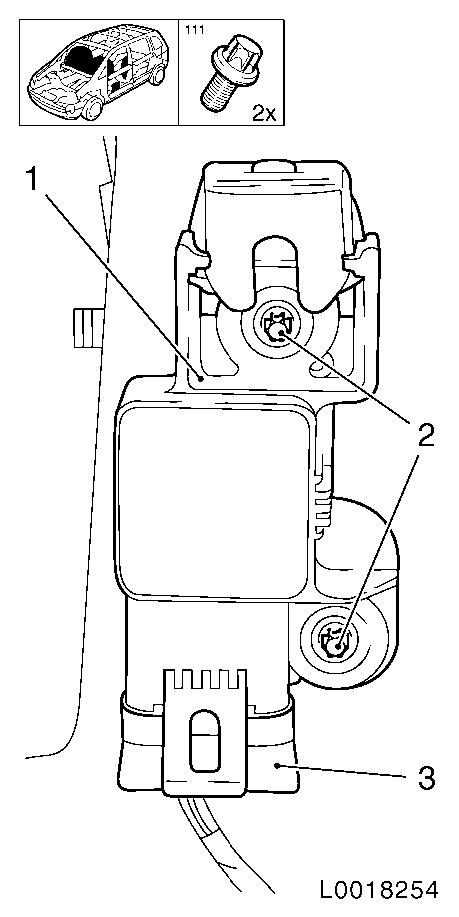
3.   Remove side airbag sensor (1)
•   Loosen 2 bolts (2)
•   Disconnect wiring harness plug (3)
– Remove sensor upwards
Object Number: 10677609  Size: DEFAULT


  Install

4.   Attach side airbag sensor
•   Position the sensor downwards
•   Tighten 2x bolts
•   Connect wiring harness plug
5.   Attach rear quarter panel inner panelling (L67) LUREF_1.gif
6.   Connect battery
7.   Readiness check for airbag system
•   After ignition ON, the airbag system readiness indicator illuminates for 4 seconds and then goes out

Parts & tools for this job For Vauxhall Astra

Links open Amazon search results in a new tab. As an Amazon Associate I earn from qualifying purchases.