
Rear wheel hub
- Make
- Alfa Romeo
- Model
- GTV / Spider GTV and Spider (916) Factory Service Manual
- Year
- 1995–2000
- Section
- Wheels and hubs › Rear wheel hub
44 Suspension and wheelsRear wheel hub
REAR WHEEL HUB
REMOVING / REFITTING
- Remove the wheel.
- Remove the brake caliper and disks (see GROUP 33).
- Remove the dust cover.
- Slacken the fastening nut and remove the hub from the wheel upright.
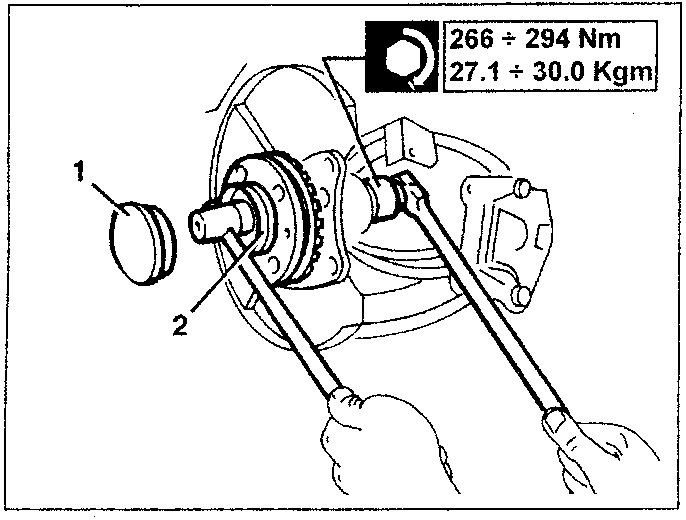
266 ÷ 294 Nm
27.1 ÷ 30.0 Kgm
CHECKS AND INSPECTIONS
CAUTION: When removing the nut fastening the upright, it is absolutely necessary to change the nut when refitting.
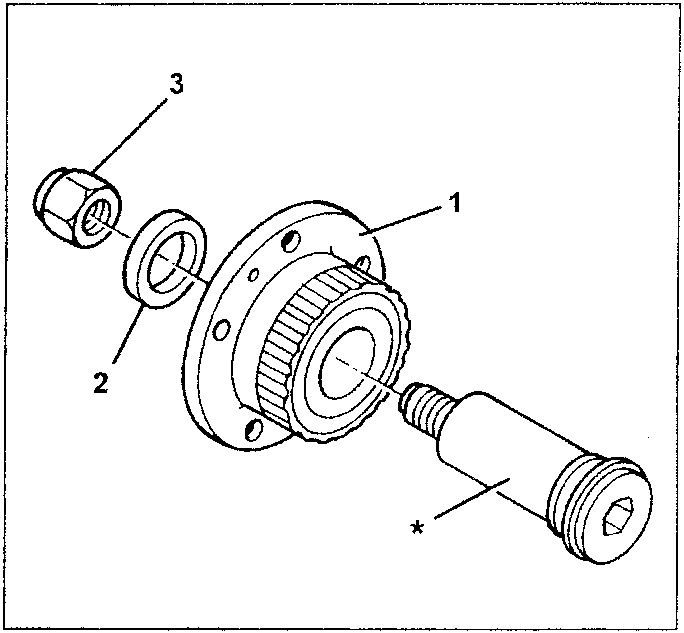
- Check the wheel bearing splined inside the hub for wear. In the event of excessive play or noise, change the complete hub.
- Check the spacer for wear and replace it if necessary.
- Replace the wheel hub fastening nut.
NOTE: If necessary, check the pin (*) for wear cracks or distortion and replace it if necessary.
N.B. To remove the pin from the wheel upright the use of a press is necessary as it is force-fitted.
Parts & tools for this job For 1995 Alfa Romeo GTV / Spider
- PARTRear wheel bearingSearch: Alfa Romeo GTV / Spider 1995 rear wheel bearing
- TOOLBearing puller kitSearch: wheel bearing puller kit
- PARTCV boot kitSearch: Alfa Romeo GTV / Spider 1995 cv boot kit
Links open Amazon search results in a new tab. As an Amazon Associate I earn from qualifying purchases.