
Image to follow
- Make
- Aston Martin
- Model
- DB9 Factory Workshop Manual
- Year
- Issue 2, 2005
- Section
- Bumpers › Image to follow
01 Body systemImage to follow · page 1 of 2
- Disconnect the retaining clips (x2).
Use a tool, i.e. a long screwdriver, to unclip the bumper from the vehicle body.
Image to follow
- Disconnect the two clips in the top centre of the bumper. Withdraw the bumper from the vehicle.
Installation
- Place the bumper to the vehicle. Locate the two clips in the center top of the bumper.
- Locate the retaining clips (x2).
- Install the bumper ‘Tag’ screw.
- Install screws (x4 (x2 each side)). Torque to 2-3 Nm.
- Install the screws (x4) in the light cluster opening.
- Install the light clusters.
- Place a light cluster unit to vehicle and connect the wiring harness plug.
- Insert the light cluster unit into position.
- Ensure the rubber seal is in position. Tighten nuts (x3).
- Repeat for the second light cluster.
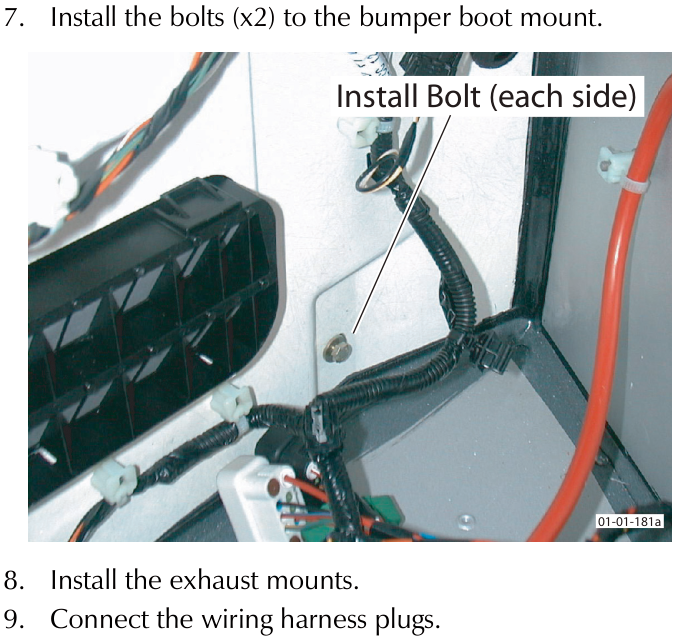
- Install the bolts (x2) to the bumper boot mount.
- Install the exhaust mounts.
- Connect the wiring harness plugs.
- Install the road wheel arch liner and wheel.
Parts & tools for this job For 2005 Aston Martin DB9
- TOOLTrim removal tool kitSearch: trim removal tool kit
- PARTTouch-up paintSearch: Aston Martin touch up paint
- PARTPanel clip assortmentSearch: Aston Martin panel clips assortment
Links open Amazon search results in a new tab. As an Amazon Associate I earn from qualifying purchases.