
Install
- Make
- Aston Martin
- Model
- V8 Vantage Factory Workshop Manual
- Year
- 2005–2010
- Section
- Engine Sealing › Install
03 EngineInstall
- Remove the four M8 Torx bolts that attach the PAS pump mounting bracket to the cylinder block and
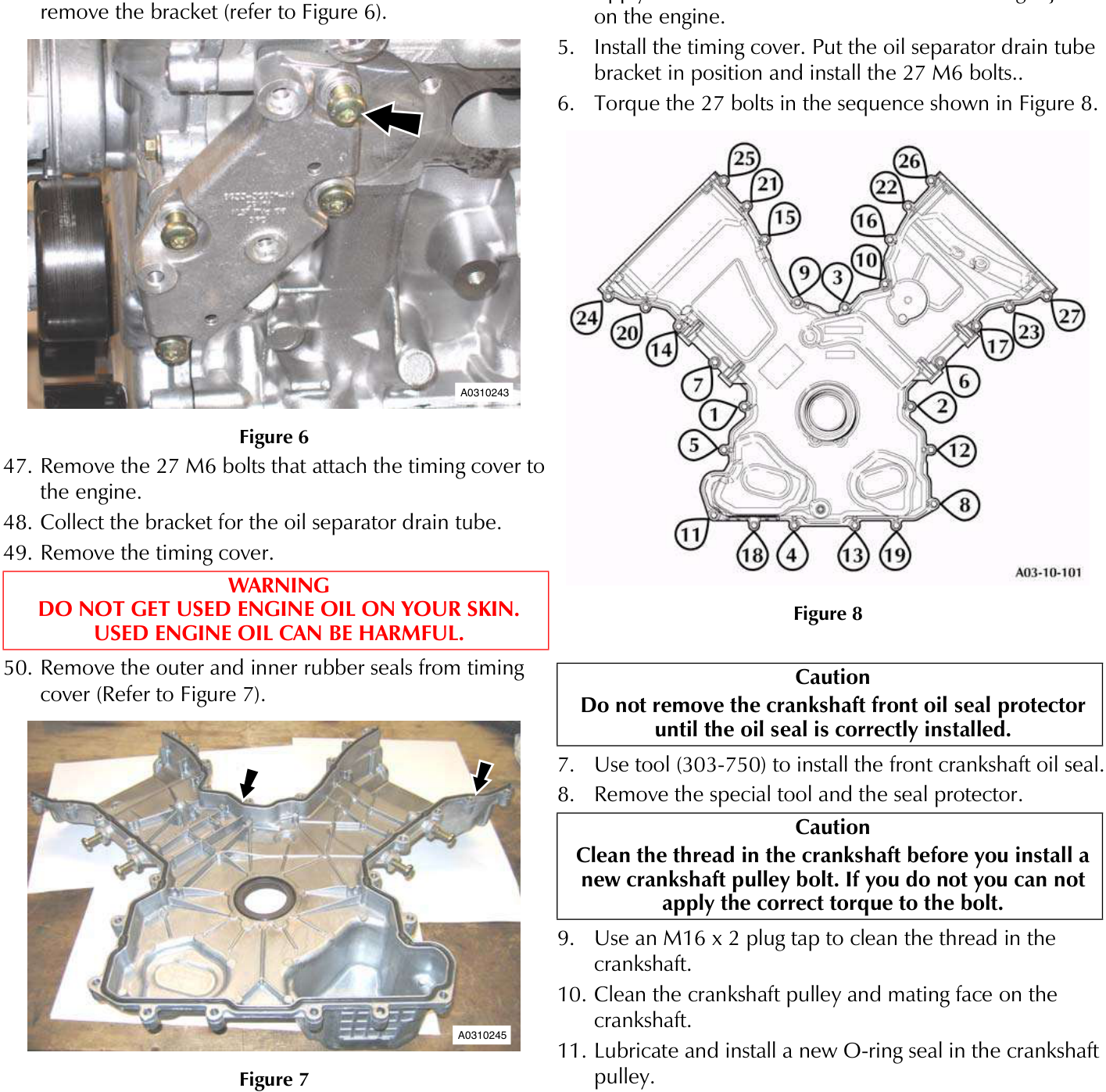
- Remove the 27 M6 bolts that attach the timing cover to the engine.
- Collect the bracket for the oil separator drain tube.
- Remove the timing cover.
DO NOT GET USED ENGINE OIL ON YOUR SKIN. USED ENGINE OIL CAN BE HARMFUL.
- Remove the outer and inner rubber seals from timing cover (Refer to Figure 7).
- Remove the front crankshaft oil seal from the timing cover.
Install
- Examine the condition of the seal in the John Guest cartridge connector for the oil return pipe. If there are signs that the connector has leaked, install a new John Guest cartridge kit (Refer to 'John Guest Cartridge in the Engine Timing Cover - Repair', page 3-10-14).
- Clean the timing cover and the mating face on the engine.
Make sure the crankshaft front oil seal mating faces are clean and dry.
- Install the inner and outer seals to the timing cover.
- Apply 3mm x 12mm beads of sealant to the eight joints on the engine.
- Install the timing cover. Put the oil separator drain tube bracket in position and install the 27 M6 bolts..
- Torque the 27 bolts in the sequence shown in Figure 8.
Do not remove the crankshaft front oil seal protector until the oil seal is correctly installed.
- Use tool (303-750) to install the front crankshaft oil seal.
- Remove the special tool and the seal protector.
Clean the thread in the crankshaft before you install a new crankshaft pulley bolt. If you do not you can not apply the correct torque to the bolt.
- Use an M16 x 2 plug tap to clean the thread in the crankshaft.
- Clean the crankshaft pulley and mating face on the crankshaft.
- Lubricate and install a new O-ring seal in the crankshaft pulley.
- Examine the crankshaft pulley and the taper collet for damage. Replace all damaged parts.
- Install the crankshaft pulley, taper collet and a new pulley bolt.
- Torque tighten the crankshaft pulley bolt.
- Remove the special tool (303-1185) from the crankcase.
- Install the inspection cover to the lower crankcase, install and tighten the two attachment bolts.
- Install the PAS pump mounting bracket. install and torque tighten the four M8 Torx bolts.
- Install the PAS pump. Install and torque the three M8 bolts.
- Install the alternator mounting bracket. Install and torque tighten the three M8 Torx bolts.
Parts & tools for this job For 2005 Aston Martin V8 Vantage
- PARTEngine gasket setSearch: Aston Martin V8 Vantage 2005 engine gasket set
- TOOLTorque wrenchSearch: 3/8 inch torque wrench
- TOOLFeeler gauge setSearch: feeler gauge set
Links open Amazon search results in a new tab. As an Amazon Associate I earn from qualifying purchases.