
Install
- Make
- Aston Martin
- Model
- V8 Vantage Factory Workshop Manual
- Year
- 2005–2010
- Section
- Engine Sealing › Install
03 EngineInstall
- Remove the four screws that attach each ignition coil.
- Remove the four ignition coils.
Note: When you remove the cam cover attachment screws in the step that follows, record their installed positions in the cam cover.
- Remove the 14 screws that attach the cam cover to the engine.
- Remove and discard the seals for the 14 cam cover screws.
- Remove the cam cover.
- Remove and discard the O-ring seal for the VVT solenoid.
- Remove and discard the cam cover gasket.
- Remove and discard the four O-ring seals from the spark plug wells.
- Clean the component mating faces.
Install
- Install four new O-ring seals in the spark plug wells.
- Install a new O-ring seal for the VVT solenoid.
- Install a new cam cover gasket.
- Apply a 12 mm by 3 mm bead of sealant to the tri-joints shown.
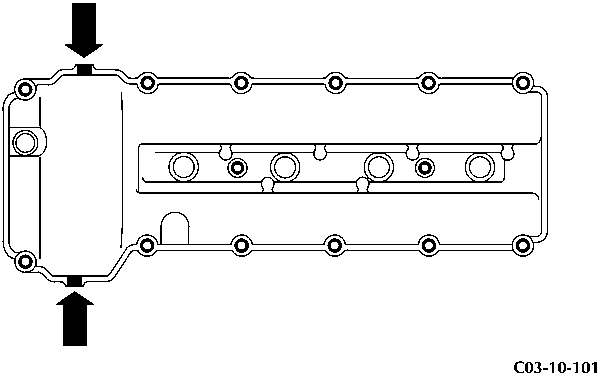
Figure C03-10-101
- Install the cam cover.
- Install new seals for the 14 cam cover screws.
CAUTION Tighten the screws gradually and equally in the step that follows. If you do not, the cam cover gasket can be damaged.
- Install and torque the 14 screws that attach the cam cover to the engine in the sequence shown to 10 Nm.
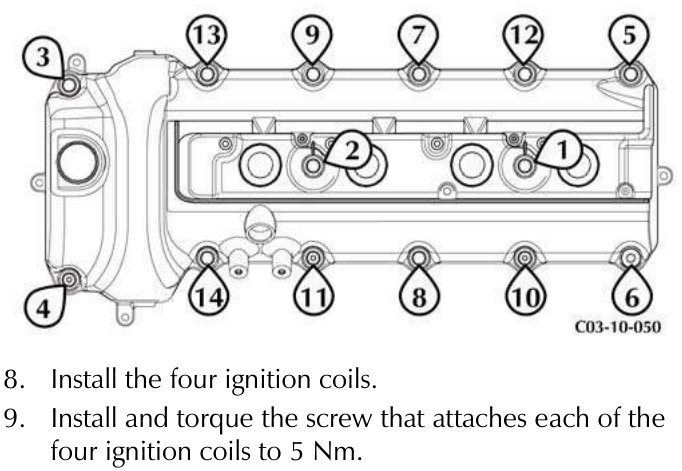
- Install the four ignition coils.
- Install and torque the screw that attaches each of the four ignition coils to 5 Nm.
- Install the front bracket for the wiring harness.
- Install the rear bracket for the wiring harness.
- Install and torque the three screws that attach the rear bracket for the wiring harness to 11 Nm.
- Install and tighten the two nuts and three screws that attach the front bracket for the wiring harness.
- Install the purge pipe and heater pipe into the two clips on the wiring harness bracket.
- Put the purge pipe P-clip into the correct position.
- Install and tighten the screw that attaches the purge pipe P-clip to the cam cover.
- Use three applicable cable ties to attach the rear of the wiring harness to the front bracket.
- Install the wiring harness for the injectors into the mounts.
- Install the fir tree clip that attaches the wiring harness for the ignition coils.
- Connect the electrical connectors to each of the four ignition coils.
- Connect the electrical connector to the VVT solenoid.
- Install the ignition coil cover.
- Remove and discard the caps from the breather pipes.
- Install the breather pipes to the cam cover.
- Install the right side front crush bar for the body reinforcement. (0101AB - Right Side Front Crush Bar for the Body Reinforcement)
- Install the front crush brace. (0101LC - Front Crush Brace)
Cam Cover - Vehicle Set - Remove and Install
| Repair Operation Time (ROT) | |
|---|---|
| Item | Code |
| Cam Cover - Vehicle Set - Remove and Install | 03.10.AW |
Parts & tools for this job For 2005 Aston Martin V8 Vantage
- PARTEngine gasket setSearch: Aston Martin V8 Vantage 2005 engine gasket set
- TOOLTorque wrenchSearch: 3/8 inch torque wrench
- TOOLFeeler gauge setSearch: feeler gauge set
Links open Amazon search results in a new tab. As an Amazon Associate I earn from qualifying purchases.