
Check operation of connect radio module
- Make
- Fiat
- Model
- Ducato Factory Service Manual
- Year
- 2002–2006
- Section
- Special accessories › Check operation of connect radio module
CHECK OPERATION OF CONNECT RADIO MODULE
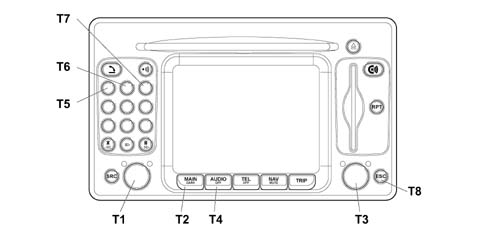
Foreword.
Even if the Connect radio function is faulty, treat the radio as if it is working (tuned to a radio station with audible sound).
Proceed as follows to gain access to internal diagnostics:
- accendere il Connect, premendo il tasto/manopola sinistro (T1).
- sullo schermo in ambiente AUDIO non deve comparire la scritta AUDIO OFF.
- premere il tasto MAIN (T2).
- premere il tasto/manopola destro (T3) per visualizzare il menù principale
- premere il tasto AUDIO (T4) per alcuni secondi finché appare la scritta "AUDIO OFF"
- inserire la password di assistenza premendo in sequenza i tasti numerati 1-2-3 (T5, T6, T7)
- premere il tasto/manopola destro (T3) per conferma
This will provide acess to the Service menu:
- utilizzare il tasto/manopola (T3) per spostarsi con il cursore sino ad attivare l´ambiente "Assistenza"
- confermare premendo il tasto/manopola destro (T3)
Turn knob (T3) to select the EOL Diagnostics menu and press the key to confirm the choice
The EOL Diagnostics menu consists of:
- N° Disegno
- Luci
- Retromarcia
- Odometro esterno
- Casse
- Antenna GPS
- Antenna AM/FM
- Errore interno: fornisce informazioni sullo stato degli errori interni al sistema. Viene indicato in un´area vicina che cambia colore: dove il colore verde indica errore assente, mentre il colore rosso indica errore presente.
- Tasto CLEAR ERROR MEMORY Questa funzione è attiva con chiave su marcia, premendo la manopola (T3) attiverà la procedura di cancellazione della memoria errori. La cancellazione della memoria avviene dopo la fase di chiave su stop/chiave su marcia. Gli errori ancora presenti saranno effettivamente presenti in quell´istante.
press the ESC key (T8) to exit from the menu.
Turn knob (T3) to select Diagnostics mode and press the knob to confirm the choice. Further submenus can be selected within this menu to continue self-diagnosis:
- GSM
- Radio
- GPS
- Input
- Navigazione
- Status and Dati
Menu: Service/Diagnostics/Input
The following are displayed in the Input submenu:
- Pannello Frontale: Questo campo consente di verificare la funzionalità di ogni tasto (sia del frontalino del Connect che dei tasti a volante), evidenziandone la stringa identificativa quanto il tasto stesso viene premuto.
- Luci: Il campo luci permette di verificare se il segnale luci di posizione On/Off viene correttamente rilevato dal Connect.
- Segnale Chiave: Questo campo permette di verificare con indicazione On/Off se il segnale +15 viene correttamente ricevuto.
If Connect is activated with the key on, the field should show On. If Connect is activated with the key off, the field should display Off.
When checking the correct operation of this manoeuvre, it is not possible to change from key-on status to key-off status because this would involve turning off Connect.
press the ESC key (T8) to exit from the menu.
Menu: Service/Diagnostics/Status and Date
The Status and Date Diagnostics menu consists of:
- Dati EEPROM
- Identification option
- DTC
This submenu is present but is not required for this test.
Parts & tools for this job For 2002 Fiat Ducato
- TOOLOBD2 scannerSearch: OBD2 scanner
- TOOLDigital multimeterSearch: automotive digital multimeter
- TOOLBack-probe test leadsSearch: back probe test leads
Links open Amazon search results in a new tab. As an Amazon Associate I earn from qualifying purchases.