
Check city button
- Make
- Fiat
- Model
- Grande Punto Factory Service Manual
- Year
- 2005–2012
- Section
- Body interior fittings and trim › Check city button
Body fittingsCheck city button
CHECK CITY BUTTON
| STEP | CHECK TO BE PERFORMED | RESOLUTION IF THE CHECK IS NOT OK |
|---|---|---|
| 1 | Check power supply (+15) - Check an Examiner in Ohmmeter mode across pins 5 and 18 of the button and check continuity with the button pressed. | Replace the city button |
| 2 | Check the wiring Check the continuity of the connection across pin 18 of the City button and pin 28 of Body Computer connector B Check the continuity of the connection across pin 5 of the City button and pin 49 of Body Computer connector B | Restore connection continuity. If the checks are regular and the City function does not activate, replace the Body Computer |
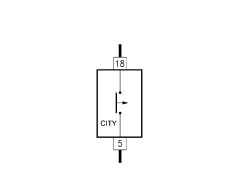
City button pinout
| Pin | Description |
|---|---|
| 5 | Earth signal input from Body Computer |
| 18 | Earth signal output for the Body Computer |
Parts & tools for this job For 2005 Fiat Grande Punto
- TOOLTrim removal tool kitSearch: trim removal tool kit
- PARTTouch-up paintSearch: Fiat touch up paint
- PARTPanel clip assortmentSearch: Fiat panel clips assortment
Links open Amazon search results in a new tab. As an Amazon Associate I earn from qualifying purchases.