
Introduction - ACCESSORIES
- Make
- Fiat
- Model
- Idea Factory Service Manual
- Year
- 2003–2012
- Section
- Accessories › Introduction - ACCESSORIES
Introduction - ACCESSORIES
Specifications
Dimensions: 1 DIN box with 2 DIN front panel
Modules included:
- Radio
- Audio CD player + CD ROM with MP3 (if fitted)
- LCD graphic display
- External CD Changer management (if fitted).
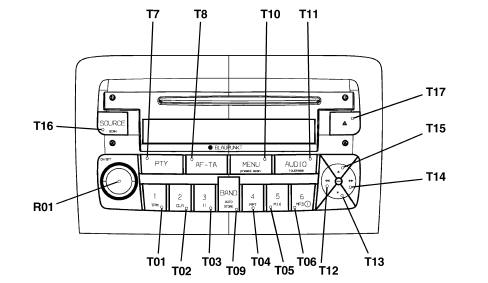
Specifications
Examples showing the disply of the various radio CD with MP3 functions are illustrated below:
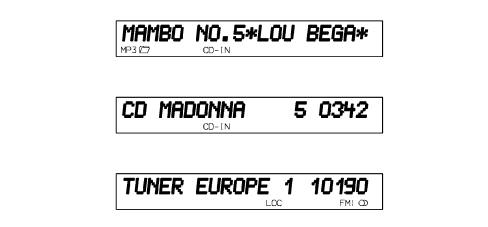
Specifications
The technical specifications are listed below:
GENERAL SPECIFICATIONS:
- music audio power: 4x35w
- 5 band graphic equalizer
- easily managed menu for adjusting radio settings and possible outside interfaces (CD-Changer)
- remote control from steering wheel
- possibility of interfacing with external CD Changer.
- speed volume control (via CAN)
- possibility of activating several controls via voice recognition module.
RADIO SPECIFICATIONS:
- RDS
- RDS - TMC (Traffic Message Channel)
- EON (Enhanced Other Network)
- TA (Traffic Announcements)
- band tuning: USW (FM); MW; LW;
memorization possibilities:
- 24 FM stations (6 of which can be programmed in the autostore);
- 6 MW stations;
- 6 LW stations;
- 6 stations that can be programmed through the autostore on the AMST band
2 scan modes (brief listening to a station and automatic moving on to the next one):
- scan of frequency band used;
- scan of programmed stations.
- possiblity of selecting programmes using PTY (on FM bands only).
- local/distant settings.
AUDIO SPECIFICATIONS:
- bass
- balance
- fader
- loudness
- treble
- hi-fi system active control
5 equalization bands:
- best (manufacturer's equalization);
- rock;
- jazz;
- classical;
- manual (can be set using 5 band graphic equalizer)
- soft mute
CD SPECIFICATIONS:
- motorized loading and ejection
- TPM function (Track Program Memory)
- shuffle function
- repeat
- skip
- pause / stop
- compression: activates the dynamic compression circuit.
- CD naming: CD identification (20 max)
CD MP3 SPECIFICATIONS:
- play list function (like TPM for audio CD)
- play list associated functions
- scan;
- repeat (one track or all);
- pause;
- skip
- maximum number of MP3 tracks considered for each CD: 999 ( if the number of MP3 files contained in the CD ROM is greater than this limit the first 999 will be considered).
- compression: activates the CD noise dynamic reduction circuit.
Blaupunkt 10 disc CD changer specifications (in luggage compartment)
- scan function
- repeat function
- shuffle function
- CD naming
- compression: activates the dynamic reduction circuit.
OPERATION
The table below describes all the functions that can be activated for both models:
| BUTTON FUNCTIONS | ||||||
|---|---|---|---|---|---|---|
| Button N° | Symbol | Description of functions | Tuner | CD/CD-MP3 Player | CD Changer | |
| Short button press | Long button press | |||||
| T01 | 1 | 1.Recall preset 2.TPM On/Off 3.PauseOn/Off 4.Repeat On/Off 5.Mix On/Off 6.MP3 info function | 1.Programme preset 2.TPM programme/reset 3.PauseOn/Off 4.Repeat On/Off 5.Mix On/Off 6.MP3 info function | 1.Recall preset 1.Programme preset | Button 1. TPM On/Off TPM memorizing Button 2. TPM reset Button 3. Pause On/Off Button 4. Repeat On/Off Button 5. Mix On/Off | 3.PauseOn/Off 4.Repeat On/Off 5.Mix On/Off |
| T02 | 2 | |||||
| T03 | 3 | |||||
| T04 | 4 | |||||
| T05 | 5 | |||||
| T06 | 6 | |||||
| T07 | PTY | PTY On/Off | Programme type display | 1.PTY On/Off 2. Programme type display | PTY On/Off | PTY On/Off |
| T08 | AF-TA | TA On/Off | AF On/Off | 1.TA On/Off 2.AF On/Off | 1.TA On/Off 2.AF On/Off | 1.TA On/Off 2.AF On/Off |
| T09 | BAND | Radio band selection | Autostore FMT | 1. Radio band selection 2.Autostore FMT | 1. Missing 2.Autostore | 1. Missing 2.Autostore |
| T10 | MENU | Access to menu | Scan preselection | 1. Access to menu 2. Scan preselection | Access to menu | Access to menu |
| T11 | AUDIO | Bass, Treble, Balance, Fader selection | Loudness On/Off | 1. Selection of Bass, Treble, Balance, Fader 2. Loudness On/Off | 1. Selection of Bass, Treble, Balance, Fader 2. Loudness On/Off | 1. Selection of Bass, Treble, Balance, Fader 2. Loudness On/Off |
| T12 | 1.Manual backwards search 2. Sel. previous PYT, TP, AF programme 3. Start of track/sel. previous track | 1. Fast backwards manual search 2. Selection of previous PTY, AF, TP programme 3 Start of track/sel. fast previous track | 1.Manual backwards search 2. Sel. previous PYT, TP, AF programme | 1. Start of track/fast selection of previous track 2. Fast selection of previous track | 1. Start of track/fast selection of previous track 2. Fast selection of previous track | |
| T13 | ▼ | 1. Automatic backwards search 2. Selection CD backward 3. Selection Previous folder | 1. Continuous automatic backwards search 2. Selection CD continuous backward . Selection continuous previous folder | 1. Automatic backwards search 2. Automatic continuous backwards search | 1. Selection Previous folder 2. Continuous selection of previous folder | 1. Selection of previous CD 2. Continuous selection of previous CD |
| T14 | 1. Manual forwards search + 2. Selection of next PYT, TP, AF programme 3. Selection of next track | 1. Manual fast forward search 2. Rapid selection of next PTY, AF, TP programme 3. Selection rapid next track | 1. Forwards manual search 2. Selection next PYT, TP, AF programme | 1. Next track selection 2. Next track rapid selection | 1. Next track selection 2. Next track rapid selection | |
| T15 | ▲ | 1. Automatic forwards search 2. Selection CD forward 3. Next folder selection | 1. Automatic continuous forwards search 2. Selection CD continuous forward 3. Next folder continuous selection | 1. Automatic forwards search 2. Automatic continuous forwards search | 1. Selection of next folder 2. Next folder rapid selection | 1. Selection of next CD 2. Next CD continuous selection |
| T16 | SOURCE | In sequence: Radio, CD, CDC | Source scan | 1. In sequence: Radio, CD, CDC 2.FM/AM scan | 1. In sequence: Radio, CD, CDC 2. CD scan | 1. In sequence: Radio, CD, CDC 2. CDC scan |
| T17 | ▲ | CD eject | CD eject | CD eject | CD eject | CD eject |
| R01 | ON/OFF | 1. Volume increase/decrease step by step 2.Mute On/Off | 1. Volume rapid increase/decrease 2.Radio On/Off | 1. Volume increase/decrease step by step 2. Volume rapid increase/decrease | 1. Volume increase/decrease step by step 2. Volume rapid increase/decrease | 1. Volume increase/decrease step by step 2. Volume rapid increase/decrease |
Anti-theft code
The radio is installed during Production and connected t to the CAN to establish communication with the Body Computer. The Body Computerstores an antitheft key known as the Exchange Code.
At each subsequent key on (or if the battery is disconnected), an automatic authenticationprocedure is repeated. The radio display shows the message CANCHECK: if the Exchange Code check is postive, the system begins to operate. If the comparison codes are not the same, the display shows a message that asks the user to entera manual code (Master Code - 4-figure code from 1111 to 6666) shown on the radio code card.
The Master Code is preprogrammed in production and is different for each radio. It is also different from the Exchange Code.
the manual entering procedure for the Master Code is only needed in the following case: if the Body Computer is being replaced and a new radio, already used on another vehicle with a CAN, is being installed.
a new radio (i.e. never installed on another car) may be fitted using an automatic authentication procedure without entering the Master Code manually.
Operation at Key Off
If the radio is on when the key is turned off, it goes off automatically after 20 minutes. It can also be kept on for a further 20 minutes by pressing the ON button again.
Connectors
Rear view:
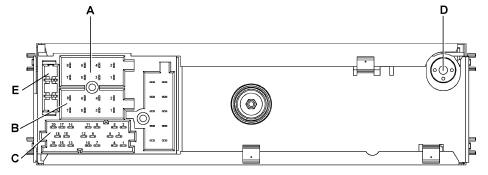
A - Supply connector
B - Speaker output connector
C - Auxiliary functions connector
D - Aerial connection
E - 10 A fuse
Connectors
Connector A pin out
| PIN | FUNCTION |
|---|---|
| A1 | B Can B |
| A2 | N.C. |
| A3 | B Can A |
| A4 | Direct supply |
| A5 | Aerial supply (N.C.) |
| A6 | Lit up with side lights on |
| A7 | N.C. |
| A8 | Earth |
Connector B pin out
| PIN | FUNCTION |
|---|---|
| B1 | Right rear speaker + |
| B2 | Right rear speaker - |
| B3 | Front speaker right + |
| B4 | Front speaker right - |
| B5 | Front speaker left + |
| B6 | Front speaker left - |
| B7 | Left rear speaker + |
| B8 | Left rear speaker - |
Connector C/D/E:
| Pin | Function |
|---|---|
| C1 | N.C. |
| C2 | N.C. |
| C3 | N.C. |
| C4 | N.C. |
| C5 | N.C. |
| C6 | Positive signal for amplifier enablement |
| D7 | Audio phone to + (NC) |
| D8 | Audio phone to - (NC) |
| D9 | Phone mute (NC) |
| D10 | N.C. |
| D11 | N.C. |
| D12 | Mute (N.C.) |
| E13 | CDC data IN |
| E14 | CDC data OUT |
| E15 | Permanent power supply for CDC |
| E16 | Positive signal for CDC supply enablement |
| E17 | CDC data GND |
| E18 | CDC audio GND |
| E19 | Input L for CDC |
| E20 | Input R for CDC |
CD changer
A special changer (Blaupunkt) makes it possible to load up to 10 discs which are then selected using the radio controls.
The changer only works if it contains at least one CD: the CDs should be inserted correctly and the flap should be properly closed.
Location
The CD Changer is fitted in the luggage compartment, in the area of the left wheel arch
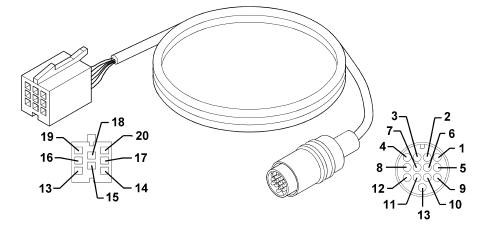
It is connected to the radio via a special lead
CD CHANGER LEAD
Radio connector E:
| PIN | SIGNAL |
|---|---|
| 13 | CDC data IN |
| 14 | CDC data OUT |
| 15 | Permanent power supply for CDC |
| 16 | Positive signal for CDC supply enablement |
| 17 | CDC data GND |
| 18 | CDC audio GND |
| 19 | Input L for CDC |
| 20 | Input R for CDC |
Rapid attachment multipolar connector, CDC side:
| Pin | Signal |
|---|---|
| 2 | Earth |
| 3 | Permanent power supply |
| 4 | Switched power supply |
| 6 | Audio earth |
| 8 | Left audio IN |
| 10 | ASCI bus CDC - radio |
| 12. | Right audion IN |
| 13 | ASCI bus radio - CDC |
Specifications
A HI FI system with special speakers and an outside amplifier is available on request.
The system has been developed ad hoc for the vehicle: the acoustic properties of the passenger compartment have been carefully studied so that the amplifier and the speakers are perfectly suited to the vehicle: the sound is excellent throughout the passenger compartment.
In addition, the system blends in perfectly with the aesthetics of the vehicle, without taking up extra space.
The system is installed in the vehicle directly in production, without any operations afterwards: the cables are incorporated in the vehicle wiring. It is therefore advisable not to modify the original system in any way (e.g. graphic equalizers, additional sub-woofers, extra amplifiers).
In addition, the system components (amplifier and speakers) should not be repaired individually, but can only be replaced with new components.
COMPOSITION
Unlike the system fitted as standard, this system includes:
- special midwoofer type front and rear speakers with separate tweeters
- built-in rear subwoofer with high power amplifier located in a special ventilated bassbox in the luggage compartment.
The other components (radio, aerial, etc.) are the same as those on the system fitted as standard.
Location
The diagram below illustrates the location of the components.
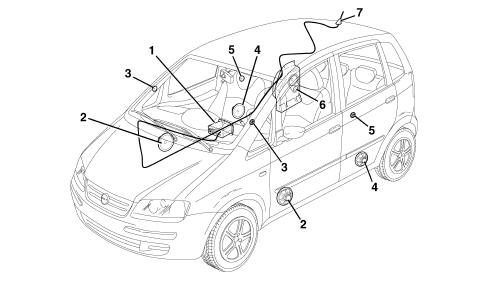
1 - Radio
2 - Front door midwoofer speakers
3 - Front tweeter speakers
4 - Rear midwoofer speakers
5 - Rear tweeter speakers
6 - Rear subwoofer speaker with built-in amplifier
7 - Aerial
SPECIFCATIONS
Amplifier, located in a ventilated bassbox, housed at the rear in the luggage compartment, which also contains the subwoofer
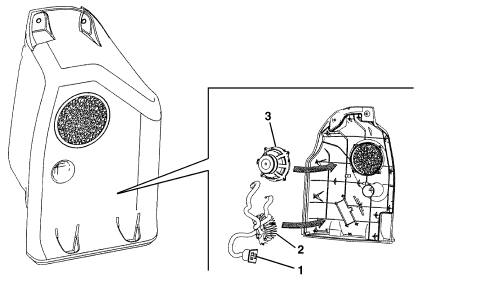
1- Amplifier connector
2 - Amplifier
3 - Subwoofer
SPECIFCATIONS
Pinout
| Pin | Operation |
|---|---|
| 1 | Left audio input (+) |
| 2 | Right audio input (+)n |
| 3 | Battery power supply |
| 4 | Left audio input (-) |
| 5 | Right audio input (-) |
| 6 | N.C. |
| 7 | Earth |
| 8 | Enablement from radio |
SUBWOOFER SPEAKER
This is a 130 mm diameter 20W power woofer speaker with a twin coil; it is fitted with a special bass box incorporated which diffuses the sound in an optimum manner preventing vibrations and interference.
MIDWOOFER SPEAKERS
The speakers in the doors are 160 mm diameter 20W power midwoofers
TWEETER SPEAKERS
The 19 mm diameter front and 11 mm diameter rear 20W power tweeter speakers are located at the front at the top of the dashboard and at the rear in the doors.
Parts & tools for this job For 2003 Fiat Idea
- TOOLDigital multimeterSearch: automotive digital multimeter
- PARTAssorted fuse kitSearch: car fuse assortment kit
- TOOLWire crimper and connector kitSearch: wire crimper connector kit
Links open Amazon search results in a new tab. As an Amazon Associate I earn from qualifying purchases.