
Check radio system operation
- Make
- Fiat
- Model
- Stilo Factory Service Manual
- Year
- 2001–2007
- Section
- Accessories › Check radio system operation
Check radio system operation
Irrespective of the position of the key, switch on the radio by pressing the 'VOL PUSH ON/OFF knob (A) for more than a second.
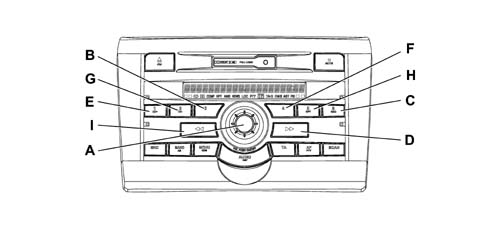
Self Test: check on internal communication between the microprocessor and the internal modules of the Radio
Press buttons '3' (B) and '6 RND (C) at the same time. Having started the acoustic test at the speakers, press button '1 CD+' (E) to enter the Self Test mode.
'COMMS TEST - PASS should appear on the display.
If the words 'CAN SYSTEM FAILURE appear, this means that the radio is not managing to converse with the vehicle CAN.
If the words 'SELF TEST FAILURE appear, this means that the internal microprocessor is not communicating correctly with one or more of the internal modules (DSP, Tuner, CD/Tape Controller, LCD).
Checksum (internal EEPROM test)
Press buttons '3' (B) and '6 RND (C) at the same time. Having started the acoustic test at the speakers, press button '4' (F) to enter the mode (internal EEPROM test).
Check that the words 'CHECKSUM - PASS appear on the display.
If the words 'CHECKSYM - FAIL appear on the display, the diagnostic procedure is over and has failed.
Check on operation of the display
Press buttons '3' (B) and '6 RND (C) at the same time. Having started the acoustic test at the speakers, press the '5 RPT button (H) to enter the 'Test Display' mode.
All the pixels should be on in the display. If some areas are not lit up in the display, the diagnostic procedure is over and has failed.
To exit the diagnostic procedures, switch off the radio by pressing the 'VOL PUSH ON/OFF button (A) for more than a second and/or turn the ignition key OFF.
Parts & tools for this job For 2001 Fiat Stilo
- TOOLDigital multimeterSearch: automotive digital multimeter
- PARTAssorted fuse kitSearch: car fuse assortment kit
- TOOLWire crimper and connector kitSearch: wire crimper connector kit
Links open Amazon search results in a new tab. As an Amazon Associate I earn from qualifying purchases.