
Kickdown cable
- Make
- Land Rover
- Model
- Defender V8i Workshop Manual Supplement
- Section
- Repair › Kickdown cable
Automatic gearboxKickdown cable
KICKDOWN CABLE
Service repair no - 44.15.01
Remove
- Site vehicle on a four post ramp.
- Select neutral ’N’.
- Disconnect battery negative lead.
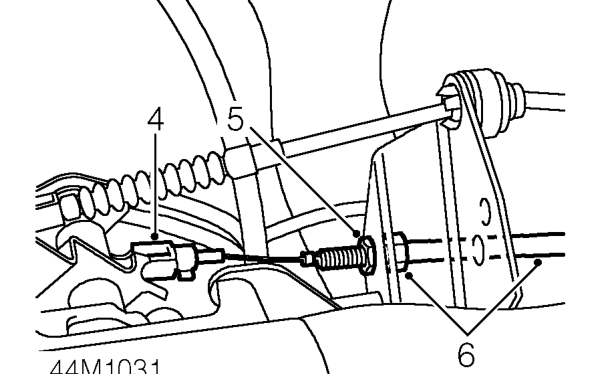
- Rotate accelerator cam and release nipple of
- Using special tool
- If cable is to be refitted, remove and discard ’O’
- Remove clevis pin and release kickdown cable
Refit
at throttle linkage.
- Release outer cable locknut.
- Fit NEW ’O’ ring seal to cable and lubricate seal.
- Disconnect cable from abutmet bracket.
- Fit cable to gearbox casing ensuring it is
- Release cable from retaining clip at bracket attached to cylinder head.
- Spring load cam by turning once and fit inner
- Feed cable through to underside of vehicle.
- Raise vehicle on ramp.
- Remove gearbox fluid pan. See Fluid pan gasket and screen.
- Ensuring cable nipple remains engaged, feed
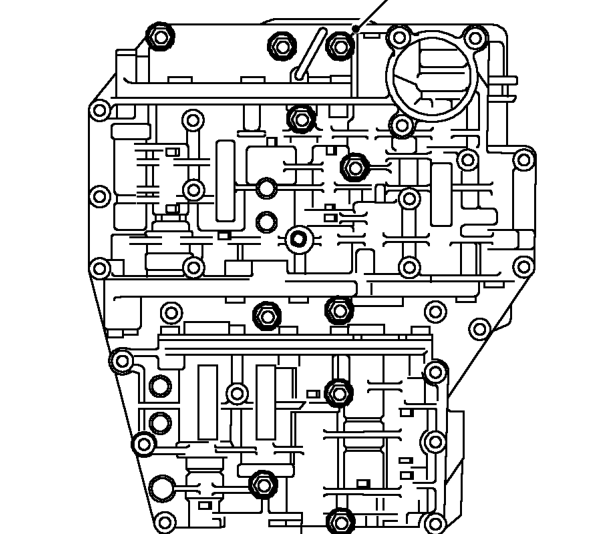
- Locate control unit assembly to gearbox and
- Remove 13 bolts securing control unit assembly to gearbox.
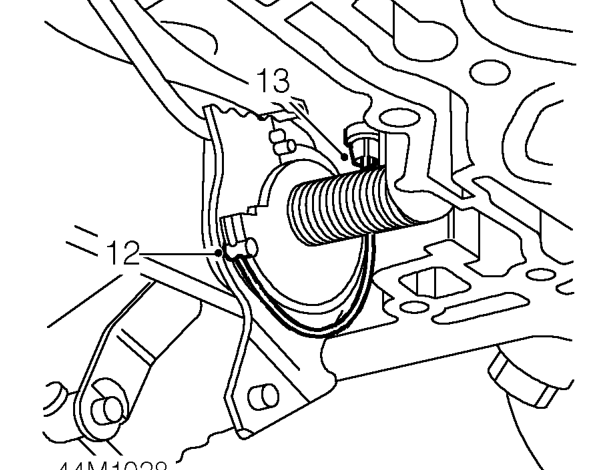
kickdown inner cable from cam. LRT-44-004, compress cable tangs and remove cable from gearbox.
ring seal and clean cable assembly.
correctly seated.
cable nipple into cam seat.
- NOTE: When a new cable is fitted, to help
- locate nipple to cam, introduce a curve
- into the cable. DO NOT bend or kink cable.
free end of cable assembly into engine compartment.
loosely fit 13 bolts. Ensure selector shaft locates into gear shift fork.
Parts & tools for this job For Land Rover Defender
- PARTTransmission filter kitSearch: Land Rover Defender transmission filter kit
- FLUIDAutomatic transmission fluidSearch: Land Rover automatic transmission fluid
- TOOLFluid transfer pumpSearch: fluid transfer pump
Links open Amazon search results in a new tab. As an Amazon Associate I earn from qualifying purchases.