
Gear change cable (page 3 of 3)
- Make
- MG
- Model
- TF Factory Workshop Manual
- Year
- 2002–2005
- Section
- Repairs
Manual gearboxGear change cable · page 3 of 3
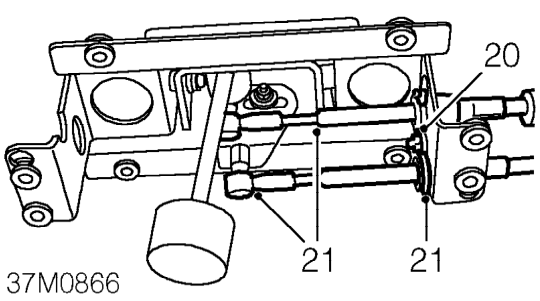
- Position gear selector assembly and remove bolt securing cable abutment clip to assembly.
- Remove cable abutment clip and release cable from assembly.
- Remove gear change cable from tunnel and engine compartment.
Refit
- Position gear change cable to tunnel and feed through rear bulkhead.
- Position cable in engine compartment.
- Lubricate all four cables with soft soap to ease grommet movement on cables.
- Position cable into closing plate slot and secure with grommet.
- Align closing plate to bulkhead and secure with bolts.
- Raise subframe on jack, fit subframe mounting bolts and tighten to 30 Nm .
- Position cable to gear selector abutment bracket.
- Engage cable to selector ball joint.
- Fit new abutment bracket clip.
- Fit cable to gear lever selector assembly.
- Position cable to abutment, fit retaining clip and secure with bolt.
- Position gear lever assembly to tunnel, fit and tighten nuts and bolts to 9 Nm.
- Position SRS DCU bracket to tunnel, fit harness earth connector, tighten Torx bolts to 10 Nm .
WARNING: The crash sensor is incorporated inside the DCU, therefore it is imperative that the DCU bolts are tightened to their correct torque.
- Fit front console. See BODY, Interior trim components.
- Untie and position coolant hoses.
- Fill engine coolant system. See COOLING SYSTEM, Adjustments.
- Fit engine cover. See ENGINE, Repairs.
Parts & tools for this job For 2002 MG TF
- PARTClutch kitSearch: MG TF 2002 clutch kit
- TOOLClutch alignment toolSearch: clutch alignment tool
- FLUIDGear oilSearch: MG TF manual gearbox oil
Links open Amazon search results in a new tab. As an Amazon Associate I earn from qualifying purchases.