
Passenger’s airbag module
- Make
- Rover
- Model
- 400 Body Repair Manual
- Year
- 1995–2000
- Section
- Repairs › Passenger’s airbag module
Restraint systemsPassenger’s airbag module
PASSENGER’S AIRBAG MODULE
Service repair no - 76.73.69
CAUTION: See safety precautions before commencement of repair.
Remove
- Remove key from starter switch, disconnect both battery leads, earth lead first, and wait 10 minutes for the SRS back-up power circuit to discharge before commencing work.
- Remove glove box. See BODY, Interior trim components.
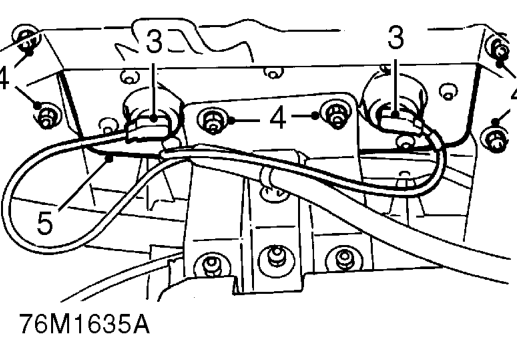
’K’ ’L’ and ’T’ Series and ’D’ Series - 97.5MY on
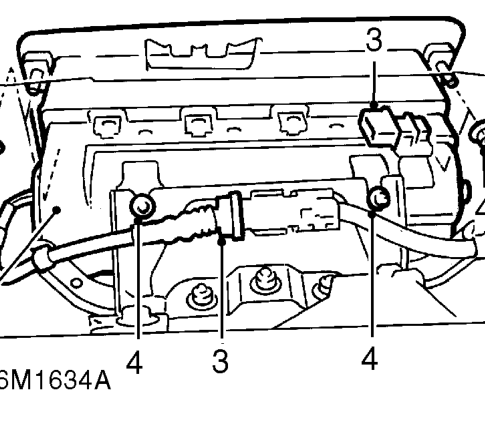
’D’ Series - Up to 97.5MY
- Disconnect 2 multiplugs from airbag.
NOTE: Up to 97.5MY - ’D’ series airbag has only one multiplug which must be isolated with the RED connector provided.
- Remove 6 nuts securing airbag to fascia.
- Remove passenger’s airbag module.
CAUTION: Store the airbag module in accordance with the storage procedures outlined in the precautions part of this section.
NOTE: If the airbag module is to be replaced, the bar code must be recorded.
Refit
- Position airbag module to fascia, fit and tighten upper nuts to 4 Nm.
- Fit NEW nuts to lower mounting and tighten to 9 Nm.
- Connect airbag multiplugs. Up to 97.5MY - ’D’ series, remove RED connector and fit to retaining clip.
- Secure harness clip.
- Fit glove box. See BODY, Interior trim components.
- Connect both battery leads, earth lead last.
- Carry out system check by turning the ignition on and checking that the SRS warning light illuminates then extinguishes after 3 seconds.
Parts & tools for this job For 1995 Rover 400
- TOOLOBD2 scannerSearch: OBD2 scanner
- TOOLDigital multimeterSearch: automotive digital multimeter
- TOOLBack-probe test leadsSearch: back probe test leads
Links open Amazon search results in a new tab. As an Amazon Associate I earn from qualifying purchases.