
Removing and installing data bus diagnostic interface J533
- Make
- SEAT
- Model
- Alhambra
- Year
- 2010–2020
- Section
- Vehicle electrics › Removing and installing data bus diagnostic interface J533
‹ Prev Renewing data bus diagnostic interface J533Next › Renewing data bus diagnostic interface J533
WiringRemoving and installing data bus diagnostic interface J533
Removing and installing data bus diagnostic interface J533
The data bus diagnostic interface J533 is located in the driver footwell, on the right, next to the steering column.
Note
- data bus diagnostic interface J533 is to be replaced, it is essential that the procedure for replacing the is carried out, so that the codes stored in the unit can be read Chapter “Data bus diagnostic interface J533 (gateway)”.
Switch off ignition and all electric loads and then remove ignition key.
Remove trim in driver footwell Compartments, covers and trim; Removing and installing left trim on driver side.
Remove driver side footwell vent Heating; Repairing heating; Passenger compartment; Removing vents.
Release connector (1) and pull it off data bus diagnostic interface J533 (2).
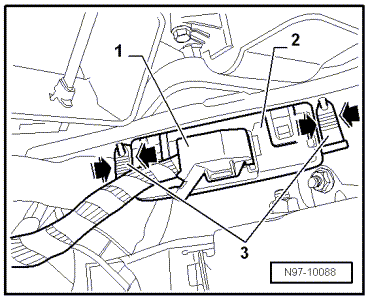
Press securing pins (3) together (arrows) and remove data bus diagnostic interface J533 from holes.
Remove data bus diagnostic interface J533 from vehicle.
Installation is carried out in the reverse order.
‹ Prev Renewing data bus diagnostic interface J533Next › Renewing data bus diagnostic interface J533
Parts & tools for this job For 2010 SEAT Alhambra
- TOOLOBD2 scannerSearch: OBD2 scanner
- TOOLDigital multimeterSearch: automotive digital multimeter
- TOOLBack-probe test leadsSearch: back probe test leads
As an Amazon Associate we earn from qualifying purchases.