
Removing and installing onboard supply control unit J519
- Make
- SEAT
- Model
- Alhambra
- Year
- 2010–2020
- Section
- Vehicle electrics › Removing and installing onboard supply control unit J519
Removing and installing onboard supply control unit J519
The onboard supply control unit J519 is located beneath the relay carrier, in the driver's side footwell.
Note
- onboard supply control unit J519 is to be renewed, the procedure Chapter “Onboard supply control unit J519” must always be carried out for reading the codes stored in the control unit.
- The following illustrations show removal on a LHD vehicle. Removal and installation of onboard supply control unit on an RHD vehicle are performed using the corresponding mirror-image procedure.
Switch off ignition and all electric loads and then remove ignition key.
Remove trim in driver's footwell Trim; Removing and installing left trim on driver side.
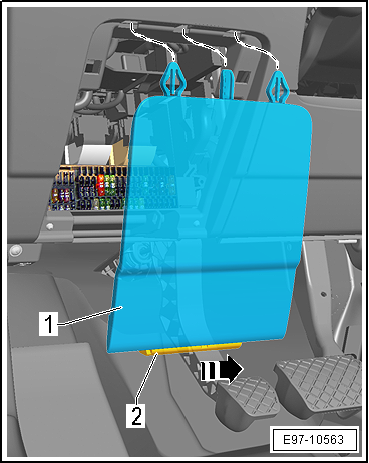
Remove the fuse cover (1) on the dash panel, press the catch of the fuse cover (2) in the direction of the (arrow).
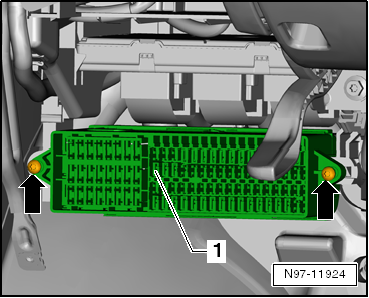
Undo the fixing bolts of the fuse box (arrows) and pull fuse holder (1) downwards under the holder.
Release and separate three connectors.
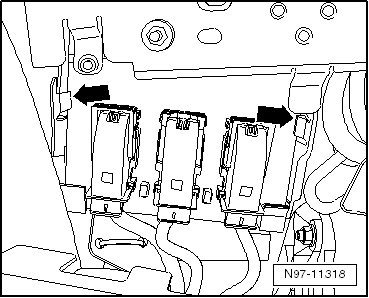
Press both catches (arrows) and swing onboard supply control unit downwards slightly.
Pull onboard supply control unit downwards and remove from holder against direction of normal travel.
Installation is carried out in the reverse sequence; note the following:
When installing, insert onboard supply control unit J519 into bracket on rear side first and then push upwards until it engages audibly in the bracket.
Parts & tools for this job For 2010 SEAT Alhambra
- TOOLDigital multimeterSearch: automotive digital multimeter
- PARTAssorted fuse kitSearch: car fuse assortment kit
- TOOLWire crimper and connector kitSearch: wire crimper connector kit
As an Amazon Associate we earn from qualifying purchases.