
Removing and installing onboard supply control unit J519
- Make
- SEAT
- Model
- Alhambra
- Year
- 2010–2020
- Section
- Vehicle electrics › Removing and installing onboard supply control unit J519
‹ Prev Control unit for the onboard network J519Next › Replace the on board network control unit J519
WiringRemoving and installing onboard supply control unit J519
Removing and installing onboard supply control unit J519
The on board network control unit J519 is found on the driver's side, behind the relay carrier.
Remove the drivers side footwell covering Footwell covering, driver's side: remove and install
Turn the knobs (5) in the direction of (arrow B) and remove the connectors (4) from the BSG control console (6).
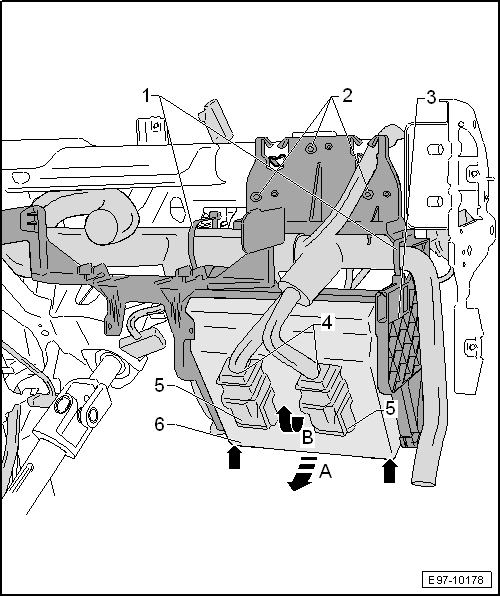
Free the BSG control console (6) from the fasteners (arrows) and remove from the housing in the direction of (arrow A).
Installation is carried out in the reverse order.
‹ Prev Control unit for the onboard network J519Next › Replace the on board network control unit J519
Parts & tools for this job For 2010 SEAT Alhambra
- TOOLDigital multimeterSearch: automotive digital multimeter
- PARTAssorted fuse kitSearch: car fuse assortment kit
- TOOLWire crimper and connector kitSearch: wire crimper connector kit
As an Amazon Associate we earn from qualifying purchases.