
Amplifier R12 (Exeo): Removing and installing
- Make
- SEAT
- Model
- Exeo
- Year
- 2008–2013
- Section
- Radio, Telephone, Navigation › Amplifier R12 (Exeo): Removing and installing
‹ Prev Amplifiers R12, for the speakers in rear doors (Exeo, Exeo ST)Next › Amplifier R12 (Exeo ST): Removing and installing
InfotainmentAmplifier R12 (Exeo): Removing and installing
Amplifier R12 (Exeo): Removing and installing
Switch off all electrical components.
Remove the ignition key.
Remove luggage compartment side trim (right-side): Trim panels.
Unplug electrical connector (2) at amplifier R12 (1).
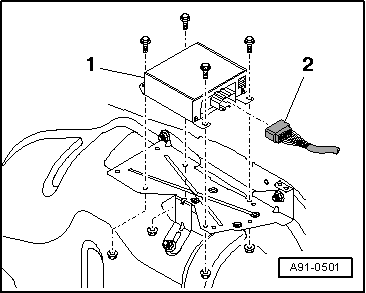
Undo the four screws and remove the amplifier R12 (1).
Installation is performed in reverse sequence.
Tightening torque: 4 Nm.
‹ Prev Amplifiers R12, for the speakers in rear doors (Exeo, Exeo ST)Next › Amplifier R12 (Exeo ST): Removing and installing
Parts & tools for this job For 2008 SEAT Exeo
- TOOLTorque wrenchSearch: 3/8 inch torque wrench
- TOOLSocket setSearch: socket set metric
- BOOKHaynes manualSearch: Haynes manual SEAT Exeo
As an Amazon Associate we earn from qualifying purchases.