
Internal microphone R74: Removing and installing
- Make
- SEAT
- Model
- Exeo
- Year
- 2008–2013
- Section
- Radio, Telephone, Navigation › Internal microphone R74: Removing and installing
‹ Prev Internal microphone R74: Functional checkNext › Harman unit amplifier R12, Models Exeo, Exeo ST: Removing and installing
InfotainmentInternal microphone R74: Removing and installing
Internal microphone R74: Removing and installing
- Front-end hooks 3370
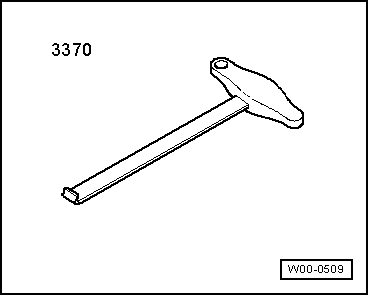
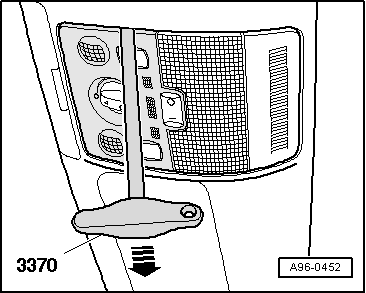
Carefully remove cover for front interior light W1 using front-end hook 3370.
Unscrew bolts (arrows) (3 Nm).
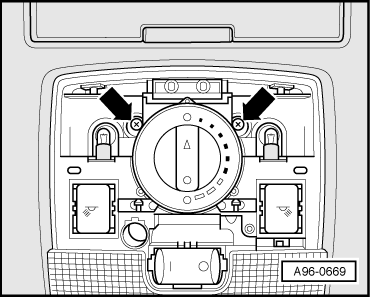
Swivel out front interior light W1 downwards.
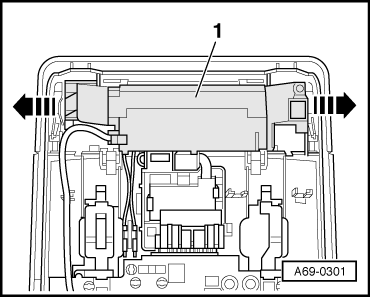
Where fitted, release clips (arrows) and remove interior monitoring sender/receiver module 1 G303 (1) from front interior light W1.
Unplug connector (1) at internal microphone R74 (2).
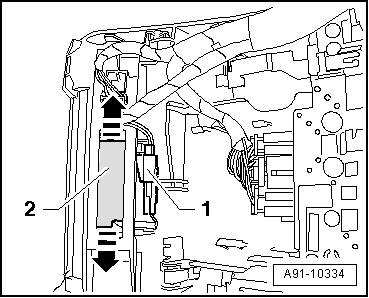
Release retaining clips (arrows) and remove internal microphone R74 (2).
Installation is performed in reverse sequence.
‹ Prev Internal microphone R74: Functional checkNext › Harman unit amplifier R12, Models Exeo, Exeo ST: Removing and installing
Parts & tools for this job For 2008 SEAT Exeo
- TOOLTorque wrenchSearch: 3/8 inch torque wrench
- TOOLSocket setSearch: socket set metric
- BOOKHaynes manualSearch: Haynes manual SEAT Exeo
As an Amazon Associate we earn from qualifying purchases.