
Telephone aerial R65: Removing and installing
- Make
- SEAT
- Model
- Exeo
- Year
- 2008–2013
- Section
- Radio, Telephone, Navigation › Telephone aerial R65: Removing and installing
‹ Prev Aerial for the navigation system R52 (Exeo ST): Removing and installingNext › Multimedia control unit
InfotainmentTelephone aerial R65: Removing and installing
Telephone aerial R65: Removing and installing
Switch off all electrical components.
Remove the ignition key.
Remove roof end trim Trim panels.
Unplug electrical connector (1) at telephone aerial R65 (2).
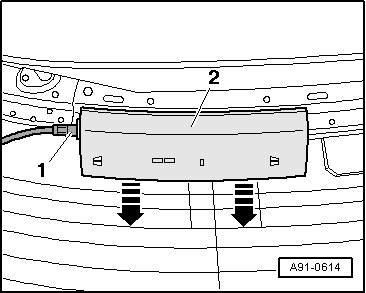
Pull telephone aerial R65 (2) down off rear edge of roof (arrows).
Installation is performed in reverse sequence.
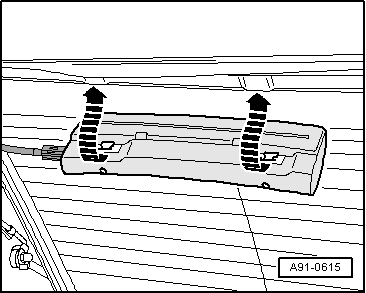
When installing, make sure that retaining clips for telephone aerial R65 (arrows) engage in recesses in rear edge of roof.
‹ Prev Aerial for the navigation system R52 (Exeo ST): Removing and installingNext › Multimedia control unit
Parts & tools for this job For 2008 SEAT Exeo
- TOOLTorque wrenchSearch: 3/8 inch torque wrench
- TOOLSocket setSearch: socket set metric
- BOOKHaynes manualSearch: Haynes manual SEAT Exeo
As an Amazon Associate we earn from qualifying purchases.