
Amplifier R12 (Exeo ST): Removing and installing
- Make
- SEAT
- Model
- Exeo
- Year
- 2008–2013
- Section
- Radio, Telephone, Navigation › Amplifier R12 (Exeo ST): Removing and installing
InfotainmentAmplifier R12 (Exeo ST): Removing and installing
Amplifier R12 (Exeo ST): Removing and installing
Switch off all electrical components.
Remove the ignition key.
Remove right side trim in the luggage compartment.
Disconnect electrical connection (2) of the amplified R12 (1) by pushing in the fastener (arrow).
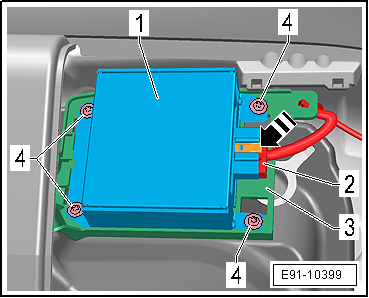
Undo the four screws (4) and remove the amplifier R12 (1).
The bracket (3) is fixed to the bodywork using two screws and can be removed if required.
Installation is performed in reverse sequence.
Tightening torques: 3.5 Nm ± 0.5.
Parts & tools for this job For 2008 SEAT Exeo
- TOOLTorque wrenchSearch: 3/8 inch torque wrench
- TOOLSocket setSearch: socket set metric
- BOOKHaynes manualSearch: Haynes manual SEAT Exeo
As an Amazon Associate we earn from qualifying purchases.