
Connect panel replace
- Make
- Alfa Romeo
- Model
- 147 Factory Service Manual
- Year
- 2000–2004
- Section
- Special accessories › Connect panel replace
Connect panel replace
Removing
1. Fit the tools in the special housings in Connect panel, making sure that they are correctly attached.
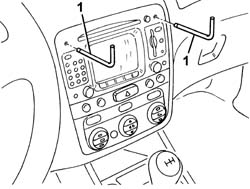
1. Extract the Connect panel pulling the tools.
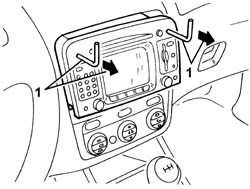
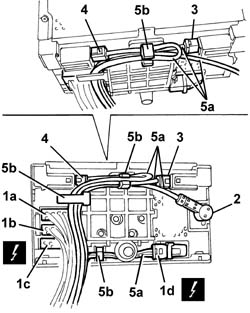
1. Disconnect the electrical connections (1a, 1b, 1c, 1d).
| Name | Connector | |
|---|---|---|
| 1a | Radio | P20A |
| Name | Connector | |
|---|---|---|
| 1b | Radio | P20B |
| Name | Connector | |
|---|---|---|
| 1c | Radio | P20C |
| Name | Connector | |
|---|---|---|
| 1d | Radio | P20D |
2. Disconnect the radio aerial.
3. Disconnect the GPS aerial.
4. Disconnect the GSM aerial.
5. Release the wiring (5a) from the retainers (5b).
6. Recover the Connect panel.
Refitting
Check that the Connect panel is not damaged.
1. Connect the electrical connections and the aerial connections.
2. Position the wiring (2a) carefully as shown in the diagram and secure it to the retainers (2b).
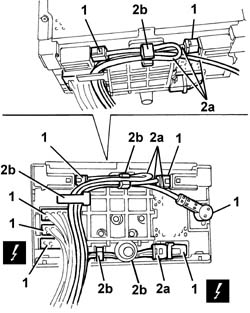
Fit the Connect panel in its housing taking great care to avoid any interference with the cables at the rear. If there is interference, check that the cables are correctly positioned (see previous diagram).
Check the operation of the Connect panel.
Parts & tools for this job For 2000 Alfa Romeo 147
- TOOLDigital multimeterSearch: automotive digital multimeter
- PARTAssorted fuse kitSearch: car fuse assortment kit
- TOOLWire crimper and connector kitSearch: wire crimper connector kit
Links open Amazon search results in a new tab. As an Amazon Associate I earn from qualifying purchases.