
Display Panel
- Make
- Aston Martin
- Model
- DB9 Factory Workshop Manual
- Year
- Issue 2, 2005
- Section
- Road Wheels and Tyres › Display Panel
04 SuspensionDisplay Panel
The display unit provides additional features when correctly connected to a previously installed ‘Smartyre’ system. The display unit connects directly to the front of the basic ‘Smartyre’ receiver and is powered from the vehicle circuits. The display will be fully illuminated during use but will go into ‘Energy Saver’ mode when no activity is detected.
Display Panel
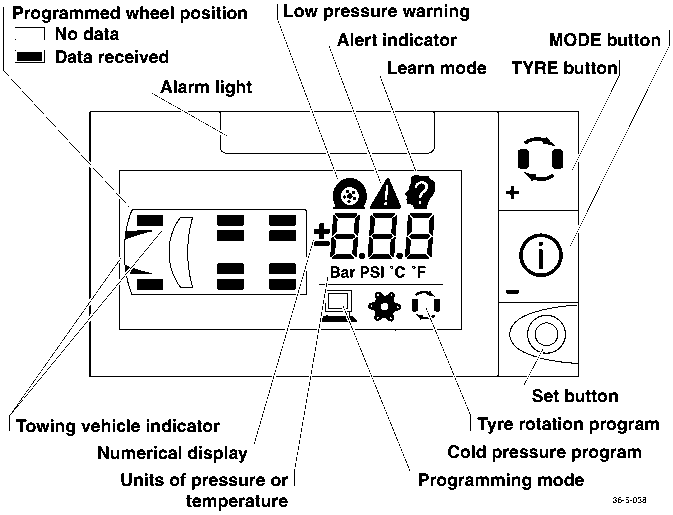
- Programmed wheel position
- No data
- Data received
- Alarm light
- Low pressure warning
- Alert indicator
- Learn mode
- MODE button
- Set button
- Towing vehicle indicator
- Numerical display
- Units of pressure or temperature
- TYRE button
- Tyre rotation program
- Cold pressure program
- Programming mode
Connection and Normal Operation
- Remove the front bezel of the Pressure Sensor Receiver. Install the extension lead to the display unit and to the receiver module. Turn on the ignition.
All icons will illuminate briefly and then extinguish leaving only the vehicle outline.
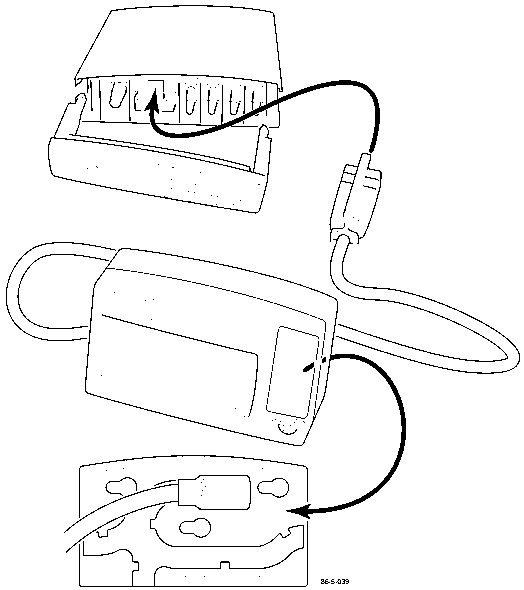
- When tyre pressure data is received, (drive the vehicle or spin the road wheels), all the road wheel icons will appear. Press the Tyre icon to access the recorded data for each of the four road wheels.
- Press the Mode button to scroll through the pressure, temperature and pressure deviation readings for the selected tyre.
- If any tyre pressure sensor is defective, the display will show three dashes to indicate the absence of data for that tyre.
- To return to normal mode, press the SET button.
System Programming
The system may be programmed by the user on three different levels. Enter Programming Mode by pressing the ‘Set’ button:
- 2 seconds to enter level 1
- 5 seconds to enter level 2
- 10 seconds to enter level 3
The following parameters may be set in each level:
| Level | Parameters |
|---|---|
| Level 1 | • Cold Pressure • Tyre Rotation • Low Pressure Warning • Pressure Deviation • High Temperature Alert • Units Selection |
| Level 2 | • Slope • Learn Transmitter ID |
| Level 3 | • Low Pressure Alert |
Level 1 Programming
Cold inflation pressure
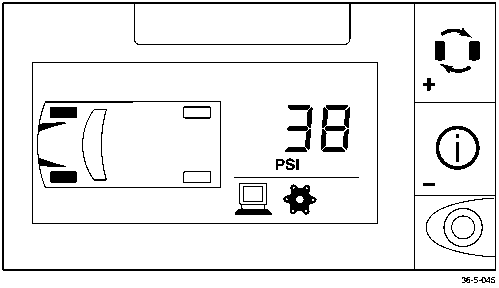
- Press ‘Set’ for 2 seconds to enter level 1 programming.
- Press ‘Tyre’ to select the front or rear axle. Front or rear tyres will be highlighted.
- Press ‘Mode’ to show the current value. Press ‘Tyre’ to increase or ‘Mode’ to decrease the current value.
- Press ‘Set’ to save the new values.
- Repeat steps 2 - 4 to set the cold inflation pressure for other the axle.
Parts & tools for this job For 2005 Aston Martin DB9
- TOOLTyre pressure gaugeSearch: digital tyre pressure gauge
- TOOLTorque wrenchSearch: 1/2 inch torque wrench
- TOOLBreaker barSearch: breaker bar
Links open Amazon search results in a new tab. As an Amazon Associate I earn from qualifying purchases.