
Level 2 Programming
- Make
- Aston Martin
- Model
- DB9 Factory Workshop Manual
- Year
- Issue 2, 2005
- Section
- Road Wheels and Tyres › Level 2 Programming
04 SuspensionLevel 2 Programming
- Press ‘Mode’ until pressure / temperature units are displayed.
- Press ‘Tyre’ to enter ‘Units Selection’ mode.
- Use ‘Tyre’ or ‘Mode’ to scroll through four combinations of pressure / temperature units.
- Press ‘Set’ to save the selected combination of units.
- Press the ‘Set’ button again to revert to normal mode.
Level 2 Programming
Slope
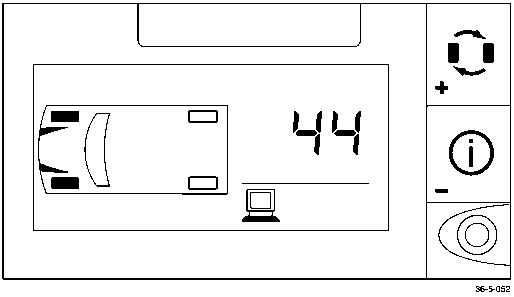
Sets rate of pressure change for tyres in use. This parameter is set at manufacture and is specific only to the recommended tyres for DB9.
- Press ‘Set’ for 5 seconds to enter level 2 programming.
- Press ‘Tyre’ until the desired vehicle axle is displayed.
- Press ‘Mode’ to display the current SLOPE entry (DB9 is set at?)
- If required, use ‘Tyre’ to increase or ‘Mode’ to decrease current value.
- Press ‘Set’ to save the final value.
- Press ‘Set’ again to return to normal mode.
Transmitter Learn Mode
This mode is used to add or delete transmitters from the system memory. It is vital that transmitter signals are correctly recognised to avoid system reaction to other transmitters (e.g. from passing vehicles with similar sensors).
1. Remove a Redundant Transmitter
- Press ‘Set’ for 5 seconds to enter level 2 programming.
- Press ‘Mode’ to select ‘Transmitter Learn’ mode.
- Press ‘Tyre’ to display possible tyre positions (filled rectangles represent currently programmed transmitters).
- Press ‘Tyre’ to scroll to the desired position.
- To delete a transmitter, press the ‘Mode’ once.
- If required, scroll to other positions using ‘Tyre’ and, if required, delete any other transmitters using ‘Mode’ button.
- Add new Transmitters.
- Press ‘Set’ for 5 seconds to enter level 2 programming.
- Press ‘Mode’ to select ‘Transmitter Learn’ mode.
- Press ‘Tyre’ to display possible tyre positions (filled rectangles represent currently programmed transmitters).
- Press ‘Tyre’ to scroll to the desired position. The chosen road wheel icon will flash.
- Program a new transmitter by either:
- Vigorously shaking the transmitter (bounce the road wheel on the ground) to promote a transmission.
- Inflate or deflate the tyre by more than 3 psi (0.2 bar).
The unit will ‘beep’ when new transmitter is recognised.
- Press ‘Tyre’ to scroll to the next position. Repeat steps 4 and 5 as required to programme additional transmitters.
- Press ‘Set’ to save the new transmitter data and to exit ‘learn’ mode. If no error is found, the system will return to ‘normal’ mode.
Level 3 Programming
Low Pressure Alert
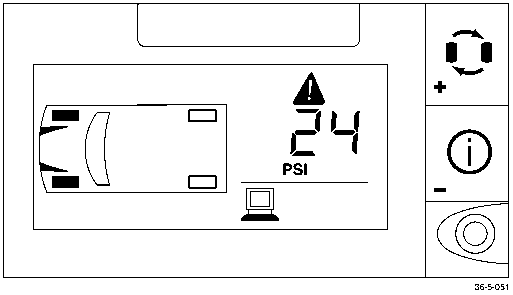
- Press ‘Set’ for 10 seconds to enter level 3 programming.
- Press ‘Tyre’ button to scroll to the desired axle.
- Press ‘Mode’ to view the current low pressure alert value.
- Press ‘Tyre’ to increase the current value or press ‘Mode’ to the decrease current value.
- Press ‘Set’ to save when the desired value is reached.
- Repeat steps 2 to 5 until the Low Pressure Alert Level has been set for all road wheels.
- Press ‘Set’ button to exit this mode.
- Press the ‘Set’ button again to return to normal mode.
Parts & tools for this job For 2005 Aston Martin DB9
- TOOLTyre pressure gaugeSearch: digital tyre pressure gauge
- TOOLTorque wrenchSearch: 1/2 inch torque wrench
- TOOLBreaker barSearch: breaker bar
Links open Amazon search results in a new tab. As an Amazon Associate I earn from qualifying purchases.