
Indicator and Side Light
- Make
- Aston Martin
- Model
- DB9 Factory Workshop Manual
- Year
- Issue 2, 2005
- Section
- Front Lights › Indicator and Side Light
17 LightingIndicator and Side Light
Indicator and Side Light
| Repair Operation Time (ROT) | |
|---|---|
| Item | Code |
| Indicator Bulb Renew | LHF 17.01.EB |
| RHF 17.01.FB | |
| Side Bulb Renew | LHF 17.01.JB |
| RHF 17.01.KB | |
- Rotate the bulb holder a quarter turn anti-clockwise and withdraw.
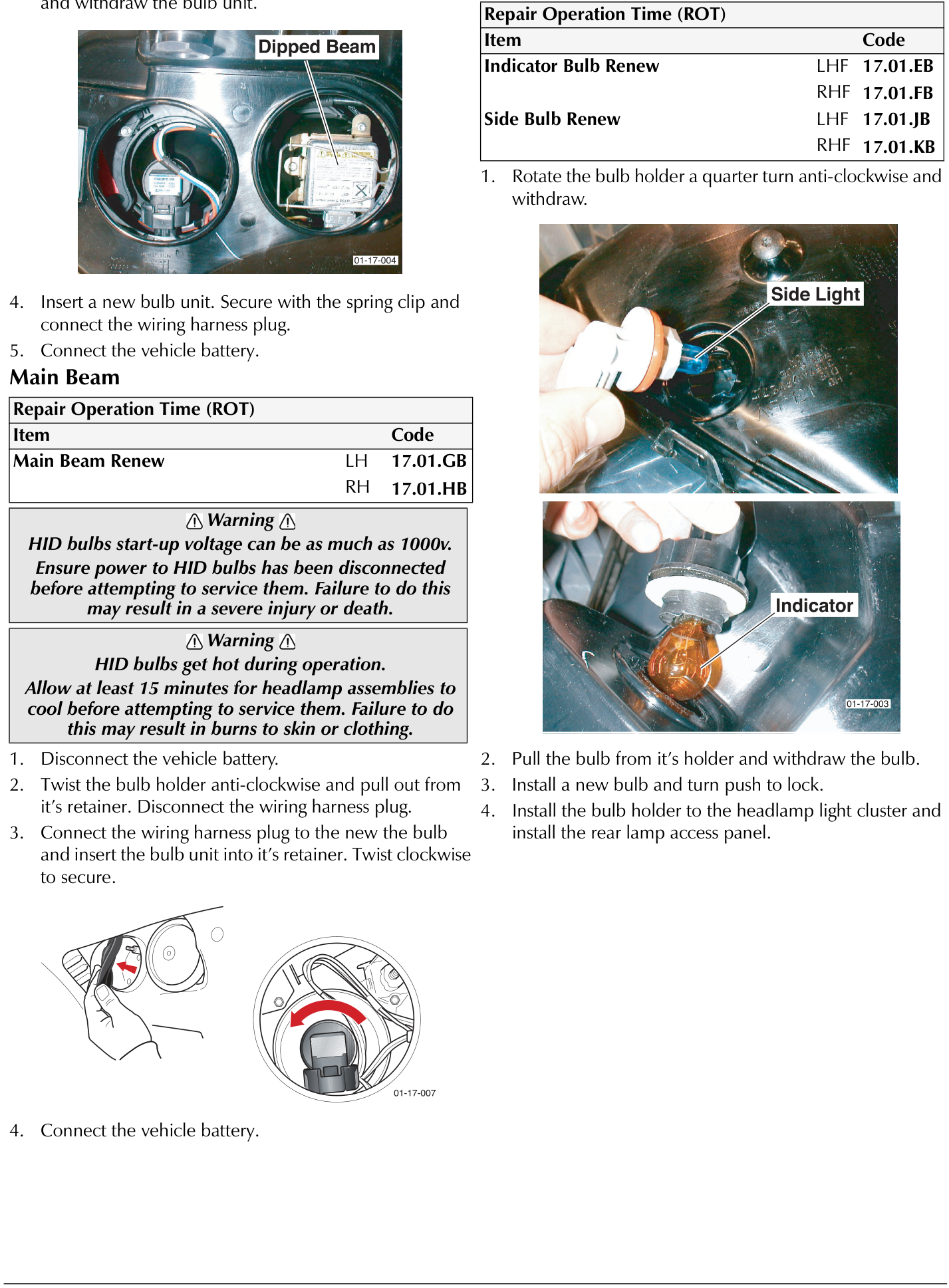
- Pull the bulb from it's holder and withdraw the bulb.
- Install a new bulb and turn push to lock.
- Install the bulb holder to the headlamp light cluster and install the rear lamp access panel.
- Disconnect wiring harness plug. Remove the spring clip and withdraw the bulb unit.
- Insert a new bulb unit. Secure with the spring clip and connect the wiring harness plug.
- Connect the vehicle battery.
Main Beam
| Repair Operation Time (ROT) | |
|---|---|
| Item | Code |
| Main Beam Renew | LH 17.01.GB |
| RH 17.01.HB | |
⚠ Warning ⚠
HID bulbs start-up voltage can be as much as 1000v. Ensure power to HID bulbs has been disconnected before attempting to service them. Failure to do this may result in a severe injury or death.
⚠ Warning
HID bulbs get hot during operation.
Allow at least 15 minutes for headlamp assemblies to cool before attempting to service them. Failure to do this may result in burns to skin or clothing.
- Disconnect the vehicle battery.
- Twist the bulb holder anti-clockwise and pull out from it's retainer. Disconnect the wiring harness plug.
- Connect the wiring harness plug to the new the bulb and insert the bulb unit into it's retainer. Twist clockwise to secure.
- Connect the vehicle battery.
Parts & tools for this job For 2005 Aston Martin DB9
- PARTReplacement bulbsSearch: Aston Martin DB9 2005 bulbs
- TOOLDigital multimeterSearch: automotive digital multimeter
Links open Amazon search results in a new tab. As an Amazon Associate I earn from qualifying purchases.