
Renewal
- Make
- Aston Martin
- Model
- DB9 Factory Workshop Manual
- Year
- Issue 2, 2005
- Section
- Front Lights › Renewal
17 LightingRenewal
| Repair Operation Time (ROT) | ||
|---|---|---|
| Item | Code | |
| Side Repeater Unit Renew | LH | TBA |
| RH | TBA | |
Renewal
- Protect surrounding paint work and rotate the repeater unit clockwise approx. 30°. Withdraw the repeater unit from the vehicle and disconnect the wiring harness plug.
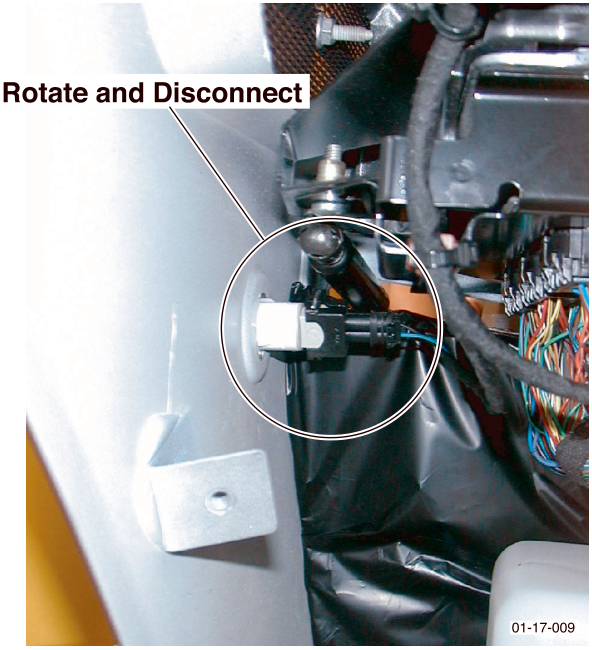
- To change the bulb. Hold the side repeater unit and turn the bulb holder 90° anti-clockwise. Withdraw the bulb and install a new one.
- To change the side repeater unit. Connect the wiring harness plug to a new side repeater unit and install.
Side Marker Unit Bulb
| Repair Operation Time (ROT) | ||
|---|---|---|
| Item | Code | |
| Side Marker Unit Bulb Renew | LH | TBA |
| RH | TBA | |
Federal Markets Only
Renewal (Front and Rear)
- Front Side Marker Unit Only.
Remove part of the road wheel arch liner to gain access to the bulb holder. - Rear Side Marker Unit Only.
Remove the rear light cluster to gain access to the bulb holder (Refer to ‘Light Cluster’, page 17-3-1). - Twist the side marker unit bulb holder 90° anti-clockwise and pull from the side marker unit.
- Install a new bulb to the bulb holder. Insert the bulb holder to the side marker unit. Twist 90° clockwise to lock in place.
- Front Side Marker Unit Only.
Install the road wheel arch liner. - Rear Side Marker Unit Only.
Install the rear light cluster (Refer to ‘Light Cluster’, page 17-3-1).
Side Marker Unit
| Repair Operation Time (ROT) | ||
|---|---|---|
| Item | Code | |
| Side Marker Unit Renew | LH | TBA |
| RH | TBA | |
Federal Markets Only
Renewal (Front and Rear)
- Front Side Marker Unit Only.
Remove part of the road wheel arch liner to gain access to the rear of the side marker unit. - Rear Side Marker Unit Only.
Remove the rear bumper to gain access to the rear of the side marker unit (Refer to ‘Rear Bumper’, page 1-13-3). - Remove speed nuts (x2) that secure the side marker unit to the bumper. Withdraw the side marker unit.
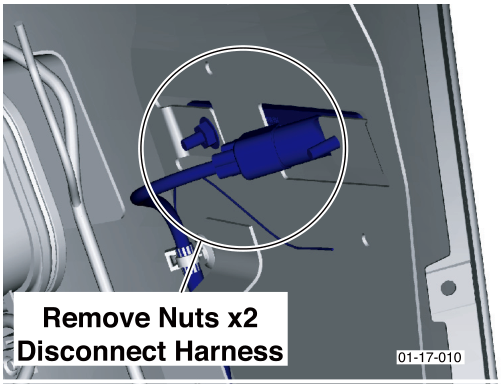
- Disconnect the wiring harness plug at the rear of the side marker unit and remove the assembly.
- Connect the wiring harness plug to a new side marker unit and install.
- Front Side Marker Unit Only.
Install the road wheel arch liner. - Rear Side Marker Unit Only.
Install the rear bumper (Refer to ‘Rear Bumper’, page 1-13-3).
Parts & tools for this job For 2005 Aston Martin DB9
- PARTReplacement bulbsSearch: Aston Martin DB9 2005 bulbs
- TOOLDigital multimeterSearch: automotive digital multimeter
Links open Amazon search results in a new tab. As an Amazon Associate I earn from qualifying purchases.