
RDS Traffic Information
- Make
- Fiat
- Model
- Bravo /Brava (182) Factory Service Manual
- Year
- 1995–2001
- Section
- Radio (98 range) › RDS Traffic Information
RDS Traffic Information
Point a)
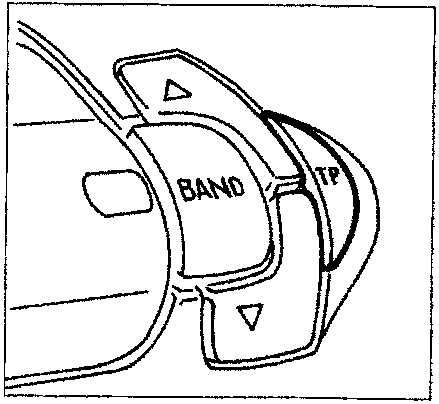
- Select an RDS I, RDS II or RDS III band as described above;
- briefly press the "TP" button so that the letters "TP" are displayed.
If the outgoing transmitter is not enabled to supply traffic information, the radio will automatically tune to the nearest transmitter enabled to do so.
If you wish to search other stations enabled for the service, press the tuning buttons (A).
To memorize the transmitters with the "TP" function activated, carry out the memorization operations (see "Memorization of a station" sub-section).
As an alternative to manual memorization, keep the "BAND" button pressed until the cassette is switched off, to effect automatic memorization (see "Automatic memorization in the FM-RDS band - Autostore")
Point b)
If you wish to receive traffic information, before inserting the cassette tape, tune to an RDS TP transmitter. If traffic information is transmitted from the latter during listening of the tape, the tape will automatically stop temporarily and will resume automatically when the message has finished.
Point c)
You can receive traffic information even if you are not listening to the radio. After tuning to an RDS TP transmitter and setting the volume to zero, if that transmitter transmits traffic information, it will be heard at a pre-set minimum volume.
In some countries there are stations which do not transmit traffic information, even with the TP function activated.
EON (Enhanced Other Network) function
In some countries there are circuits which group together several transmitters enabled to transmitt traffic information.
In these cases, listening to the programme of the RDS TP will be temporarily interrupted to receive traffic information, whenever this information is transmitted by one of the transmitters on the same circuit.
To exclude the EON function, press the "TP" button briefly.
CASSETTE PLAYER
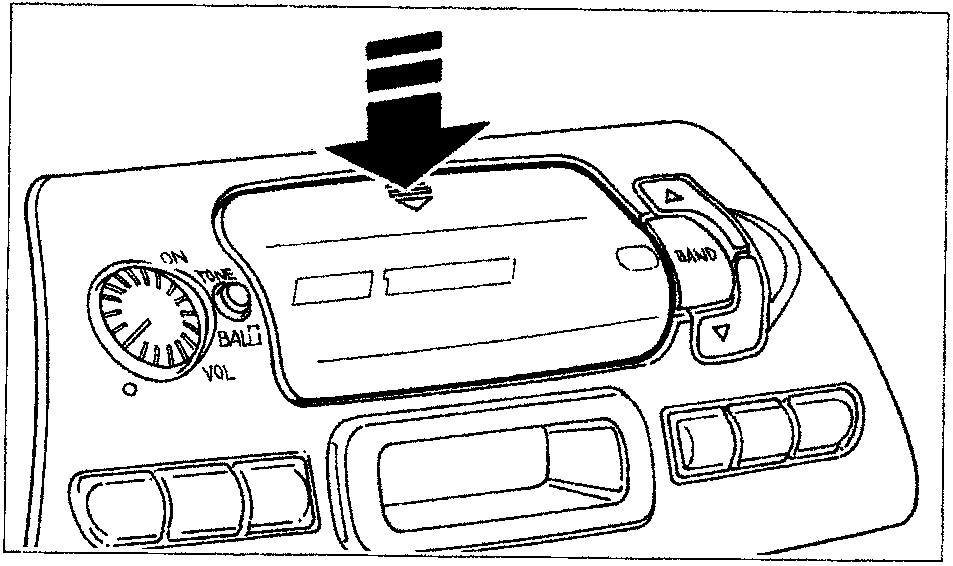
Cassette tape reproduction
Press vertically on the two arrows at the top of the door on the tape insertion slot, until you hear the click of the clip disengaging.
Parts & tools for this job For 1995 Fiat Bravo
- TOOLDigital multimeterSearch: automotive digital multimeter
- PARTAssorted fuse kitSearch: car fuse assortment kit
- TOOLWire crimper and connector kitSearch: wire crimper connector kit
Links open Amazon search results in a new tab. As an Amazon Associate I earn from qualifying purchases.