
Body computer - r.r
- Make
- Fiat
- Model
- Grande Punto Factory Service Manual
- Year
- 2005–2012
- Section
- Instrument/gauge electrical circuits › Body computer - r.r
BODY COMPUTER - R.R
Removing
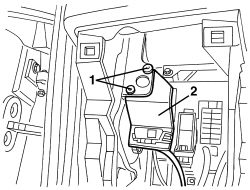
Op. 7040A37 FUSE BOX COVER IN INSTRUMENT PANEL - R.R
1. Undo the bolts or remove the rivets.
2. Move the diagnostic socket mount.
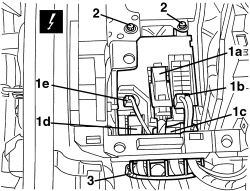
1. Disconnect the front electrical connections (1a, 1b, 1c, 1d, 1e, 1f).
| Description | Component |
|---|---|
| BODY COMPUTER | See M001 BODY COMPUTER |
2. Undo the bolts.
3. Open the wiring multistrip.
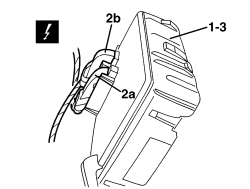
1. Move the body computer assembly slightly.
2. Disconnect the electrical connections (2a, 2b).
| Description | Component |
|---|---|
| BODY COMPUTER | See M001 BODY COMPUTER |
3. Recover the body computer assembly.
Refitting
- Check that the body computer assembly is not damaged.
- Connect the rear electrical connections.
- Position the body computer assembly and tighten the bolts.
- Connect the front electrical connections.
- Position the wiring multistrip and close.
- Position the diagnostic socket mount.
- Tighten the bolts or fit the rivets.
- If the body computer is being replaced, proceed as follows.
If the Body Computer is being replaced, an "identical copy of the Body Computer" must be obtained from the Parts Dept. as a V.O.R. order quoting the vehicle chassis number: this copy will contain all the default settings entered when the vehicle was new which are stored in the Parts Dept. database for the vehicle chassis number.
- If the same body computer that was removed is being refitted on the vehicle, use the Examiner to check that the system has not picked up errors during the operation.
- Test the operation of the electrical system.
Parts & tools for this job For 2005 Fiat Grande Punto
- TOOLTrim removal tool kitSearch: trim removal tool kit
- PARTTouch-up paintSearch: Fiat touch up paint
- PARTPanel clip assortmentSearch: Fiat panel clips assortment
Links open Amazon search results in a new tab. As an Amazon Associate I earn from qualifying purchases.