
Diagnostic control unit (DCU)
- Make
- MG
- Model
- TF Factory Workshop Manual
- Year
- 2002–2005
- Section
- Repairs › Diagnostic control unit (DCU)
Restraint systems (SRS)Diagnostic control unit (DCU)
DIAGNOSTIC CONTROL UNIT (DCU)
Service repair no - 76.73.72
WARNING: See GENERAL INFORMATION, SRS Precautions.
Remove
- Make the SRS system safe. See GENERAL INFORMATION, SRS Precautions.
- Remove centre console panel. See BODY, Interior trim components.
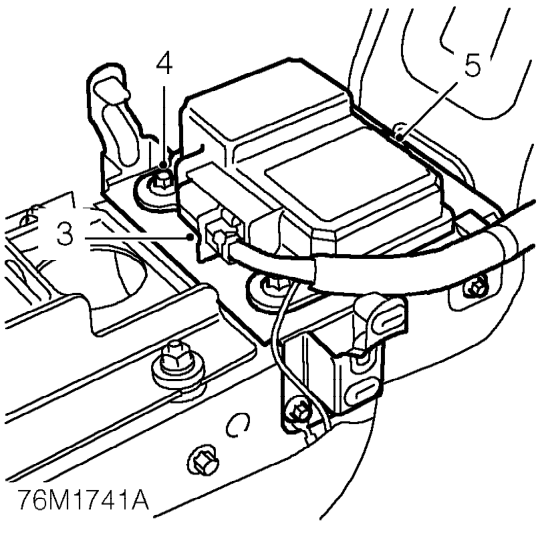
- Disconnect multiplug from DCU.
- Remove 3 Torx bolts securing DCU to bracket.
- Remove DCU.
Refit
WARNING: Because the crash sensor is incorporated inside the DCU, it is imperative that bolts securing the DCU are tightened to their correct torque.
- Position DCU to support bracket, fit and tighten Torx bolts to 10 Nm.
- Connect multiplug.
CAUTION: Before connecting multiplug ensure that clip is in the open position, pointing away from the harness. Lock the connector into position by pushing clip towards harness.
- Fit centre console panel. See BODY, Interior trim components.
- Carry out system check using TestBook.
Parts & tools for this job For 2002 MG TF
- TOOLOBD2 scannerSearch: OBD2 scanner
- TOOLDigital multimeterSearch: automotive digital multimeter
- TOOLBack-probe test leadsSearch: back probe test leads
Links open Amazon search results in a new tab. As an Amazon Associate I earn from qualifying purchases.