
Clutch assembly and release bearing
- Make
- Mini
- Model
- Mini Workshop Manual
- Year
- 1996–2000
- Section
- Repairs › Clutch assembly and release bearing
ClutchClutch assembly and release bearing · page 1 of 2
CLUTCH ASSEMBLY AND RELEASE BEARING
Service repair no - 33.10.07
Remove
- Remove CKP sensor. See ENGINE MANAGEMENT SYSTEM - MEMS, Repairs.
- Remove clutch release bearing. See this section.
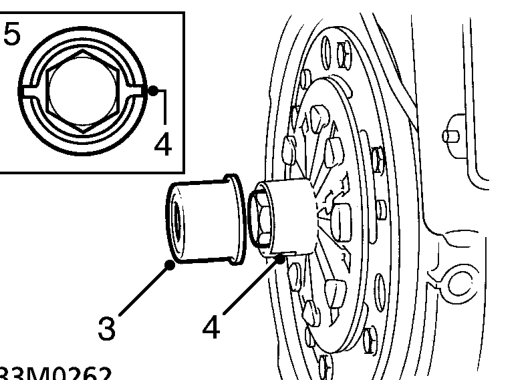
- Remove thrust bearing sleeve from clutch hub.
- Rotate crankshaft and knock back tabs on clutch hub lock washer.
- Rotate crankshaft until clutch hub slots are aligned horizontally.
CAUTION: If crankshaft is not positioned correctly, primary drive ’C’ shaped washer may become displaced and make it impossible to remove flywheel.
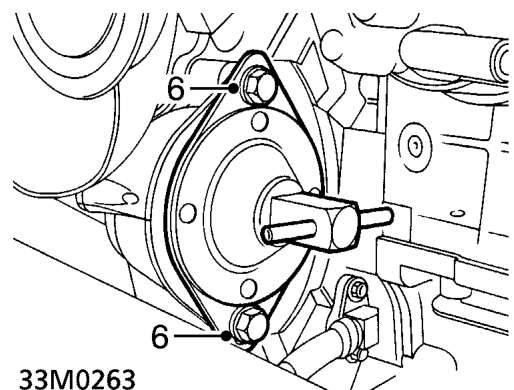
- Fit flywheel locking tool and secure with bolts.
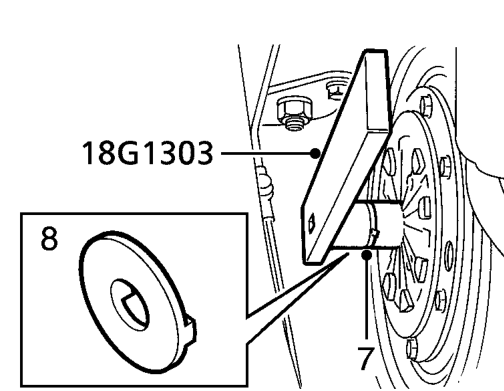
- Using tool 18G 1303, remove flywheel retaining bolt.
- Remove key plate from crankshaft.
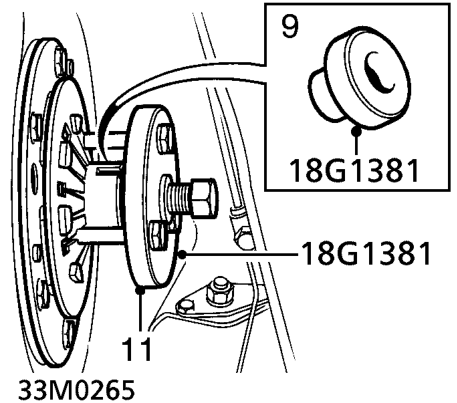
- Fit thrust button of tool 18G 1381 to crankshaft.
- Loosen centre bolt of tool 18G 1381 and position to flywheel.
- Fit and tighten bolts securing tool 18G 1381 to flywheel.
- Tighten centre bolt of tool to release flywheel from crankshaft taper.
- Remove tool 18G 1381 from flywheel.
- Remove flywheel and clutch assembly.
Parts & tools for this job For 1996 Mini Mini
- PARTClutch kitSearch: Mini Mini 1996 clutch kit
- TOOLClutch alignment toolSearch: clutch alignment tool
- FLUIDGear oilSearch: Mini Mini manual gearbox oil
Links open Amazon search results in a new tab. As an Amazon Associate I earn from qualifying purchases.