
Modulator function check (page 2 of 2)
- Make
- Rover
- Model
- 600 Rover 600 Repair Manual - Volumes 1 and 2 - 2nd Edition
- Section
- Repairs
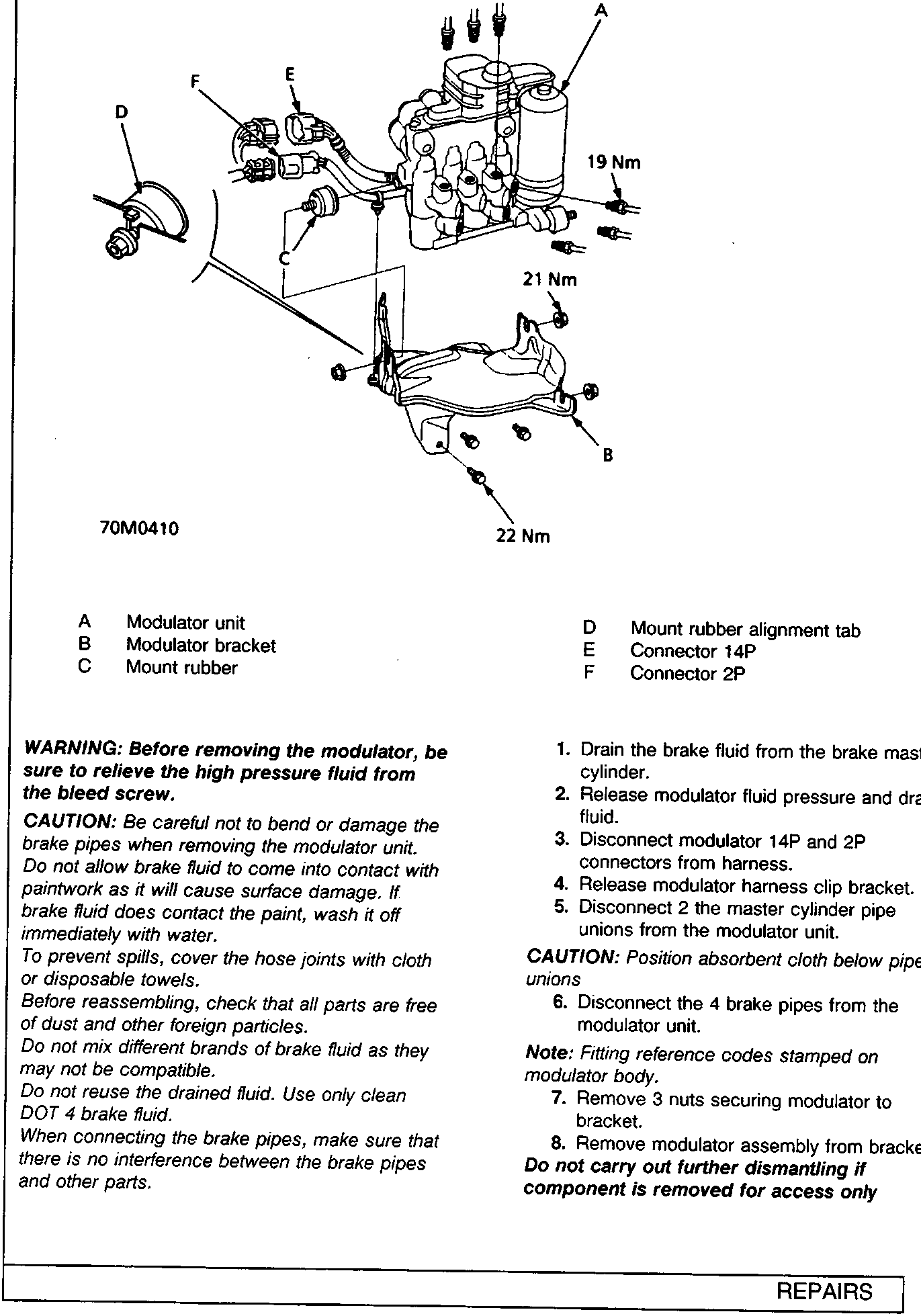
WARNING: Before removing the modulator, be sure to relieve the high pressure fluid from the bleed screw.
CAUTION: Be careful not to bend or damage the brake pipes when removing the modulator unit. Do not allow brake fluid to come into contact with paintwork as it will cause surface damage. If brake fluid does contact the paint, wash it off immediately with water.
To prevent spills, cover the hose joints with cloth or disposable towels.
Before reassembling, check that all parts are free of dust and other foreign particles.
Do not mix different brands of brake fluid as they may not be compatible.
Do not reuse the drained fluid. Use only clean DOT 4 brake fluid.
When connecting the brake pipes, make sure that there is no interference between the brake pipes and other parts.
- Drain the brake fluid from the brake master cylinder.
- Release modulator fluid pressure and drain fluid.
- Disconnect modulator 14P and 2P connectors from harness.
- Release modulator harness clip bracket.
- Disconnect 2 the master cylinder pipe unions from the modulator unit.
CAUTION: Position absorbent cloth below pipe unions
- Disconnect the 4 brake pipes from the modulator unit.
Note: Fitting reference codes stamped on modulator body.
- Remove 3 nuts securing modulator to bracket.
- Remove modulator assembly from bracket.
Do not carry out further dismantling if component is removed for access only
Parts & tools for this job For Rover 600
- TOOLOBD2 scanner with ABSSearch: OBD2 scanner ABS SRS
- TOOLDigital multimeterSearch: automotive digital multimeter
Links open Amazon search results in a new tab. As an Amazon Associate I earn from qualifying purchases.