
Replacement
- Make
- Rover
- Model
- 600 Rover 600 Repair Manual - Volumes 1 and 2 - 2nd Edition
- Section
- Repairs › Replacement
Supplementary restraint system (SRS)Replacement
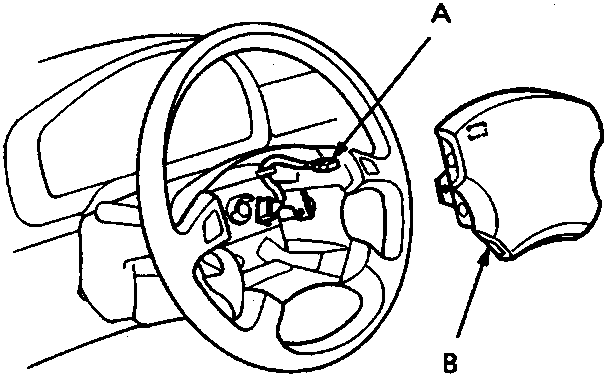
A SRS unit sub harness 5 – P connector
B Airbag assembly
- Pull out the connector lock, then disconnect the SRS unit sub harness 5 – P connector from the SRS unit, then remove the airbag assembly from the steering wheel.
Note: Dispose of the connector lock, it is not to be reused.
Replacement
CAUTION: Be sure to install the SRS wiring so that it is not pinched or interfering with other car parts.
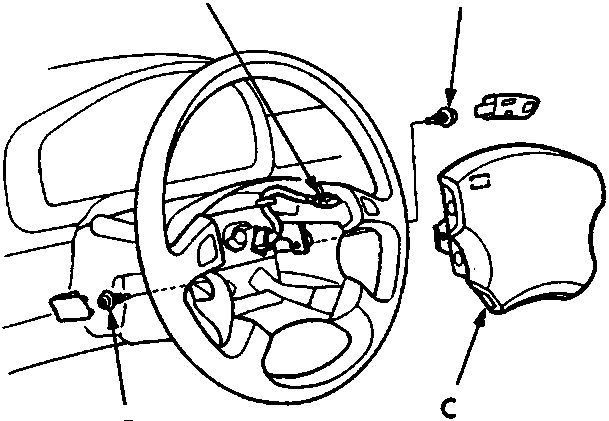
A SRS unit sub harness 5 – P connector
B Special bolt
C Airbag assembly
D Special bolt
- Install the new airbag assembly.
- Reconnect the SRS unit sub harness 5 – P connector to the SRS unit.
- Place the airbag assembly in the steering wheel. Use two new special bolts, start the bolts by hand to avoid cross threading and then torque to 10 Nm with a TORX TX30 bit.
- Reconnect the battery positive and negative cables
- After installing the airbag assembly, confirm proper system operation:
- Turn the ignition ON (II): The instrument panel SRS indicator light should come on for about six seconds and then go off.
- The SRS self diagnosis indicator (LED) should blink one time with the ignition switch ON.
Note: Be sure to torque the bolts as specified and do not over tighten.
Parts & tools for this job For Rover 600
- TOOLOBD2 scanner with SRSSearch: OBD2 scanner ABS SRS
- TOOLTrim removal tool kitSearch: trim removal tool kit
Links open Amazon search results in a new tab. As an Amazon Associate I earn from qualifying purchases.