Workshop Manuals Factory service & repair Audi
01 Running gear02 Body03 Power unit04 Power transmission05 Vehicle electrics06 Heating, ventilation, air conditioning system
Audi A505 · Vehicle electrics
05 · General

Multi-function steering wheel

Make
Audi
Model
A5
Section
Communication › Infotainment › Multi-function steering wheel
Vehicle electricsMulti-function steering wheel
Removing and installing multifunction buttons in 4-spoke steering wheel (from model year 2012 onwards)
Special tools and workshop equipment required
   
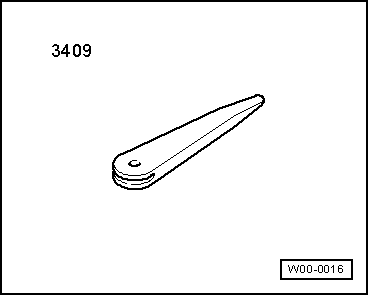
t  Removal wedge -3409-
  W00-0016
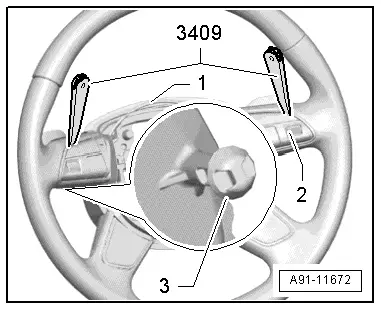
The multifunction buttons -2- are bolted to the trim panel -1-. The trim panel -1- is secured on the steering wheel together with the multifunction buttons -2-. Each multifunction button -2- has an extra retainer -3-.
When removing, make sure to loosen trim panel -1- by hand first (approx. 5 mm) and then disengage retainers -3- for multifunction buttons -2- using removal wedge -3409- and finally pull off trim panel -1- together with multifunction buttons -2-.
  A91-11672
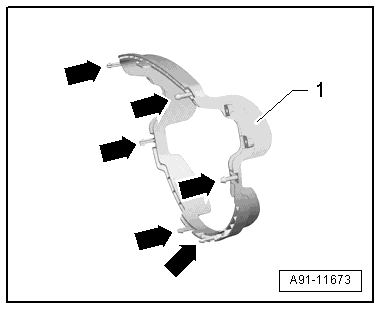
Retainers for trim panel
1 - Trim panel
Arrows - retainers
  A91-11673
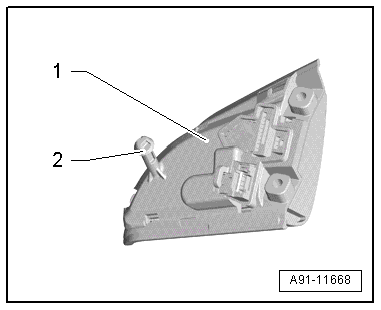
Retainer for multifunction buttons
1 - Multifunction button
2 - Retainer
–  Switch off all electrical equipment.
–  Switch off ignition and take out ignition key.
Removing
–  Remove driver's airbag → General body repairs, interior; Rep. gr.69.
–  Take connecting wires out of their guides in steering wheel.
  A91-11668
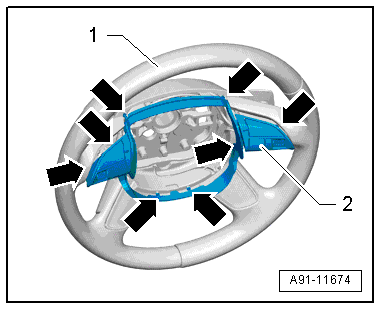
–  Slightly loosen trim panel -2- together with multifunction buttons -arrows- by hand and pull it off steering wheel -1- (approx. 5 mm).
  A91-11674
–  Use removal wedge -3409- to disengage multifunction buttons -2- in immediate vicinity of retainers -3-. Apply removal wedge -3409- as illustrated.
  A91-11672
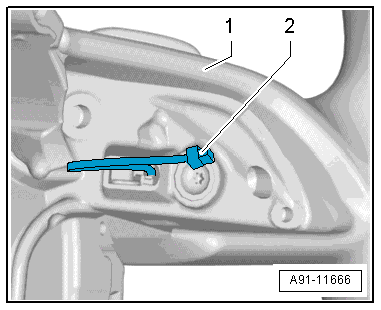
–  At the same time, pay attention to connectors leading to tiptronic switches -2-.
–  Unplug this connector -2- at multifunction buttons.
–  Detach trim panel together with multifunction buttons from steering wheel.
The multifunction buttons are bolted to the trim panel.
–  Unplug connector at multifunction button.
  A91-11666
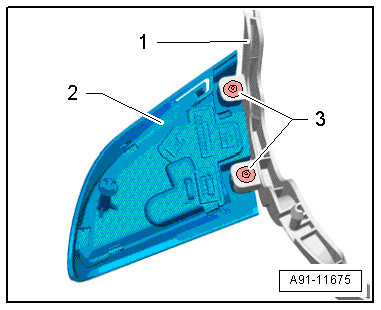
–  Remove bolts -3- and press multifunction button -2- out of trim panel -1-.
The additional wiring on the multifunction button (right-side) remains attached to the multifunction button.
Installing
–  Installation is performed in reverse sequence, paying attention to the following:
–  Position trim panel with multifunction buttons fitted on steering wheel.
  A91-11675
–  Ensure connecting wiring -2- for tiptronic switches is routed as shown in illustration.
–  Route remaining connecting wiring, including connectors, in guides in steering wheel.
  A91-11666
–  Push trim panel -2- together with multifunction buttons onto steering wheel -1- until they engage properly.
–  Then check again that wiring in steering wheel is correctly routed.
Tightening torques → Chapter
  A91-11674

Parts & tools for this job For Audi A5

Links open Amazon search results in a new tab. As an Amazon Associate I earn from qualifying purchases.