
Activating CD operation
- Make
- Fiat
- Model
- Bravo /Brava (182) Factory Service Manual
- Year
- 1995–2001
- Section
- Radio system (99 range) › Activating CD operation
only for H4 version
Activating CD operation
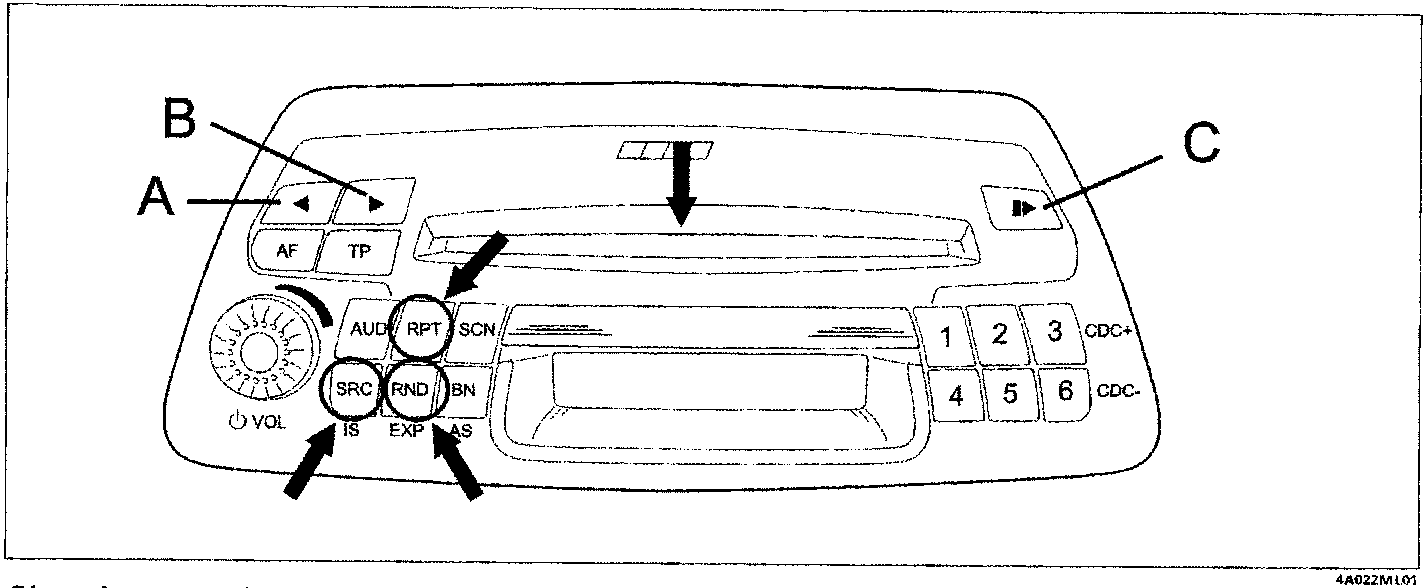
Place a CD in the slot and press slightly, the player will draw in the CD automatically.
If a CD is already present in the slot, press the SRC key until the message «DISC» appears on the display; the CD begins to play automatically.
SRC = Source; the sources are: RADIO, DISC, CDC (CD Changer)
Choosing a track
Keep tapping key A to choose a track in increasing order; similarly, keep tapping key B to choose a track in decreasing order.
Fast forward to a track
Hold keys A or B down continuously to fast forward or retur to the track being played.
Repeating a track
Press the RPT key to repeat the track being played currently; the wording «RPT ON» appears on the display for a few seconds.
The current track will be repeated until the function is deactivated by pressing the RPT key again; the wording «RPT OFF» appears on the display for a few seconds.
RANDOM track selection
Tracks to be played are selected automatically after pressing the RND key; the message «RND ON» appears on the display for a few seconds.
The function is interrupted by pressing RND again; the message «RND OFF» appears on the display for a few seconds.
Automatic track scan
Press the SCN key to play all tracks on the CD for about 10 seconds each. The message «SCN ON» appears on the display for a few seconds
The function is suspended by pressing SCN again; the message «SCNOFF» appears on the display for a few seconds.
Concluding operation and removing the CD
Simply press the C EJECT key to remove the CD from the player.
The wording «EJECT» appears for a few seconds on the display.
Alternatively press the SRC key, the source changes from DISC to CDC (if CD Changer present) or RADIO. Source selection is sequential: RADIO, DISC, CDC.
NOTE: Status of RPT, RND, SCN functions are not stored when the radio set is turned off.
Parts & tools for this job For 1995 Fiat Bravo
- TOOLDigital multimeterSearch: automotive digital multimeter
- PARTAssorted fuse kitSearch: car fuse assortment kit
- TOOLWire crimper and connector kitSearch: wire crimper connector kit
Links open Amazon search results in a new tab. As an Amazon Associate I earn from qualifying purchases.