
Audio Settings
- Make
- Fiat
- Model
- Bravo /Brava (182) Factory Service Manual
- Year
- 1995–2001
- Section
- Radio system (99 range) › Audio Settings
Audio Settings
Radio System
Example 1: bass setting.
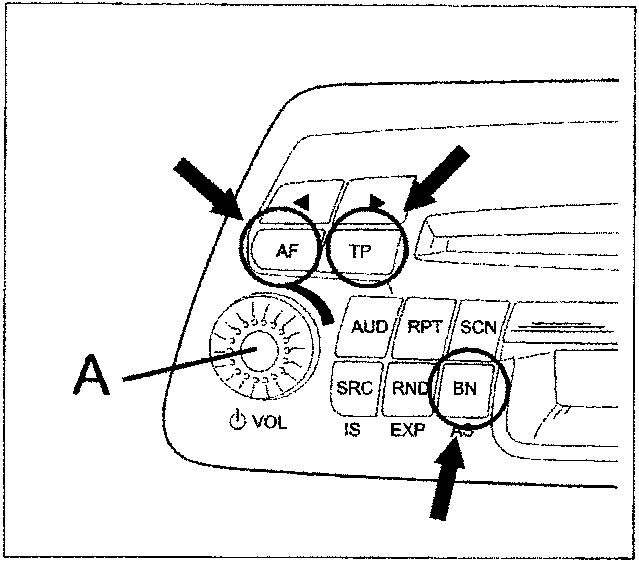
Repeatedly press the AUD key until the display shows: «BASS 00».
Use the A key to adjust the bass tones.
To restore all sound settings to neutral (all set to zero), keep the AUD key depressed for longer than 2 seconds until the display shows "00"
NOTE: this reset function only applies to the source in current use; the existing settings remain valid for the others. The LOUDNESS FUNCTION IS NOT INCLUDED IN THIS RESET FUNCTION MUST ALWAYS BE DEACTIVATED MANUALLY.
Example 2: LOUDNESS setting
Repeatedly press the AUD until the display shows»LOUD».
To activate(LOUD ON), turn the volume key anticlockwise; to deactivate (LOUD OFF) turn it clockwise.
When the Loudness function is active, the display shows the symbol «LD».
Volume distribution FAD (FADER)
The FADER is used to distribute volume between the front speaker group «F» (Front) and rear group «R» (Rear). Use knob A. to adjust the function.
The display shows «FAD F -- -- R».
Only for version M2: the function must be activated (see EXPERT settings) in the case of changes to the speaker system (4 x 5W speakers).
With the standard system (2 x 15W speakers) the function is not usable
Volume ratio BAL (balance)
Balance is the volume ratio between the left and right hand speakers Use knob A. to adjust the function
The display shows«BAL L -- -- R».
Manual switching to MONO
See EXPERT settings This function is recommended when the radio is tuned to a station with a lot of interference, to reduce the background noise.
RADIO (Tuner)
Parts & tools for this job For 1995 Fiat Bravo
- TOOLDigital multimeterSearch: automotive digital multimeter
- PARTAssorted fuse kitSearch: car fuse assortment kit
- TOOLWire crimper and connector kitSearch: wire crimper connector kit
Links open Amazon search results in a new tab. As an Amazon Associate I earn from qualifying purchases.