
Automatic PTY search
- Make
- Fiat
- Model
- Bravo /Brava (182) Factory Service Manual
- Year
- 1995–2001
- Section
- Radio system (99 range) › Automatic PTY search
Automatic PTY search
When selecting a programme type, an automatic search may be activated in two ways.
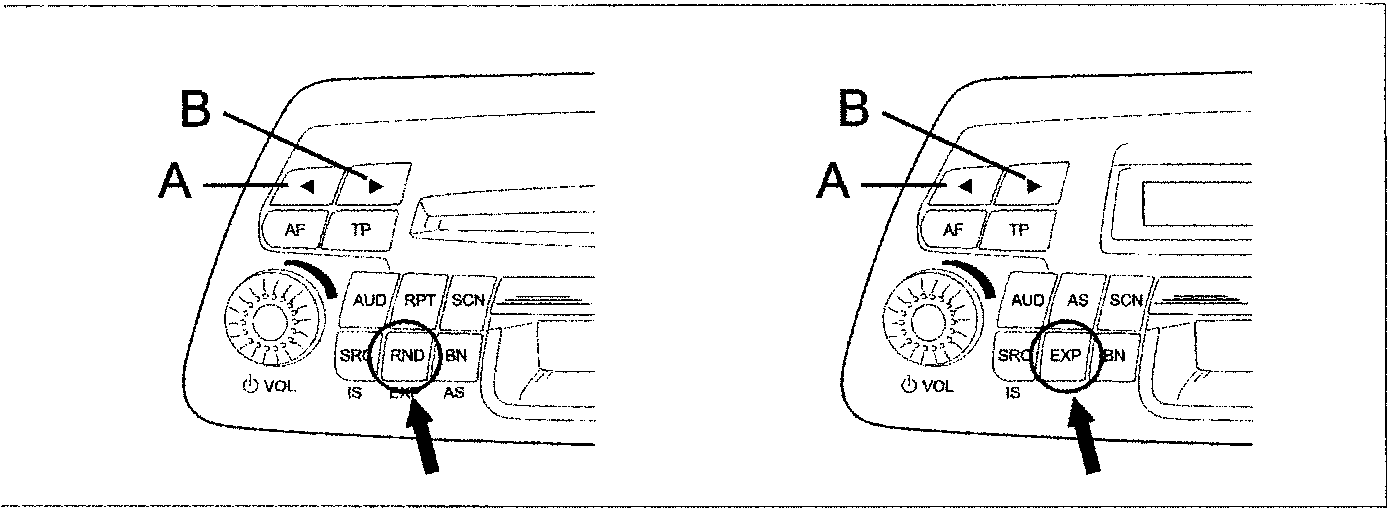
- Six programme types are allocated to the 6 programme keys (station selection keys). The preset allocation may be altered as required.
- A programme type may be selected from the stored list and an automatic search may then be started.
The procedure is described below:
1. Reactivate PTY function
Press the TP for longer than 2 seconds until the message «PTY ON» appears on the display. Then the last type of programme selected will appear on the display (e.g. «POP»).
2. setting programme type
Give a short press to a key from 1 to 6. An automatic PTY search is started for the next station offering the selected programme type and the programme type is briefly displayed (e.g. "POP"), followed by the station code and the message "PTY".
Alternatively, press one of the keys A or B repeatedly until the required programme type appears on the display.
Press one of the keys A or B for more than 2 seconds until the automatic PTY search starts. La ricerca automatica PTY si arresta automaticamente sull'emittente successiva che offre il tipo di programma pre-selezionato, e mostra il tipo di programma (es. «POP») e la scritta «PTY».
NOTE: If no station offers the selected programme type, the last station tuned is played and the PTY function is abandoned.
3. deactivating the PTY function
This occurs automatically after about 10 seconds.
Storing PTY programme keys: station selection keys
The standard setting is defined in the table:
| 1 | 2 | 3 | 4 | 5 | 6 |
|---|---|---|---|---|---|
| NEWS | SPORT | POP | ROCK M | CLASSICS | EDUCATE |
Each station selection key may be occupied by any programme type as required:
- Activating the PTY function:
Press the TP key for longer than 2 seconds until the display shows »PTY ON« and select the set programme type (e.g. «NEWS»). - Press one of the keys A or B repeatedly until the required programme type appears on the display.
- Press one of the station selection keys for longer than 2 seconds.
Parts & tools for this job For 1995 Fiat Bravo
- TOOLDigital multimeterSearch: automotive digital multimeter
- PARTAssorted fuse kitSearch: car fuse assortment kit
- TOOLWire crimper and connector kitSearch: wire crimper connector kit
Links open Amazon search results in a new tab. As an Amazon Associate I earn from qualifying purchases.