
Introduction - on board instruments
- Make
- Fiat
- Model
- Croma Factory Service Manual
- Year
- 2005–2010
- Section
- Instruments › Introduction - on board instruments
INTRODUCTION - ON BOARD INSTRUMENTS
Specifications
The panel is installed behind the steering wheel.
Its position guarantees maximum visibility/legibility of the information for the driver in all vehicle usage conditions (day/night) without reflections, distortions or double images.
The panel is available on the Comfort version
View of assembly
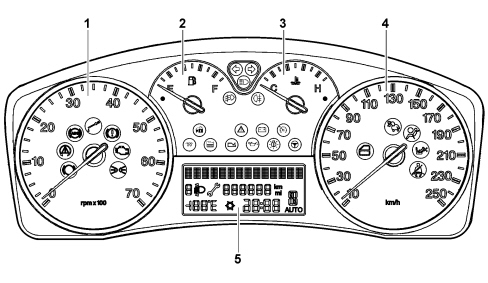
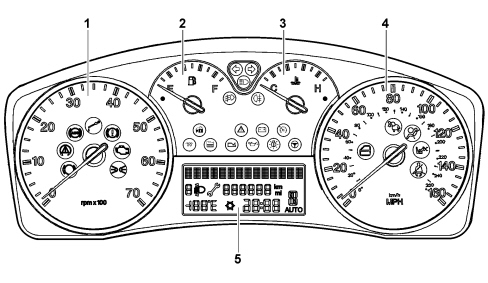
- rev counter
- fuel level gauge (with reserve warning light)
- engine coolant temperature gauge (with overheating warning light)
- milometer
- multifunction display
The views of the control panel for the 1.9 JTD 16v, 2.4 JTD 20v and 2.2 petrol versions are illustrated showing both right hand drive and left hand drive versions.
The end of scale for the speedometer on the 1.9 JTD 8v version is 200 km/h or 140 MPH.
Composition:
The panel contains 4 analogue gauges:
- Electronic speedometer
- Electronic rev counter
- Fuel level (with insufficient fuel level warning light)
- Engine coolant temperature gauge (with overheating warning light)
All the indicators are moved by a stepping motor.
There is a positive three line alphanumerical display:
The top line has 14 dot matrix characters (7x5) for the display of:
- Date
- Trip computer data (processed by the control panel);
- Set-up menu with messages for settings/adjustments;
- Messages about: activation of functions / service / failure / warning;
- Radio/telephone information repetition;
The bottom two lines in segments are for displaying:
- Milometer;
- Clock;
- Outside temperature and ICE DANGER symbol
- Headlamp alignment corrector reading;
- "Return to workshop" symbol (spanner);
- Automatic transmission information (display of gear engaged and AUTO symbol);
There is a buzzer with the possibility of managing signals of different intensity for carrying out the following functions:
- Alarm/warning/danger signals
- Doors open with the vehicle moving
- Handbrake applied with vehicle moving
- Driver''s/passenger seat belt not fastened
- Driver''s/passenger seat belt not fastened
- Fuel reserve
- Button pressing roger beep
- Automatic transmission signalling
- Parking sensor signalling
- Engine coolant temperature
- Insufficient engine oil pressure/level
- EOBD failure
- EBD / ABS / ESP
- TPMS (puncture only)
- AIR-BAG / SBR
- Automatic transmission fluid overheating
- Electric Steering
- DPF
- Key (TEG) not recognized
The instrument panel interfaces with:
- 5 external buttons fitted on the dashboard: “C.A.F.+”, “C.A.F. –“, “Mode”, “Mode+”, “Mode–“.
- TRIP button on the right steering column switch unit lever.
A three line transreflective technology alphanumerical display is located in the centre.
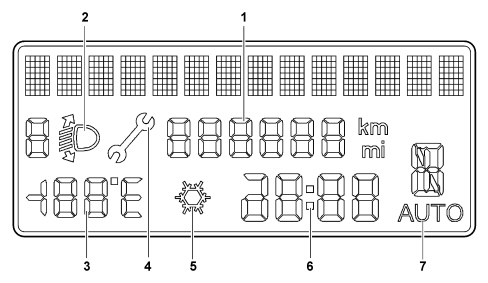
1 - milometer reading
2 - headlamp alignment corrector reading
3 - outside temperature reading
4 - Spanner symbol with SERVICE message
5 - Ice danger warning
6 - Time
7 - Automatic transmission
8 - 14 character diplay for showing messages
WARNING LIGHTS IN INSTRUMENT PANEL
The warning lights in the instrument panel are shown in the diagram and in the table below:
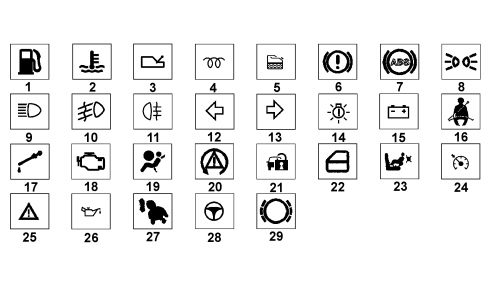
| REF. | WARNING LIGHT | COLOUR |
|---|---|---|
| 1 | Fuel reserve | amber |
| 2 | Engine coolant temperature | red |
| 3 | Gearbox failure (optional on Auto Trans version only) | red |
| 4 | Heater plugs (for diesel versions only) | amber |
| 5 | Water in diesel filter (for diesel versions only) | amber |
| 6 | Defective operation of braking system (insufficient brake fluid level/handbrake applied) | red |
| 7 | ABS failure | amber |
| 8 | Side lights | green |
| 9 | Main beam headlamps | blue |
| 10 | Front fog lights | green |
| 11 | Rear fog lamps | amber |
| 12 | Right direction indicators | green |
| 13 | Left direction indicators | green |
| 14 | Lights failure | amber |
| 15 | Battery charge | red |
| 16 | Seat belt locking | red |
| 17 | Insufficient fluid level | red |
| 18 | Engine management system failure (EOBD) | amber |
| 19 | Air Bag failure | red |
| 20 | ESP system failure | amber |
| 21 | Vehicle protection system failure | amber |
| 22 | Doors not properly shut | red |
| 23 | Passenger Air Bag manual disabling | red |
| 24 | Cruise control on (optional) | green |
| 25 | General failure | amber |
| 26 | Engine oil pressure | red |
| 27 | Rear side bag manual disabling (optional) | amber |
| 28 | Electric steering failure | red |
| 29 | Brake pad wear | red/amber |
The general failure warning light includes:
- TPMS (tyre signalling system failure)
- FIS intervention
- engine oil pressure sensor failure
- rain sensor failure (windscreen wiper automatic function not available)
- parking sensor failure
- dusk sensor failure
- window anti-crush safety system failure
- pollution control filter blocked signal
Rear view of instrument panel
The rear view of the instrument panel and the pin out is illustrated below.
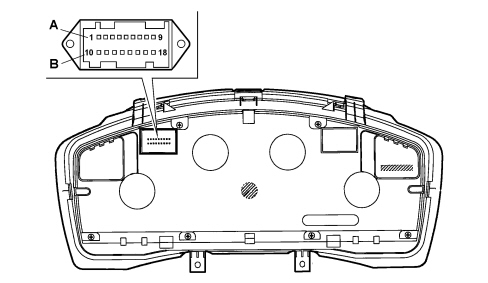
PIN OUT connector A/B (9+9 way)
| PIN | FUNCTION |
|---|---|
| 1 | INT |
| 2 | +30 |
| 3 | B - CAN A |
| 4 | B - CAN B |
| 5 | Reference signal for headlamp alignment actuators |
| 6 | + dipped headlamps signal for headlamp alignment corrector |
| 7 | Earth |
| 8 | Negative signal from trip computer key on steering wheel stalk unit |
| 9 | Signal from controlson PCS: “Mode -” |
| 10 | I.E./EOBD failure warning light negative signal from NCM |
| 11 | Signal from PCS headlamp alignment correcter up, headlamp alignment correcter down |
| 12 | Dimmed positive command for switch panel lighting LED (n.c.) |
| 13 | Negative signal from spare warning light (n.c.) |
| 14 | n.c. |
| 15 | n.c. |
| 16 | Signal from controlson PCS: “Mode”, “Mode +” |
| 17 | Engine oil level sensor power supply (n.c.) |
| 18 | Signal from engine oil level sensor (n.c.) |
Operation
Display at key on
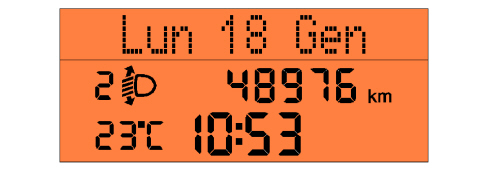
The information in the standard display is:
- date (on the 14 character alphanumerical line)
- clock
- milometer
- headlamp alignment corrector information
- outside temperature
- ice symbol (in the case of ice danger)
- automatic transmission readings (where present)
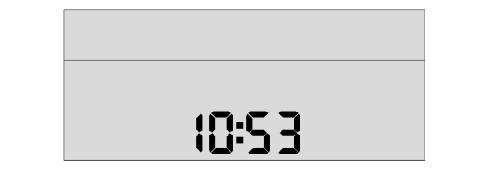
With the ignition in the OFF position and the front doors closed, the display shows the clock and should not be lit up.
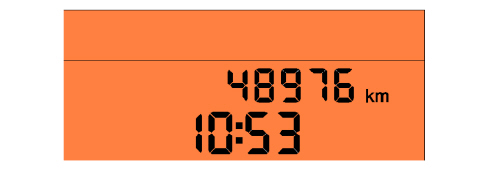
The moment one of the front doors is opened in the key off position, the display will show:
- clock
- milometer
Set-up menu display
Access to the menu screen
The buttons for the set-up are present in the controls, pressing "MODE" activates the ambient menu.
The + and - buttons are used for navigating inside the menu.
The menu set-up functions can be selected using the "MODE" / "+" / "-" buttons which should only be activated with the vehicle stationary with the exception of the following functions: "SPEED LIMIT EXCEEDED" (selecting activation/deactivation of speed limit and selecting speed limit level).
Not all the functions can be activated during the fault message display cycles
The operation should be the sequential type as described below.
"MODE" buttons
With 1 brief press:
- if the vehicle speed is less than 4 km/h: activation of the "complete" set-up menu and shown on the display;
- if the vehicle speed is above the 4km/h parameter: activation of the "reduced" set-up menu;
- confirmation of the selected function;
- confirmation of the setting/modification and return to the main menu screen (same option).
With 1 long press and not on the release of the button:
- memorizing of the modifications confirmed with the short press and return to the standard screen (or the screen activated before the "MODE" button was pressed briefly).
"+" / "-" keys
- Selection of functions present in the set-up menu.
- Setting/adjustment of functions present in the set-up menu;
The setting of the functions (e.g. clock adjustment) takes place in increasingly shorter steps depending on the time the button is kept pressed.
Timeout
If no operation is carried out for a period of 60 seconds, the standard screen is restored (or the screen activated before the "MODE" button was pressed).
The following functions can be displayed whilst the vehicle is being driven by pressing the "MODE" button:
- Introductory words for opening the menu
- Selecting speed limit activation/deactivation
- Selecting speed limit level
- Dusk sensor sensitivity level adjustment
- Menu exit
The following functions can be displayed whilst the vehicle is stationary by pressing the "MODE" button:
- Introductory words for opening the menu
- Selecting speed limit level
- Selecting speed limit activation/deactivation
- Dusk sensor sensitivity level adjustment
- TRIP B activation / deactivation.
-- Clock adjustment
- Hour mode (12h / 24h)
- Date adjustment
- Activation/deactivation of boot release together with unlocking of all the doors
- Activation/deactivation of unlocking of front door only
- Activation/deactivation of automatic locking of doors + boot above 20 km/h
- Setting unit of measurement for distances
- Setting unit of measurement for fuel consumption
- Language setting
- Volume of buzzer for alarms/failures/warnings
- Button pressing buzzer volume (roger beep)
- Reactivation of buzzer for SBR signalling
- Service interval display (km/miles/days)
- Menu exit
Lighting dimmer
The driver can adjustment the brightness inside the passenger compartment (lighting for graphics/gauges/control panel display and climate control) by pressing the "MODE +" and "MODE -" buttons. The lighting brightness cannot however be reduced to zero.
The effect of the adjustment of the brightness (after pressing the buttons) is immediately visible.
The dimming value is transmitted by the NQS via the CAN to allow the brightness value to be sent to the other Nodes.
If the side lights are deactivated, the display is 100% lit up and the brightness cannot be adjusted (dimmed). The adjustment is only possible with the exterior lights on.
The warning lights are not subject to adjustment/dimming (brightness always 100%).
If the brightness is adjusted the first line of the display shows the message "Lighting" and the brightness adjustment symbols come on/go off.
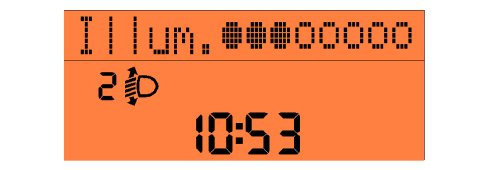
This screen remains for 5 seconds after the lst command is given after which the previous screen is displayed.
The lighting for the display during the screens relating to the signalling of faults/information (with the exception of the ICE DANGER cycle) is not subject to adjustment/diming and the brightness always remains constant at 100% in daytime conditions (side lights deactivated).
The display lighting during screens relating to other signals is, on the other hand, subject to adjustment/dimming.
The "MODE +" and "MODE -" buttons remain activated to regulate the brightness of the control panel and the other vehicle components. However the message "Lighting" is not shown on the first line of the display and the brightness adjustment symbols come on/go off.
Ice danger warning signal
To warn the driver of the possible presence of ice on the road, if the outside temperature remains below 3 degrees C, the temperature reading flashes and the "snow" symbol and the "Ice danger" message are displayed in place of the clock.
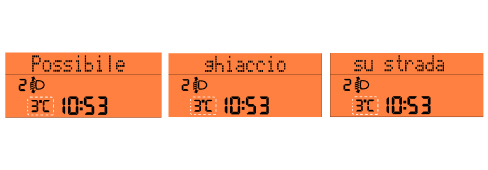
At the end of the warning cycle:
- the message disappears and the screen prior to the event reappears;
- the temperature reading stops flashing;
- the "snow symbol" remains in the special area of the display (as long as T is below 6 °C).
This display only takes one after the outside temperature is recognized to be T < 3°C and is only repeated if the temperature reaches the value T > 6°C and then returns again to T < 3°C.
If the outside temperature at the key-on is T < 3° C, then the display shows the entire diagnostic cycle at the key-on (check in progress, etc. ad defined previuosly) and later on it initiates the "warning cycle" described above.
Dusk sensor
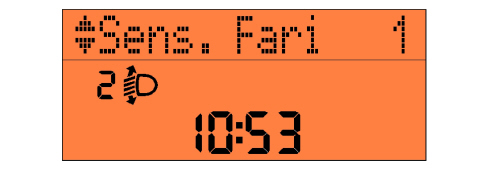
The dusk sensor sensitivity is adjusted by means of the special item in the setup menu.
This adjustment is only possible with the vehicle stationary.
It is possible, during the display, to adjust the setting of the dusk sensor from (1 to 3) shown in the control panel display using the "MODE +" and "MODE -" buttons.
Once the setting is adjusted, it is memorized in the control panel and transmited on the CAN.
The last setting memorized is displayed when the dedicated item is selected.
The set-up menu item that allows the adjustment of the sensitivity levels is also present when the dusk sensor is present but not activated.
This item should only appear if the dusk sensor is not present.
Clock display
The reading in hh:mm should always remain present at the key on and at the key off.
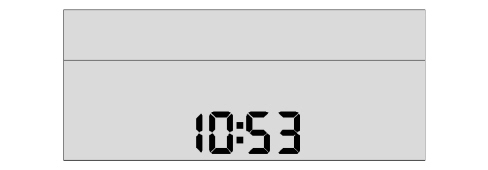
The clock adjustment is an item in the set-up menu.
It is also possible to select the hh:mm information from the set-up menu in 24h mode (0 - 23 h) or in 12h mode (1 - 12) without the indications AM and PM.
Outside temperature reading
The outside temperature reading should be guaranteed in standard screen conditions.
At the key on, until the NQS receives the first frame with the outside temperature information, the part of the display dedicted to this information will show nothing; if, as a result of problems with the signal, the outside temperature information continues not to be present in the network for longer than the standard recovery time, some dashes with the unit of measurement set will be displayed in place of the temperature, e.g.: (---°C).
Planned maintenance
When the planned maintenance (so-called service) is close to the next interval, this is displayed automatically at the key on (after the initial check procedure), the spanner symbol and the "service" message followed by the number of kilometres or miles (depending on the unit of measurement set using the set-up menu (see chapter on "Functions that can be selected/activated using the "MODE"/"+"/"-") buttons until the next service.
The display of the programmed maintenance information can also be shown if the user requests by selecting a special item in the setup menu.
In this case the display is possible, irrespective of the intervals.
There are 9 services in the Planned Maintenance Programme as follows:
| 1st service | 2nd service | 3rd service | 4°, 5°, 6°, 7°, 8° | 9th service |
|---|---|---|---|---|
| After: - 30,000 km (or 18,000 mi) | After:- 30,000 km (or 18.000 mi) from 1st service | After:- 30,000 km (or 18.000 mi) from 2nd service | After: ……………. | After:- 30,000 km (or 18.000 mi) from 8th service |
The starting information for the "mileage" is 30,000 km (or 18,000 mi) and is set by the supplier of the instrument panel.
The starting figure of 30,000 km is then suitably converted into miles by the control panel, in order to guarantee that the levels are recognized, corresponding to the signals in the display (as defined in the next paragraph).
Automatic service condition control panel display logic
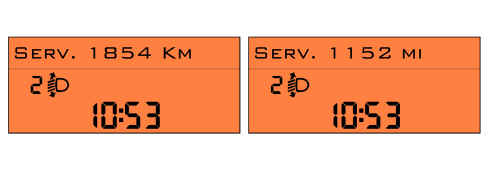
The first message is displayed only once at the key on; if the kilometres or miles (depending on the unit of measurement set) until the next service are equal to or less than the limit level (2000 km or 1240 miles, as indicated in the table below).
Later on the message is only displayed once at the key on each time the value is equal to or less than the partial level vlues 1800, 1600, 1400, 1200, 1000, 800, 600, 400, 200, 100, 50 km (for the corresponding partial levels in miles, see the table below) and will not be displayed at subsequent keys on until the next partial level is reached.
The message displayed at the key on should indicate the "actual" km/mi until the next service, once one of the various levels is exceeded. This value should therefore be the same as or less than the respective level value considered:
The display can be interrupted by the driver pressing the "MODE" button briefly.
In this case the next screen after the SERVICE one is suggested, in accordance with the sequence defined during the key on stage.
| Levels in "km" for Planned Maintenance. | Levels in "mi" for Planned Maintenance. |
|---|---|
| 2000 km (¹) | 1240 mi (¹) |
| 1800 km (²) | 1116 mi (²) |
| 1600 km (²) | 992 mi (²) |
| 1400 km (²) | 868 mi (²) |
| 1200 km (²) | 744 mi (²) |
| 1000 km (²) | 620 mi (²) |
| 800 km (²) | 496 mi (²) |
| 600 km (²) | 372 mi (²) |
| 400 km (²) | 248 mi (²) |
| 200 km (²) | 124 mi (²) |
| 100 km (²) | 62 mi (²) |
| 50 km (²) | 31 mi (²) |
| 0 km (³) | 0 mi (³) |
(1) Limit level
(2) Partial level
(3) Expiry
The partial levels for the "km/mi" are displayed when they are exceeded until the Planned Maintenance is carried out by the Service Centre and the counter (km/mi) reset.
If the km (2000 km) or mileage (1240 mi) LIMIT LEVEL is reached:
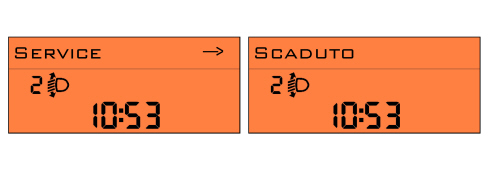
The moment the expiry value of 0 km/mi is reached the message "Service Expired" should be shown at every key on for the next 1000 km.
Display logic as requested by the driver:
The information relating to the planned maintenance can be displayed at any time by selecting the relevant item from the set-up menu.
The request to display information relating to the planned maintenance using the set-up menu is updated in real time and does not cause the spanner symbol to light up.
If the limit level has not been reached and you are not within a partial level, when the user requests SERVICE information the actual kilometres (or miles) until the next service will be displayed.
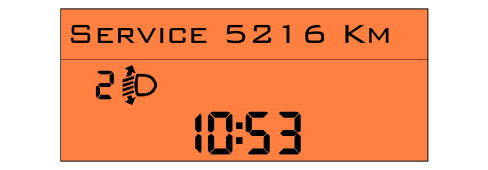
If one of the two limit levels has been reached or you are within a partial level, the message will be displayed in the following way:
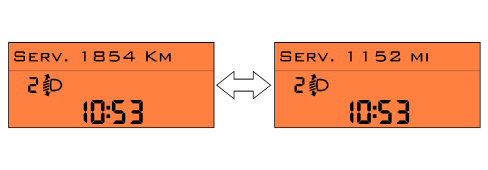
If the LIMIT LEVEL for the km (2000 km) has been reached first:
or miles (1240 mi):
The moment the expiry value of 0 km/mi is reached, the display will show the message "Service Expired".
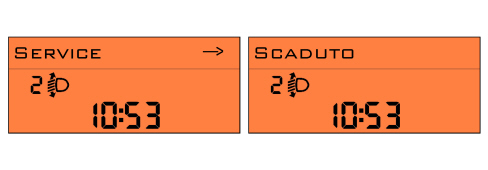
Control panel display logic once all 9 services have been carried out
No message should be displayed in "Automatic Service" conditions.
In "Display on request" conditions it should no longer be possible to select the item from the set-up menu (it can no longer be activated).
Counter reset by the service network
At each service interval, the Service personnel should:
- reset the "km" (or miles) counter to the starting vlue (30,000 km/18,000 mi) using the diagnostic equipment. It should be possible to read/rewrite the data using the diagnostic equipment.
- memorize that the Planned Maintenance (service) has taken place. There should be a trace of the last service carried out, through the indication: service date/ service no. carriedout / total mileage. It should be possible to read/rewrite the data using the diagnostic equipment. The number of the service should decrease at each Reset-Info-Service beginning with the starting figure = 9 (decreasing from 9 to 0).
If the instrument panel is being replaced, the Service personnel should:
- reset the km/mi in the milometer.
- read the number of services carried out and enter them into the new panel.
- read the km/mi counters until the next service and enter them into the new panel.
- read the last service date and rewrite it in the new control panel.
If the battery is disconnected the data memorized in the control panel will be preserved.
The only settings that need resetting are the date and the time.
Follow me home function
The following are shown on the control panel display:
- the "follow me home" function activated message.
- The total seconds set using the steering column switch unit which should not decrease during the display.
- After the steering column switch unit has been pressed 7 times (210 seconds) it cannot increase further.
The display of the screen for the FOLLOW ME HOME function remains for 20 seconds starting from the last time the steering column switch unit is pressed unless the function is deactivated during the display using the left steering column switch unit lever.
This also takes place after the steering column switch unit is pressed for the seventh time.
Rev counter
This indicates the engine rpm with the help of a stepping motor.
The control electronics and the operation is achieved by means of a microprocessor which guarantees the precision of the signal in the gauge.
Odometer
When starting, the milometer display shows the total or trip mileage in km memorized at the previous key off.
The tripmeter is reset by keeping the TRIP button in the steering column switch unit pressed for more than 2 secs.; the total mileage can also be zeroed only once within the first 200 km.
In the case of a new instrument the mileage reading is preceeded by and "H", after the first 200 km the letter "H" disappears automatically.
Fuel level gauge
The reading is the analogue type produced by a stepping motor, the control electronics and operation is achieved using a microprocessor.
The fuel level is measured by a sensor in the tank which informs the Body Computer by means of an interface (microprocessor) transforming it into a percentage value.
The system guarantees that there are no fluctuations/errors in the readings for the fuel gauge.
The reading for the fuel reserve is siganlled by both the warning light and an acoustic signal through a buzzer inside the panel.
Engine coolant temperature gauge
The reading is the analogue type produced by a stepping motor, the control electronics and operation is achieved through a microprocessor, the red sector in the gaug signals the max. temperature correspondingn to the danger zone.
TRIP COMPUTER
General specifications
The TRIP computer is a specific function that makes it possible to show various information in the control panel display relating to the operating state of the vehicle. These scales are summarized in the table below.
| Scales | Units of measurement | |
|---|---|---|
| Decimal metric system | Position Imperial | |
| Distance travelled | km | mi |
| Instantaneous fuel consumption and average fuel consumption | km/l l/100km | mpg |
| Range | km | mi |
| Average speed | km/h | mph |
| Trip time | hh:mm | hh:mm |
The control panel receives the following information to compute these scales (input):
| Control panel input | Received from |
|---|---|
| Instant distance, with % increase included | NBC |
| Fuel level (as a percentage of a full tank) | NBC |
| Capacity of fuel tank, in litres (memorized in NQS, calibration parameter entered during EOL programming) | Memorized in the NQS |
| Real instatnt speed (without increase) | NBC |
| Instantaneous fuel consumption (litres/hour) | NCM |
| Trip time counted | Clock inside NQS |
The unit of measurement for the consumption can be set by the user (km/l or l/100km or mpg)
All information appears individually in the display
Whenever the battery is connected, all the TRIP values are reset.
Measurement unit setting via the menu is maintained at all times.
The counting/updating of the TRIP scales only takes place with the engine running.
Zeroing by manual reset of one of the TRIP data items automatically resets all the others (apart from RANGE and INSTANTANEOUS FUEL CONSUMPTION). After this, the count for each data item proceeds independently of the rest.
Resetting the General TRIP also resets TRIP B.
TRIP B is reset independently.
The resetting takes place by pressing the button for longer than 2 secs. (and not when the button is released).
The automatic zeroing takes place when:
- the distance travelled data item reaches the mileage limit of 9999.9 (km or mil);
- when the trip time reaches the counter limit of 99.59;
- every time the battery is reconnected
| General TRIP |
|---|
| Range |
| Distance travelled |
| Average fuel consumption |
| Instant fuel consumption |
| Average speed |
| Trip time |
| TRIP B |
|---|
| Distance travelled - B |
| Average consumption - B |
| Average speed - B |
| Journey time - B |
The display cycle can be interrupted in two ways:
- removing the cause of the malfunction that produced the problem;
- the driver pressing the "MODE" button. In this case the screen prior to the fault will be reproposed but the signal should be kept activted through the warning light in the panel which should remain on until the cause of the malfunction that produced the fault is solved.
The message corresponding to the TRIP function activated should be shown on the display (in other words in addition to "B" for selecting Trip B). It should be possible to exclude the display for TRIP B from the set-up menu. The control panel should always process the data for Trip B and then transmit it via the CAN even when the display in the actual panel is excluded using the set-up menu.
Recovery
If information is missing (no relevant CAN signals) some of the TRIP data will display the message "not available".
If the speed sensor is faulty, all the TRIP counters display dashes "----" together with the data characteristics (with units of measurement) for each item (km or mi for range, km/h or mph for average speed etc.).
If the fuel level sensor is faulty, dashes only "----" will be displayed for the Range, together with descriptions (with the relevant units of measurement) for each item.
If the instant fuel consumption signal is not validated, dashes "-----" will be displayed for the Range, Average consumption, Instantaneous consumption together with descriptions (with the relevant unit of measurement) for each item.
If the malfunction disappears, the counting of the various items continues in their different ways and the values downloaded prior to the mission are not reset and the mission is not restarted.
Range
The range indicates the estimated distance (in km or miles) that the car could travel with the fuel currently in the tank, assuming the mission is continued applying the same driving style (same fuel consumption conditions).
The range is calculated using the following information:
- received from the NBC;
- instantaneous mileage;
- fuel level (as a percentage of a full tank);
- received from the NCM; instantaneous fuel consumption (in litres/hour);
- fuel tank capacity, in litres (calibration parameter entered during the EOL programming - supplier).
when the range is calculated for versions with DPR (Diesel Particulate Filter) a different value is used for the calculation parameters.
Distance travelled
The distance travelled by the vehicle from the start of the mission is indicated, i.e. from when the user carried out a rest by pressing the dedicated button.
The reading is consistent with the display on the total mileage recorder.
Each time the battery is reconnected and at the beginning of each new mission (reset), the display shows "0:0", after which the calculated value is displayed.
At each key on, the value stored at the previous key off is displayed.
When the maximum possible distance is reached, the mileage display should be automatically zeroed and, at the same time, there is a total TRIP reset with the exception of the Range and Instantaneous Consumption items.
The calculation of the Distance Travelled is activated at the key on.
The distance reading should be displayed and sent on the CAN with:
- range between 0 and 9999.9 km (or mi)
- resolution of 0.1 km (or miles)
- update of display: every 0.1 km (or miles)
Average fuel consumption
Average fuel consumption measn the ratio between distance travelled since the start of the mission and number of litres consumed since the start of the mission.
The control panel downloads the fuel consumption signal via the CAN and processes it to divide it by the distance travelled since the start of the mission.
The calculation is only carried out with the engine running (300 rpm).
At the start of a new mission, due to the battery being reconnected, the average consumption figure is initialized at the "predefined average standard consumption" value personalized for the vehicle/engine type. At the start of a new mission due, on the other hand, to a reset (by the user by pressing the dedicated button or a reset of one of the TRIP parameters) the Average Consumption value is initialized at the "average consumption value calculated during the previous mission". A weighting to be attributed to the above initial value to avoid excessive fluctuations in the reading shown during the first few minutes of the mission. The information displayed tends to represent the actual mission consumption condition within 3 minutes and the effect of the standard data becomes nil within 3 minutes.
The value displayed is equal to "----" for a distance travelled by the vehicle from the start of the mission equal to the parameter 500 m, after which the value calculated will be displayed.
At each key on, the value stored at the previous key off is displayed.
The displayed average consumption is equal to"----", whenever:
- The user resets the counter by pressing the dedicated button.
- One of the TRIP parameters is reset.
The value is displayed and sent on the CAN with:
- resolution of 0.1 km/l (or mpg)
- calculation precision: < 0.1 km/l (or mpg)
- display updated every 10 s ± 0.1s
- max value shown equal to 50 km/litre - 2 l/100km -99.9 mpg
- min value shown equal to 4 km/litre - 25 l/100km - 2mpg
Instantaneous fuel consumption
The Instantaneous Fuel Consumption refers to the value of litres of fuel consumed per unit of distance travelled by the vehicle during the mission.
The value displayed makes the user aware of the differences in fuel consumption connected with the style of driving without varying excessively and/or with inconsistent values.
The Instantaneous Fuel Consumption is calculated using the following information:
- received from the NBC; - instantaneous mileage
- received from the NCM; instantaneous fuel consumption (in litres/hour)
Average speed
The average speed is calculated from the beginning of the mission, as a ratio between distance travelled and trip time.
The calculation is only carried out with the engine running (300 rpm).
Each time the battery is connected and at the start of each new mission (reset) the display will show "----" for a distance travelled by the vehicle from the start of the mission equal to the parameter 500 m after which the value calculated will be displayed.
At each key on, the value stored at the previous key off is displayed.
The displayed average speed is equal to"----", whenever:
- The user resets the counter by pressing the dedicated button.
- One of the TRIP parameters is reset.
The value is displayed and sent on the CAN with:
- resolution of 0.1 km/h (or miles)
- calculation precision: < 0.1 km/h
- display updated every 10 s ± 0.1s (10 s ± 0.1 s ).
Journey time
The trip time shows the time elapsed from the start of the mission, i.e. since the user reset the counter by pressing the dedicated button or an automatic reset occurred
Each time the battery is reconnected and at the beginning of each new mission (reset), the display shows "0:00", after which the calculated value is displayed.
At each key on, the value stored at the previous key off is displayed.
If the vehicle is parked with the engine off (key off), the accumulated trip counter stops but does not reset to zero. The count resumes as soon as the vehicle sets off again (next key on - engine running).
The counting of the Journey Time is activated at the key on with the engine running (parameter 300 rpm).
Starting at the key on, the Journey Time is indicated in hh:mm and is sent on the CAN with:
- range between 0:00 and 99:59
- resolution equal to 1 min.
- display updated every minute
- data update every second
- the two dots between hh and mm flash during normal operation (frequency 1 Hz. – D.C. 50%)
When the maximum possible value is reached (99.59), the journey time display should be automatically zeroed and, at the same time, there is a total TRIP reset with the exception of the Range and Instantaneous Consumption items.
Buzzer specifications
The buzzer function is produced by a piezoelectric acoustic signal. On versions with auto. trans. the buzzer is also responsible for the signals coming from the CAN as well as the specific signals for the Automatic Transmission. The function is also activated with the key off.
Buzzer function access priority
Since the buzzer function on the automatic transmission version is shared between the requirements of the panel and the requirements of the automatic transmission control unit, access priority is given to the Automatic Transmission Node function. This Node notifies the Panel of the decision/desire to activate the buzzer; the signal is the low active type and is managed directly by the microprocesssor. If the Automatic Transmission Node activation signal is present, the buzzer is activated by the electronic structure inside the Panel. In the case of a short circuit to earth for the pin involved, the stage is protected by there will be an increase in the stand by current.
DPF SYSTEM
On vehicles equipped with this system (DPF) certain operating conditions may occur on diesel engines that will have the following impact on the customer:
1) Particle Filter blocked: the GENERAL FAILURE warning light is activated and/or the display of a specific message in the Control Panel display (QdB) combined with an acoustic signal
2)Engine oil in poor condition: the minimum engine oil pressure warning light flashes with a specific message in the Control Panel display.
Warnings to the customer
If the Particle Filter is blocked, the following message is displayed: "Pollution control filter blocked, see manual" plus an acoustic signal
If the oil is in poor condition, the minimum oil pressure warning light will flash and the display will show the following message: "Change the engine oil".
The warning light must be reset at each oil change.
For further details
Parts & tools for this job For 2005 Fiat Croma
- TOOLDigital multimeterSearch: automotive digital multimeter
- PARTAssorted fuse kitSearch: car fuse assortment kit
- TOOLWire crimper and connector kitSearch: wire crimper connector kit
Links open Amazon search results in a new tab. As an Amazon Associate I earn from qualifying purchases.