
Bluetooth® language installation procedure
- Make
- Fiat
- Model
- Grande Punto Factory Service Manual
- Year
- 2005–2012
- Section
- Accessories › Bluetooth® language installation procedure
BLUETOOTH® LANGUAGE INSTALLATION PROCEDURE
Press the ESC button to suspend the update procedure at any time.
| STEP | CHECK TO BE PERFORMED | RESOLUTION IF THE CHECK IS NOT OK |
|---|---|---|
| 1 | Disconnect the mobile phone enabled by the Bluetooth® system and remove from inside the vehicle or switch it off. If the mobile phone is not removed from the vehicle and a call is received during the installation process, the procedure will not be successful. | |
| 2 | Switch the diagnostic equipment on. Insert the USB pen in the USB port of the diagnostic instrument. Insert the update CD in the tester, then turn on. Select the language in which instructions are to be read. When the final user licence appears, press I Accept. | You cannot continue if you do not press I Accept |
| 3 | Select Create single language pen in the main menu. In the language select menu, select the language to be reinstalled, then wait for the software to be installed on the USB pen and remove it | The USB pen is not supported by the diagnostic tester or software: use a compatible USB pen. Pens supported are with standard USB 1.0, 1.1 or 2.0 connectors and capacity up to 1 GB. The following models are certainly supported: Lexar™ JumpDrive® 2.0 512 MB, Memorex® Travel Driver 256 MB USB 2.0, Memorex® Travel Driver 1 GB USB 2.0, PNY® Attaché 256 MB USB 2.0, SanDisk® Cruzer™ micro 256 MB USB 2.0, SanDisk® Cruzer™ Mini 256 MB / 1 GB USB 2.0 and Sony® Micro Vault® |
| 4 | Turn the ignition key to the OFF position. Insert the USB pen in the appropriate port of the glove compartment. Turn the ignition key to the ON position. Check on that the message "Install language <selected language>? / <Selected language>?” appears on the instrument panel. (the message depends on the vehicle specification). The procedure will not be successful if the USB pen is removed during the installation procedure. Re-insert the pen, wait for 30 seconds and repeat this step | The installation procedure starts automatically: move on to Step 6 |
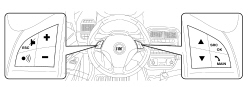
| 5 | Press the SRC or MAIN buttons to activate the installation procedure | |
| 6 | Check that the message "Update complate" appears after update | If a software update is available, install by carrying out the See Test 5570TP BLUETOOTH® SOFTWARE LANGUAGE UPDATE PROCEDURE |
| 7 | Turn the ignition key to the OFF position. Wait 3 minutes. Turn the ignition ON and check that the language update is complete | Repeat the entire procedure |
Parts & tools for this job For 2005 Fiat Grande Punto
- TOOLDigital multimeterSearch: automotive digital multimeter
- PARTAssorted fuse kitSearch: car fuse assortment kit
- TOOLWire crimper and connector kitSearch: wire crimper connector kit
Links open Amazon search results in a new tab. As an Amazon Associate I earn from qualifying purchases.