
Check operation of voice recognition
- Make
- Fiat
- Model
- Grande Punto Factory Service Manual
- Year
- 2005–2012
- Section
- Accessories › Check operation of voice recognition
CHECK OPERATION OF VOICE RECOGNITION
| STEP | CHECK TO BE PERFORMED | RESOLUTION IF THE CHECK IS NOT OK |
|---|---|---|
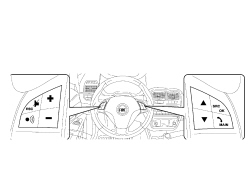
| 1 | Turn the ignition key ON. Press the voice recognition button among the steering wheel controls (lower left in the left unit) and check whether a tone can be heard indicating activation of the function | Continue as instructed in the See table N069 THE BLUETOOTH CONTROLS ON THE STEERING WHEEL DO NOT WORK |
| STEP | CHECK TO BE PERFORMED | RESOLUTION IF THE CHECK IS NOT OK |
|---|---|---|
| 2 | Speak the word "Help" in the langauge installed on the Bluetooth® system and check that the systems responds with a voice message | Continue as instructed in the See Test 5570TN BLUETOOTH® LANGUAGE UPDATE PROCEDURE then move on to Step 7 |
| 3 | Press the voice recognition button to interrupt the message and say the word "Settings" in the langauge set on the Bluetooth® system and check that the system responds with a voice message | Continue as instructed in the See Test 5570TN BLUETOOTH® LANGUAGE UPDATE PROCEDURE then move on to Step 7 |
| 4 | Press the voice recognition button to interrupt the message and say the word "Cancel" in the langauge set on the Bluetooth® system and check that the system deactivates the voice recognition | Continue as instructed in the See Test 5570TN BLUETOOTH® LANGUAGE UPDATE PROCEDURE then move on to Step 7 |
| 5 | While the customer''s phone is connected to Convergence, press the voice recognition button and say the keyword "Telephone" in the langauge set on the Bluetooth® system and check that the system responds with a voice message | Continue as instructed in the See Test 5570TN BLUETOOTH® LANGUAGE UPDATE PROCEDURE then move on to Step 7 |
| 6 | Check how to operate voice recognition correctly on the mobile phone by reading the phone operating handbook. When the settings are correct, the system should also operate on the vehicle. The test can be considered over | The problem is inherent to the phone: the customer must contact a mobile phone service centre |
| 7 | Carry out Bluetooth Network Disconnection active diagnosis, then repeat the entre test and ensure it is successful | Replace the Bluetooth® control unit See Test 5570T49 BLUETOOTH ELECTRONIC CONTROL UNIT - R.R. |
Parts & tools for this job For 2005 Fiat Grande Punto
- TOOLDigital multimeterSearch: automotive digital multimeter
- PARTAssorted fuse kitSearch: car fuse assortment kit
- TOOLWire crimper and connector kitSearch: wire crimper connector kit
Links open Amazon search results in a new tab. As an Amazon Associate I earn from qualifying purchases.