
Media player operation check
- Make
- Fiat
- Model
- Grande Punto Factory Service Manual
- Year
- 2005–2012
- Section
- Accessories › Media player operation check
MEDIA PLAYER OPERATION CHECK
In the procedure that follows, use a USB device that also works as a portable media player and which contains music tracks.
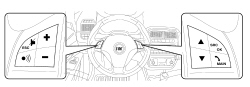
| STEP | CHECK TO BE PERFORMED | RESOLUTION IF THE CHECK IS NOT OK |
|---|---|---|
| 1 | Make sure that no USB device is present in the media player port. Press the MAIN button and then the Scan up button until MEDIA PLAYER appears on the display. Then press the OK button and check that the following appears: MEDIA NOT FOUND. | Carry out the Bluetooth disconnection active diagnosis on the Bluetooth® system, delete the errors and check whether the fault disappears. If this is not the case, replace the Bluetooth® control unit |
| 2 | Insert the USB device in the media player port and check that it is correctly inserted. | Move on to Step 5 |
| 3 | Press the MAIN button and then the Scan up button until MEDIA PLAYER appears on the display. Then press the OK button and then Scan down until the following appears on the display: EVERYTHING PLAYING. | Remove and reconnect the USB device. If the problem persists, move on to Step 5 |
| 4 | Press the OK status and check that the system circulates the sound, whilst the information relating to the track being played appears on the display. The test can be considered over | The problem does not relate to the media player, but to the sound distribution system: check the connections to the speakers |
| 5 | Check that the USB port in the media player is not damaged by inserting the USB pen used for software updates and check that it is properly inserted. | Replace the media player |
| 6 | Some USB devices cannot be correctly connected to the media player. Use a USB connecting lead. Check that the USB device and/or the connecting lead are fully inserted in the media player USB port. | The connecting cable or, if cables are not used, the USB device has a damaged USB port: replace them |
| 7 | Return to Step 2 and make sure that everything is working properly |
Parts & tools for this job For 2005 Fiat Grande Punto
- TOOLDigital multimeterSearch: automotive digital multimeter
- PARTAssorted fuse kitSearch: car fuse assortment kit
- TOOLWire crimper and connector kitSearch: wire crimper connector kit
Links open Amazon search results in a new tab. As an Amazon Associate I earn from qualifying purchases.