
Scuff panel side moulding (one) - r+r
- Make
- Fiat
- Model
- Idea Factory Service Manual
- Year
- 2003–2012
- Section
- Moulding and protection › Scuff panel side moulding (one) - r+r
Scuff panel side moulding (one) - r+r
Removing
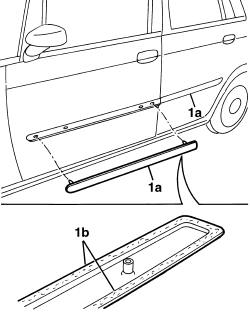
1. Use a plastic platula to detach the mouliding (1a) by unsticking the double-sided adhesive strip round the perimeter (1b).
The old moulding cannot be reused.
Refitting
1. Use heptane to clean the door surfaces to be bonded.
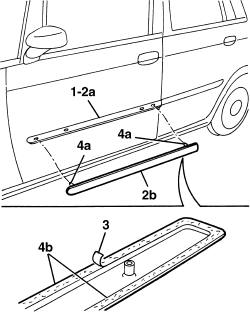
2. Heat areas (2a) of the door to be bonded and moulding (2b) to at least 18 C.
3. Remove the film protecting the adhesive on the new moulding.
Never touch the double-sided adhesive with your hands.
4. Position the moulding, aligning locating pins (4a), then stick the double-sided adhesivep perimeter strip (4a) to the door. Promote adhesion of the double-sided adhesive strip with slight manual pressure to prevent air bubbles forming between moulding and body.
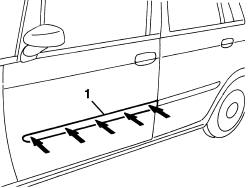
1. Press the moulding vigorously.
It is advisable to leave the car parked for a few hours before using.
Parts & tools for this job For 2003 Fiat Idea
- TOOLTrim removal tool kitSearch: trim removal tool kit
- PARTTouch-up paintSearch: Fiat touch up paint
- PARTPanel clip assortmentSearch: Fiat panel clips assortment
Links open Amazon search results in a new tab. As an Amazon Associate I earn from qualifying purchases.