
Front brake pads - replace
- Make
- Fiat
- Model
- Croma Factory Service Manual
- Year
- 2005–2010
- Section
- Disc brakes › Front brake pads - replace
FRONT BRAKE PADS - REPLACE
Removing
The following procedure describes the removing-refitting of the left front brake pads, carry out the same operations for the right front brake pads.
- Position the vehicle on a lift.
- Make sure that the ignition key is in the OFF position, then disconnect the battery terminal (-).
| Description | Connector | |
|---|---|---|
| Battery | See A001 BATTERY |
Op. 4450B02 LEFT FRONT WHEEL - R.R
1. Disconnect the electrical connection for the brake pad wear sensor and release the wiring from the fastenings.
| Description | Connector | |
|---|---|---|
| 1 | Left brake pad wear sensor (switch) | See K020 LEFT BRAKE PAD WEAR SENSOR (SWITCH) |
There is no brake pad wear sensor on the right front caliper.
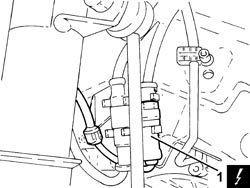
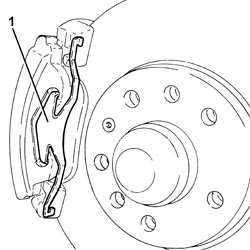
1. Remove the brake caliper spring.
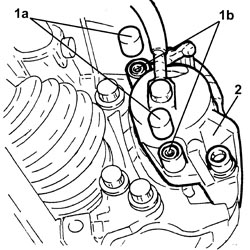
1. Remove the plugs (1a) and undo the brake caliper fixing bolts (1b).
2. Move the brake caliper complete with inner pad from its housing.
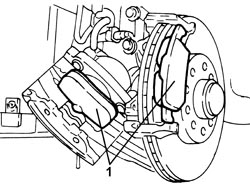
1. Remove the front brake pads.
Refitting
1. Push the brake caliper piston into its housing using a suitable tool.
The level of the brake fluid in the reservoir will increase; if necessary, draw off any excess fluid using a suitable tool.
2. Grease the brake caliper and bracket in the areas of the pad support surfaces.
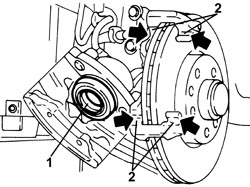
- Place the lfront brake pads in their housings.
1. Place the brake caliper assembly in its housing.
2. Tighten the bolts (2a) fixing the brake caliper to the recommended torque and fit the plugs (2b).
| Component | Fastening | dia | Value (daNm) | Validity |
|---|---|---|---|---|
| Front brake calipers | Bolt | (bracket side) 2.5 - 3.0 | 1.8 2.2 1.9 JTD 8v |
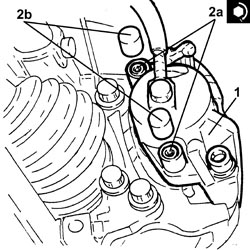
- Place the brake caliper spring in its housing.
- Connect the electrical connection for the brake pad wear sensor and fasten the electrical wiring.
Op. 4450B02 LEFT FRONT WHEEL - R.R
- Connect the negative battery terminal.
- Remove the vehicle from the lift.
Removing
The following procedure describes the removing-refitting of the left front brake pads, carry out the same operations for the right front brake pads.
- Position the vehicle on a lift.
- Make sure that the ignition key is in the OFF position, then disconnect the battery terminal (-).
| Description | Connector | |
|---|---|---|
| Battery | See A001 BATTERY |
Op. 4450B02 LEFT FRONT WHEEL - R.R
1. Disconnect the electrical connection for the brake pad wear sensor.
| Description | Connector | |
|---|---|---|
| 1 | Left brake pad wear sensor (switch) | See K020 LEFT BRAKE PAD WEAR SENSOR (SWITCH) |
There is no brake pad wear sensor on the right front caliper.
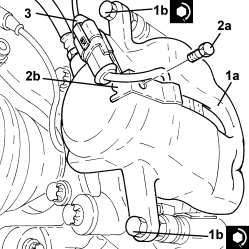
2. Undo the bolt (2a) for the bracket (2b) securing the brake pad wear sensor electrical connection.
3. Undo the bolts (3a) and place the brake caliper (3b) at the side without disconnecting the hydraulic pipe.
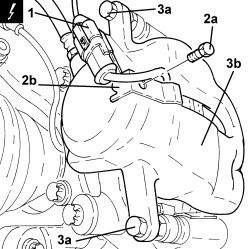
1. Remove the front brake pads.
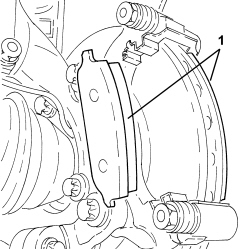
Refitting
- Push the brake caliper piston into its housing using a suitable tool.
The level of the brake fluid in the reservoir will increase; if necessary, draw off any excess fluid using a suitable tool.
- Grease the brake caliper and bracket in the areas of the pad support surfaces.
- Place the front brake pads in their housings.
1. Position the brake caliper bracket (1a) in its housing and secure it tightening the bolts (1b) to the recommended torque.
| Component | Fastening | dia | Value (daNm) | Validity |
|---|---|---|---|---|
| Front brake calipers | Bolt | M8x1 | (bracket side) 3.1 - 3.8 | 1.9 JTD 16v 2.4 JTD 20v |
2. Tighten the bolt (2a) for the bracket (2b) securing the brake pad wear sensor electrical connection.
3. Connect the electrical connection for the brake pad wear sensor.
Op. 4450B02 LEFT FRONT WHEEL - R.R
- Connect the negative battery terminal.
- Remove the vehicle from the lift.
Parts & tools for this job For 2005 Fiat Croma
- PARTFront brake padsSearch: Fiat Croma 2005 front brake pads
- TOOLCaliper piston rewind toolSearch: brake caliper piston rewind tool
- FLUIDBrake fluidSearch: brake fluid
Links open Amazon search results in a new tab. As an Amazon Associate I earn from qualifying purchases.