
(one) number plate light - r.r.
- Make
- Fiat
- Model
- Croma Factory Service Manual
- Year
- 2005–2010
- Section
- Exterior lighting › (one) number plate light - r.r.
(ONE) NUMBER PLATE LIGHT - R.R.
Removing
- Turn the ignition key to the OFF position.
- Disconnect the negative battery terminal.
| Description | Connector | |
|---|---|---|
| BATTERY | See A001 BATTERY |
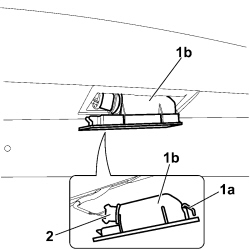
1.Using a very small screwdriver, release the retaining tab (1a) and extract the number plate light (1b) from its housing.
2. Extract the bulb holder and bulb from the number plate light.
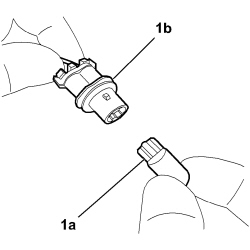
1. Check the condition of the number plate light bulb and, if necessary, replace it removing the bulb (1a) from the bulb holder (1b).
Refitting
- Check the condition of the bulb holder mounting and bulbs.
- Place the bulb in position and fit the bulb holder in the number plate light.
- Fit the number plate light in its housing attaching the retaining tab.
- Connect the negative battery terminal.
| Description | Connector | |
|---|---|---|
| BATTERY | See A001 BATTERY |
Parts & tools for this job For 2005 Fiat Croma
- PARTReplacement bulbsSearch: Fiat Croma 2005 bulbs
- TOOLDigital multimeterSearch: automotive digital multimeter
Links open Amazon search results in a new tab. As an Amazon Associate I earn from qualifying purchases.