
Trinary pressure switch control switches
- Make
- Land Rover
- Model
- Defender V8i Workshop Manual Supplement
- Section
- Repair › Trinary pressure switch control switches
Air conditioningTrinary pressure switch control switches
TRINARY PRESSURE SWITCH CONTROL SWITCHES
Service repair no - 82.20.04 Service repair no - 82.20.10 - Temperature Control Switch Remove Service repair no - 82.20.11 - Fan Switch
- Disconnect battery negative lead. Remove
- Recover refrigerant from system. See Adjustment, refrigerant recovery, recycling, recharging
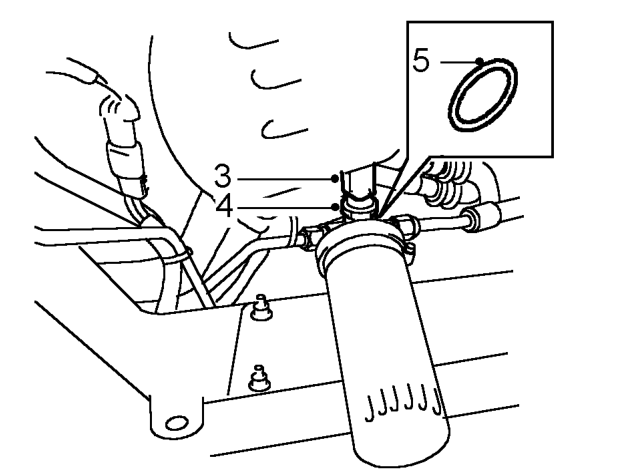
- Access below front RH of vehicle: Disconnect multiplug from switch.
- Remove switch from adaptor.
- WARNING: Wear eye and hand protection
- when disconnecting components
- containing refrigerant.
- Remove ’O’ ring from switch and discard. Refit
Refit
- Lubricate NEW ’O’ ring with refrigerant oil and fit to switch.
- Fit switch to adaptor and tighten to 11 Nm (8 lbf.ft). 10. Fit fascia duct bezel.
- Connect multiplug.
- Evacuate and recharge air conditioning system. 11. Carry out system test. See Adjustment, Refrigerant recovery, recycling, recharging
- Reconnect battery negative lead.
- Carry out system test. See Adjustment, System test
- Remove fascia duct bezel. See fascia duct bezel
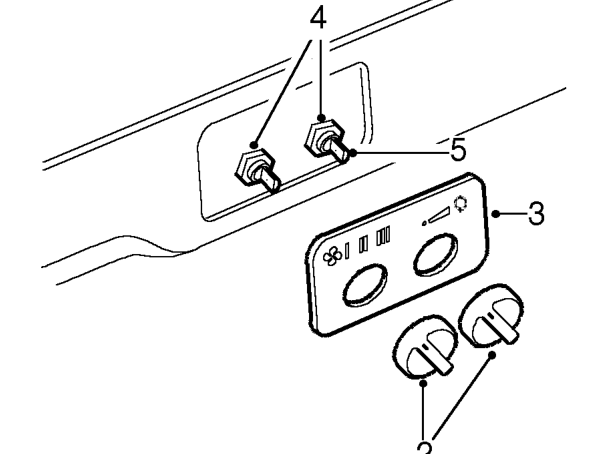
- Pull control knobs from switches.
- Remove switch panel.
- Remove nut securing switch to bezel.
- Remove switch.
NOTE: Fan switch to left.
- Fit temperature control switch. Position capillary tube inside duct to RH side.
- Fit and tighten nut securing switch to bezel.
- Fit switch panel.
- Fit control knobs. See fascia duct bezel; Refit See Adjustment, System test
Parts & tools for this job For Land Rover Defender
- TOOLOBD2 scannerSearch: OBD2 scanner
- TOOLDigital multimeterSearch: automotive digital multimeter
- TOOLBack-probe test leadsSearch: back probe test leads
Links open Amazon search results in a new tab. As an Amazon Associate I earn from qualifying purchases.