
Throttle and kickdown cable (Automatic gearbox)
- Make
- Rover
- Model
- 100 Repair Manual Supplement
- Year
- 1996–1998
- Section
- Adjustments › Throttle and kickdown cable
Automatic gearboxThrottle and kickdown cable
THROTTLE AND KICKDOWN CABLE
Service repair no - 44.30.02
Adjust
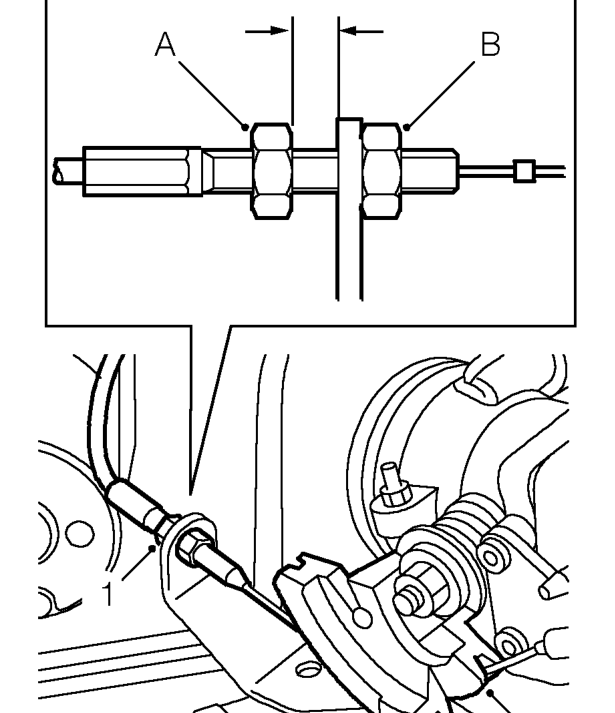
- Loosen kickdown cable adjusting nut and locknut.
- Adjust throttle cable. See ENGINE MANAGEMENT SYSTEM - MEMS, Adjustments.
- Rotate and hold throttle cam in its fully open position.
- With assistance, insert a 1 mm thick feeler gauge between the kickdown cable adjusting nut (A) and abutment bracket.
- Tighten adjusting nut (A) to remove all free play from kickdown cable. Ensure throttle cam is still in its fully open position.
- Remove feeler gauge and tighten kickdown cable locknut (B).
- Release throttle cam and check that full movement of throttle cam is achievable.
Parts & tools for this job For 1996 Rover 100
- PARTTransmission filter kitSearch: Rover 100 1996 transmission filter kit
- FLUIDAutomatic transmission fluidSearch: Rover automatic transmission fluid
- TOOLFluid transfer pumpSearch: fluid transfer pump
Links open Amazon search results in a new tab. As an Amazon Associate I earn from qualifying purchases.