
Kickdown cable
- Make
- Rover
- Model
- 100 Repair Manual Supplement
- Year
- 1996–1998
- Section
- Repairs › Kickdown cable
Automatic gearboxKickdown cable
KICKDOWN CABLE
Service repair no - 44.15.01
Remove
- Connect battery earth lead.
- Remove air cleaner assembly. See ENGINE MANAGEMENT SYSTEM - MEMS, Repairs.
- Raise front of vehicle.
- Remove starter motor. See REPAIR MANUAL - Electrical.
- Remove fluid pan. See REPAIR MANUAL - Automatic Gearbox.
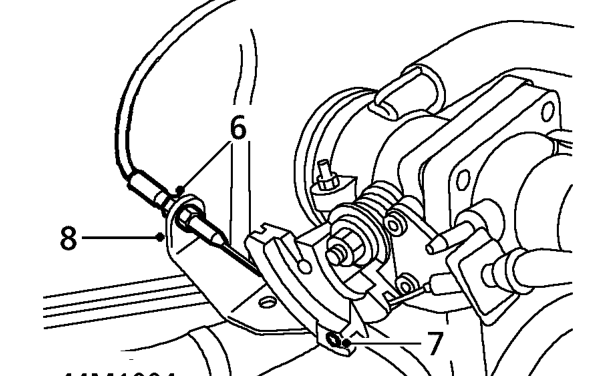
- Loosen downshift cable lock and adjusting nuts.
- Release inner cable from throttle cam.
- Release downshift cable from abutment bracket.
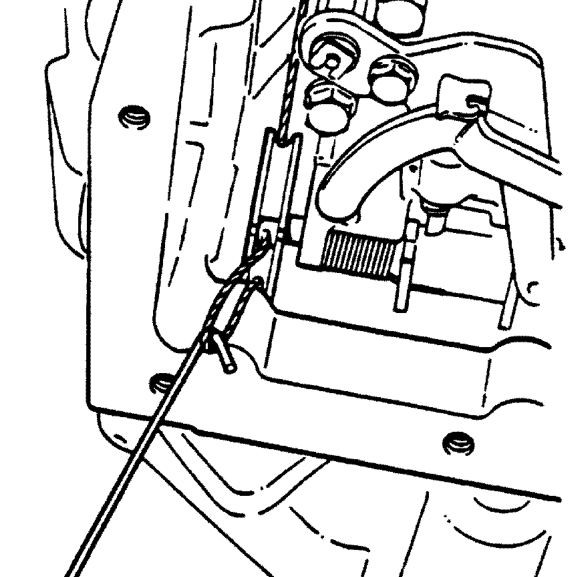
- Release inner cable from valve cam inside gearbox using a piece of stiff wire with a hook on the end.
Parts & tools for this job For 1996 Rover 100
- PARTTransmission filter kitSearch: Rover 100 1996 transmission filter kit
- FLUIDAutomatic transmission fluidSearch: Rover automatic transmission fluid
- TOOLFluid transfer pumpSearch: fluid transfer pump
Links open Amazon search results in a new tab. As an Amazon Associate I earn from qualifying purchases.